


Meeting Booking

From Website Visitor to Calendar Invite in 60 Seconds

Stop losing prospects to form friction. Warmly lets visitors book meetings directly on rep calendars — with intelligent routing that gets them to the right person automatically.
Meeting Booking is Warmly's instant scheduling feature that lets website visitors book directly through AI chat or popups — embedding your team's calendar links (Calendly, Google Calendar, Outlook, etc.) right in the conversation. Visitors book while context is fresh, and reps see full visitor history before the meeting. No forms, no friction, no missed opportunities.
4.8/5
on G2
Warmly Meeting Booking rated for ease of use and time-to-meeting reduction.
Crush your quota

What is Warmly's Meeting Booking?

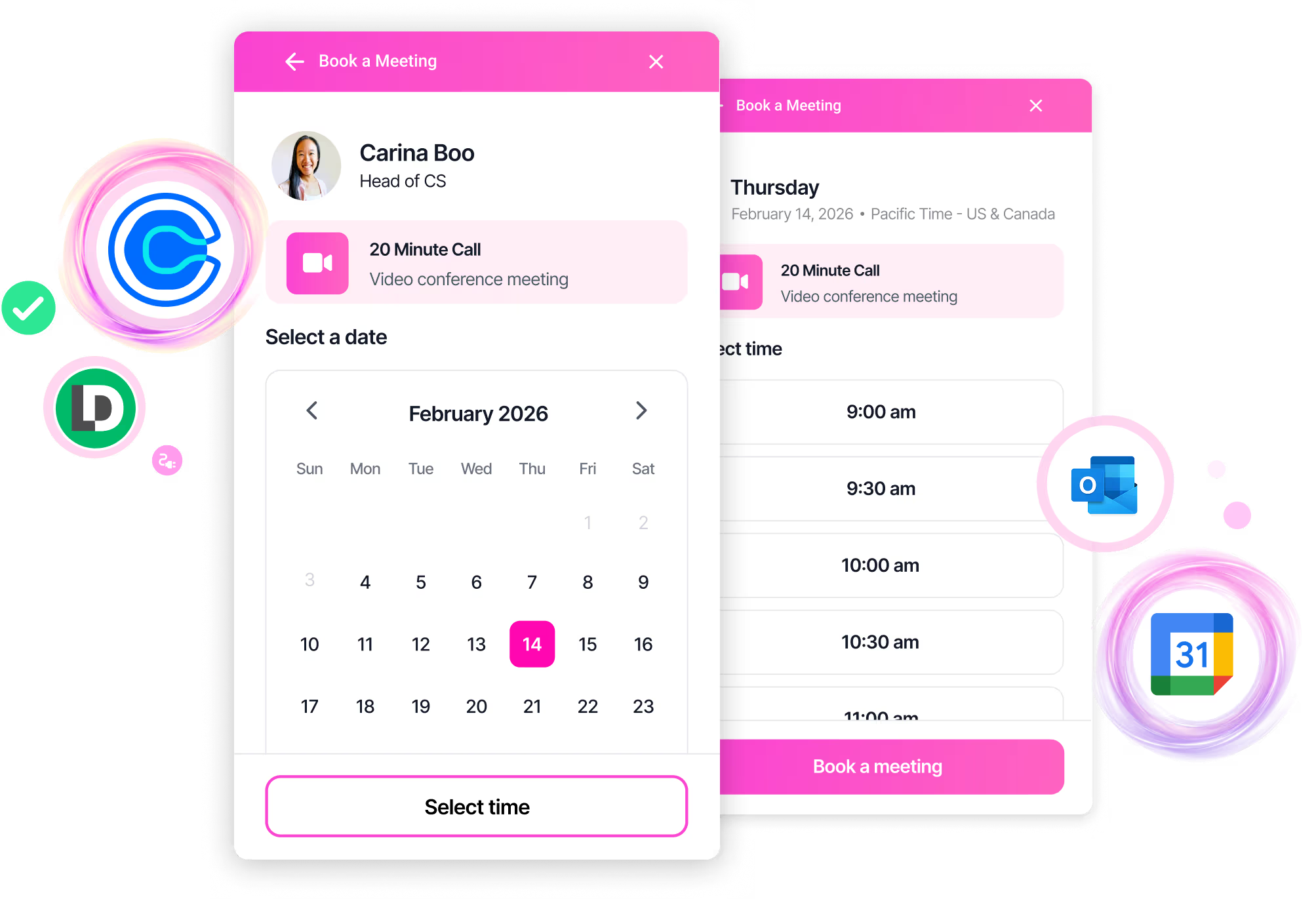
Meeting Booking lets website visitors schedule time instantly by embedding your calendar links in the conversation
No forms required
Book directly through AI chat or popups
Works with any calendar
Calendly, Google Calendar, Outlook, Cal.com, or any booking link
Flexible display
Embed in chat, open in new tab, or full-page redirect
Assigned rep or team calendar
Route to the right person's calendar based on chat assignment
Full context in Warmly
Rep sees visitor history, pages viewed, and conversation before the meeting

How visitors book
Through AI Chatbot conversation
Via Warm Offers popups
After Live Human Chat engagement
Best for
Teams tired of form-to-meeting conversion drop-off
Sales orgs wanting more qualified meetings
Companies where speed-to-meeting matters

Forms Kill Conversion

Pain Points:
Form friction
80% of visitors abandon forms before completion
Response delay
Hours or days pass before SDR follows up — intent evaporates
Email ping-pong
Multiple exchanges to find a time that works
Wrong rep assignment
Meetings routed manually, often to the wrong person
Conversion collapse
2-3% of visitors become meetings at best
No-show epidemic
Cold leads with no context don't show up
Traditional booking flow:
01 Visitor fills out form (20% complete it)
02 Form goes to queue
03 SDR reviews (hours later)
04 SDR sends calendar link (another email)
05 Prospect picks time (if they're still interested)
06 Meeting happens (maybe)
Each step loses people.
Best case: 2-3% of visitors become meetings.
Warmly's flow:
01 Visitor engages with AI or rep
02 "Want to book time?" → Yes
03 Available slots appear
04 Visitor picks time
05 Meeting confirmed instantly
Same visitor, 3x the meetings.

Connection to Inbound Agent

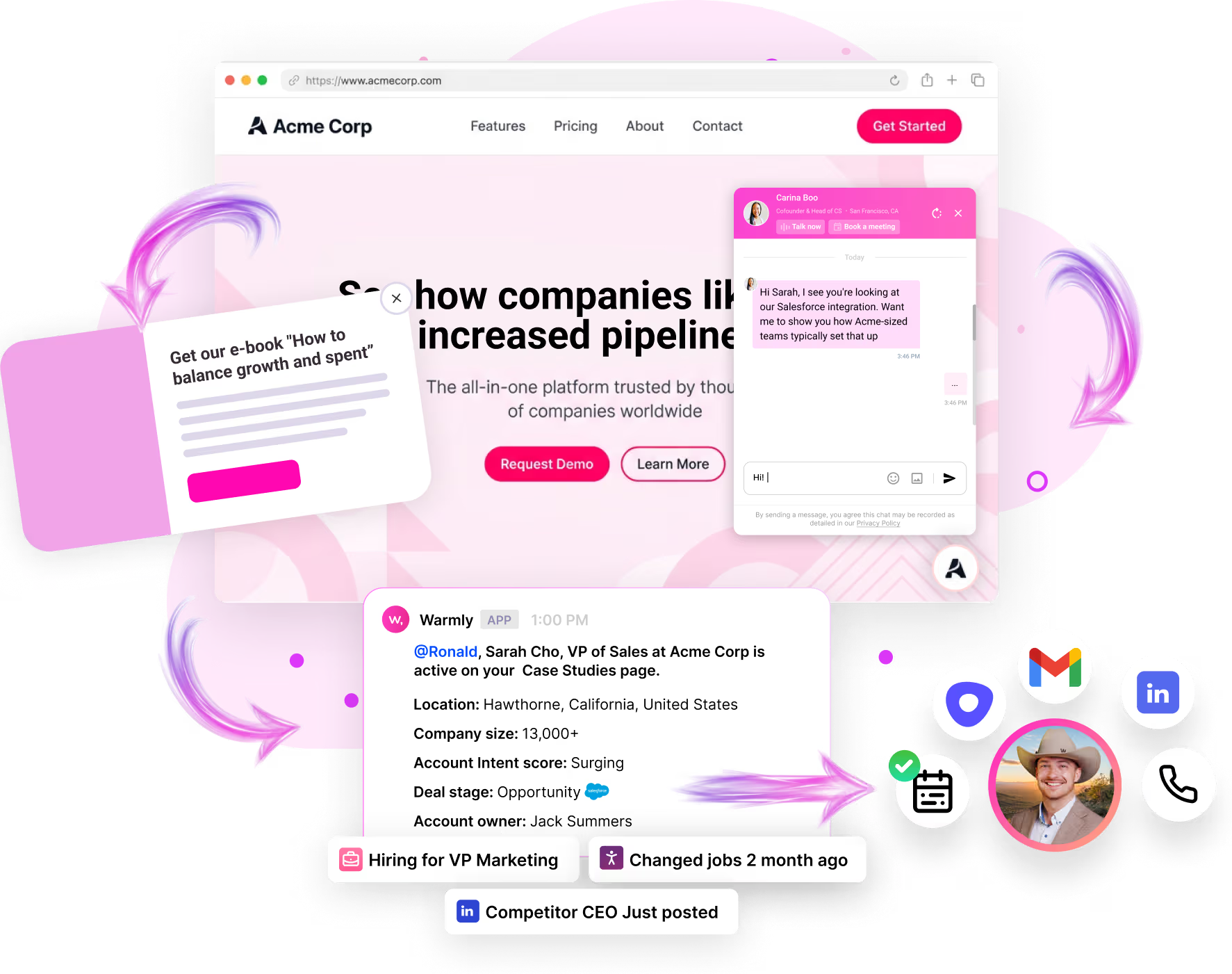
Meeting Booking is the conversion engine within the Inbound Agent suite. Every engagement channel leads here:
Crush your quota
Inbound Agent Feature
Meeting Booking Integration
Detects intent, offers booking in conversation
Calendar picker embedded in targeted popups
Rep triggers booking during conversation
Notifies reps when high-value accounts book
Powers intelligent rep assignment

Instant Booking, Seamless Experience

Crush your quota
Three display modes:
Embedded
Calendar appears right in the chat panel (default)
New tab
Opens calendar in a new browser tab
Current tab
Redirects to calendar page
Assigned rep or team calendar
Route to the right person's calendar based on chat assignment
Full context in Warmly
Rep sees visitor history, pages viewed, and conversation before the meeting

What Warmly adds:
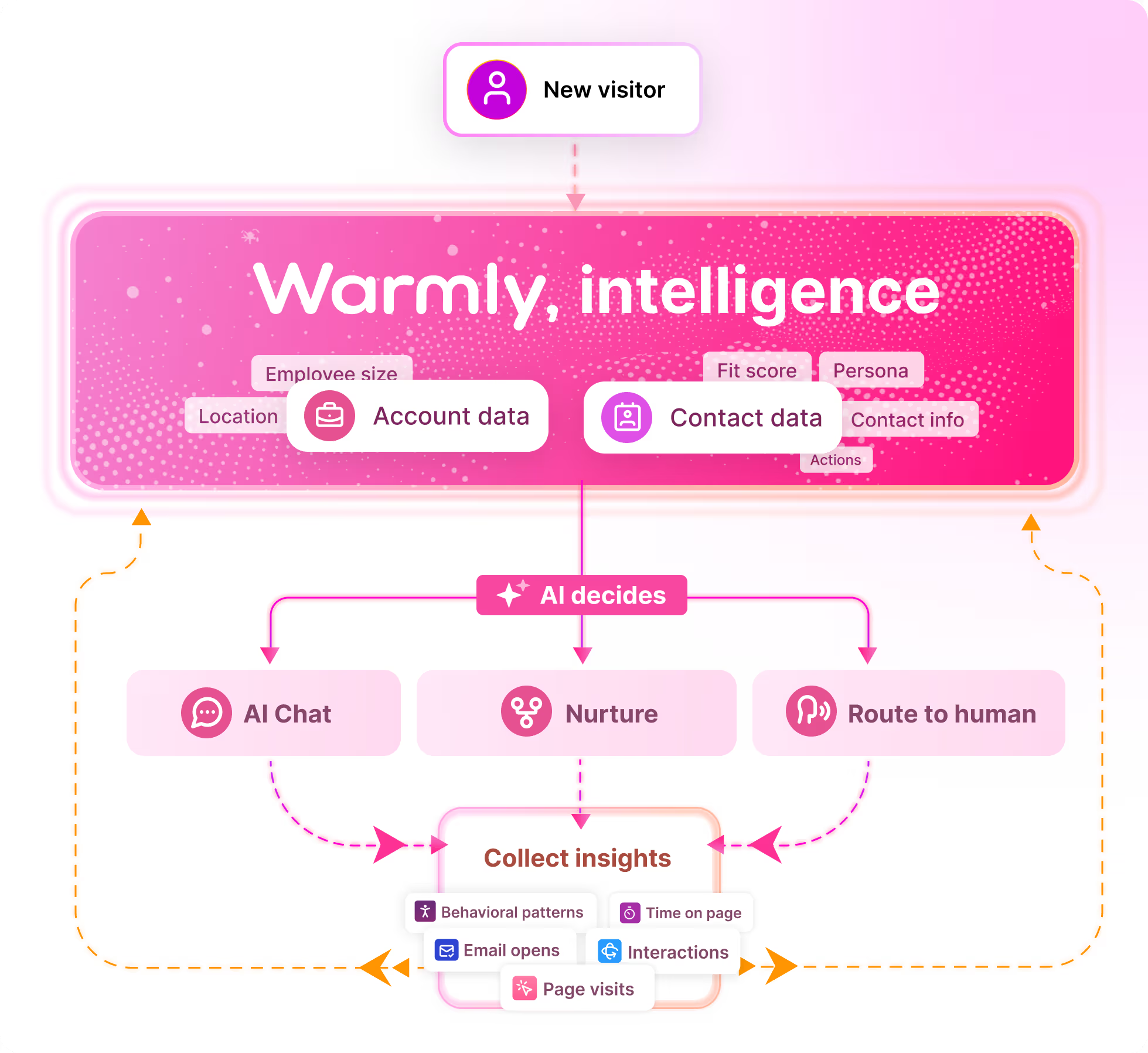
Visitor identification before they book
Full conversation transcript for context
Pages viewed, intent signals, and company data
Seamless transition from AI chat to booking

Route to the Right Calendar

Two Routing Options:
Option 1
Assigned Rep's Calendar
Uses the personal calendar link of whoever is assigned to the conversation
Great for: Account-based routing where assignment happens before booking
Fallback: If rep has no calendar configured, uses team calendar
Option 2
Team Calendar
Uses your organization's shared booking link
Great for: Round-robin scheduling, shared SDR calendars
Works with: Calendly team pages, Google Calendar appointment scheduling, shared Outlook calendars
How Assignment Works:
Booking uses whichever rep is assigned to the conversation. Assignment can happen via:
Rep Routing rules — Territory, ownership, round-robin
Manual assignment during live chat
AI Chat handoff to specific rep
The booking step then shows that rep's calendar (or falls back to team calendar).

Works With Any Booking Link

Supported Calendar Services
Warmly embeds any calendar booking link your team uses:
Calendly Personal or team booking pages
Google Calendar Appointment scheduling links
Microsoft Bookings Outlook/365 booking pages
Cal.com Open-source scheduling
HubSpot Meetings HubSpot scheduling links
Chili Piper If you use it for routing
Any URL If it's a booking link, it works
How It Works
01 Rep level
Each rep adds their personal calendar link to their Warmly profile
02 Team level
Set a shared booking link for your organization
03 In chat
Warmly embeds the appropriate calendar based on routing
Your calendar service handles availability, buffers, time zones, and confirmations. Warmly handles getting visitors to the right calendar with full context.

Full Visitor Context Before Every Meeting

When a visitor books, your rep has everything they need in Warmly:
In Warmly dashboard:
Full conversation transcript (what they asked, what AI answered)
Visitor identity (name, title, company, LinkedIn)
Pages they viewed before and during the conversation
Intent signals and buying behavior
Previous visits and engagement history
Account context from your CRM
In Slack/MS Teams alert:
Notification that a high-value visitor booked
Quick link to view full context in Warmly
Company and visitor summary
The difference vs standalone calendars:
Calendly Alone
Warmly + Your Calendar
Name and email from form
Full identity before they type anything
No context
Complete conversation transcript
No history
All previous visits and pages viewed
Cold meeting
Warm meeting with talking points

What Teams See

0
More meetings from same traffic
0
Meeting show rate
0
Faster speed-to-lead
3x More Meetings
"We used to get 50 form fills a month and convert 15 to meetings. Now we get 45 meetings directly booked. Same traffic, 3x the result."
— VP of Sales, Series B SaaS
Higher Show Rates
"Show rates went from 60% to 85% overnight. The difference is context — our reps know exactly who they're meeting and why before the call even starts."
— Director of Sales Development, Mid-Market SaaS
No SDR Scheduling
"We eliminated the entire SDR calendar-scheduling workflow. Prospects book themselves with the right rep, and the meeting context is already in Salesforce."
— Head of Revenue Operations, Enterprise Tech
More pipeline from existing traffic
Challenge
Form conversion rates are stuck at 2-3%
Solution
Direct booking removes friction, captures intent at peak moment
Outcome
3x meetings from same website traffic, 85% show rate
Key metric
Meetings booked per 100 visitors
Eliminate scheduling overhead
Challenge
SDRs spend hours on calendar ping-pong instead of prospecting
Solution
Self-service booking with intelligent routing handles scheduling
Outcome
SDRs reclaim 5+ hours/week, focus on outbound
Key metric
Time from form fill to meeting scheduled
Clean data and proper attribution
Challenge
Manual booking creates data gaps and attribution blind spots
Solution
Automatic CRM logging with full visitor context and attribution
Outcome
Every meeting tracked with source, behavior, and intent data
Key metric
Meeting-to-opportunity conversion with full attribution

Enable Booking in Minutes

Add calendar links
Each rep adds their Calendly/Google/Outlook booking link to their profile
Set team calendar
Configure a shared booking link for fallback
Choose display mode
Embedded, new tab, or current tab
Add to workflow
Drop the booking node into your chat flow
Go live
Visitors start booking with full context

Common Questions

What calendar services work with Warmly?
Does Warmly replace Calendly?
How does Warmly decide which calendar to show?
What if the assigned rep doesn't have a calendar link?
Can the calendar appear inside the chat?
How is this different from just linking to Calendly?
Do I need to change my existing calendar setup?
What about no-shows?
Can different reps use different calendar services?
How quickly can I set up Meeting Booking?

Connect with Our Experts

Book a 15-minute conversation with a customer of ours and discover how Metric transforms their GTM strategy.