
How We Generated $3M in Pipeline Using Signal-Based Outbound
We documented the exact steps behind $3M in pipeline. It's a 5-step outbound motion that combines intent signals, AI agents, and well-timed outreach. Take it and apply it to your own team.
The Problem
How We Built $3M in Pipeline in a Single Month
In April 2026, Warmly hit $3.25M in pipeline generated, our highest month ever. We grew from $1M to $3M in about 30 days without adding headcount or significantly increasing spend.
Signal-based outbound was one of the plays that got us there. Not the only one. We also rebuilt our content strategy and tightened how we ran demos. But outbound was the fastest to spin up once we had it working, and it's the most repeatable play we've found.
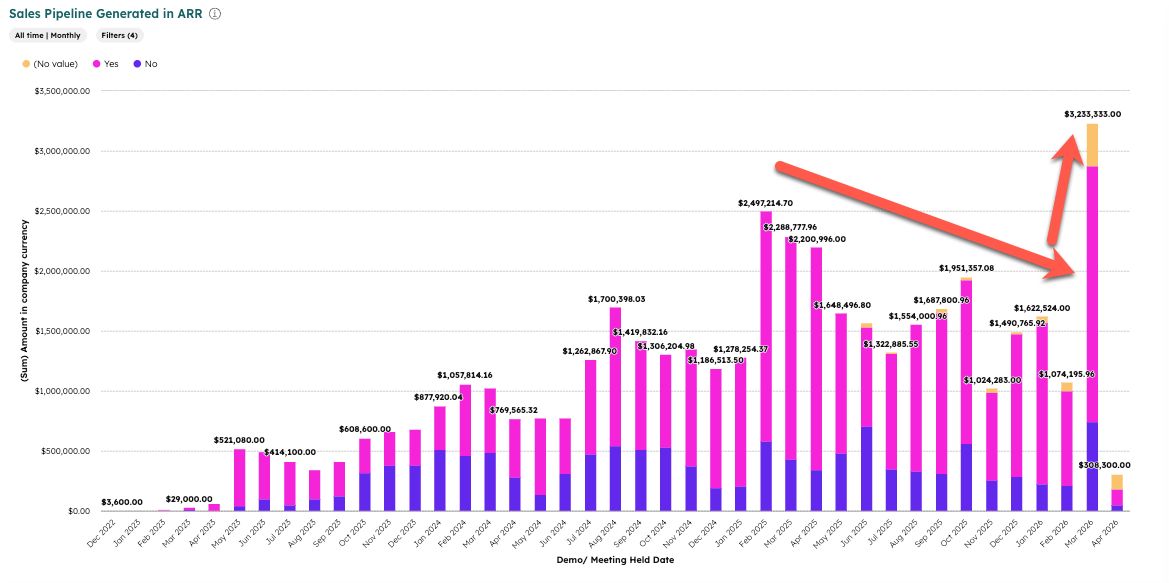
"Prospects' eyes light up when we show them our results. Last month we were at $1M. This month we're at $3M and the month isn't over. We're spending about $20k total compared to $40-60k when we had a much bigger team."
Alan Zhao, Co-founder, Warmly
Read Alan's full post on LinkedIn
This playbook covers specifically the outbound piece: how we used AI agents connected to live intent signals to find in-market accounts, rank them every morning, and write outreach tied to the specific event that triggered each signal.
The insight that unlocked this: most teams run site visitor data, third-party intent, and enrichment in three separate tools. We put all three on one surface that an AI agent could query in a single session. When those signals live in the same place, what you can ask changes, and so does the list you hand to reps each morning.
The Play
What This Got Us
- A ranked list of our hottest accounts every morning, before standup
- A re-engagement list from closed-lost, signal-gated, free to generate
- Outreach drafts tied to the specific event that triggered each signal
- $3M in pipeline without uploading a single CSV
What We Used to Run This
- Warmly MCP, installs in 30 seconds. Open your terminal and run:
claude mcp add --transport http warmly
https://opps-api.getwarmly.com/api/mcp
Authorize via OAuth. You get three tools: list_warm_visitors, list_third_party_signals, get_credits_remaining.
- Claude Code or Claude Desktop, where you'll run the prompts below.
- Your ICP definition: company size, industry, title of your buyer. Tell Claude once per session and every query builds on it.
- Optional: a CRM export or account list for the enrichment plays. A CSV of domains is enough.
5 Steps We Used to Build This
Step 1: Define your signal stack
Before pulling any data, we had to decide which signals actually matter for our ICP. Warmly has 395 signal subtypes. The answer is not to use all of them. Pick the 3-4 that correlate with your buying trigger.
For us, the highest-converting signals indicated a window of change: a new exec arriving, fresh capital, or headcount expansion. Those moments have a short half-life. The account is open to new solutions for about 30-90 days. After that, your window closes.
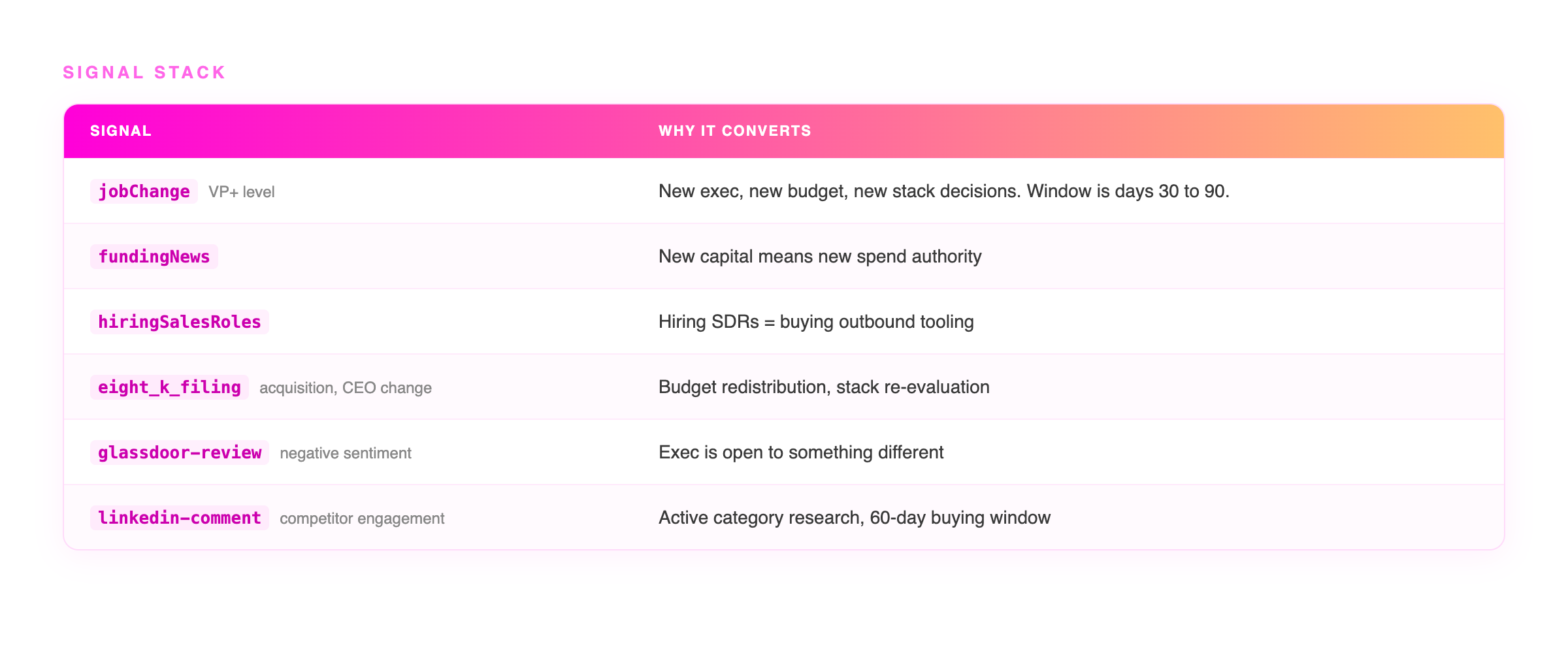
Pick 3-4 signals for your first run. Two signals stacked on one account beats six signals spread across six separate accounts.
Step 2: Find in-market accounts (no list needed)
This is the discovery play. We ran it cold, no existing account list, no CSV. The goal is to find companies showing buying behavior right now, filtered to your ICP.
What surprised us the first time: the volume. On a slow week, 200-300 accounts in our ICP showed at least one signal. Most reps would never surface those accounts through manual research. The agent found them in seconds.
Prompt to paste into Claude Code:
I sell [product] to VP Sales and VP Marketing at 100-1,000 employee B2B SaaS companies.
Using Warmly's MCP, pull list_third_party_signals with:
- signalCategories: workforce, leadership, financial
- detectedSince: 30 days ago
- preview: true
Tell me the total count first. Then pull the top 50 by relevance, excluding companies under 100 or over 2,000 employees. Show: company name, signal type, signal date, contact resolved.
preview: true costs zero credits. It shows you the universe size before you commit. We always start here.
Step 3: Stack signals with your site visitors
This is where the real lift happened. A company visiting your site today AND showing a third-party signal in the past 60 days is not a cold lead. It is a company actively researching your category while something just changed on their end. That combination is rare and extremely high-intent.
In our experience, this list was small, sometimes 5-10 companies per day, but the close rate on outreach to these accounts was significantly higher than anything from a cold pull.
Prompt:
Pull today's list_warm_visitors from Warmly.
For each company domain, call list_third_party_signals in by_company mode with detectedSince: 60 days ago and preview: true.
Return only companies with at least one signal. Rank by signal count descending. Show: visitor name (if known), company, signal types, signal dates.
This is my priority call list for today.
Step 4: Enrich your existing account list
You already have accounts in your CRM that you have given up on. Closed-lost from last year, last quarter's ABM targets that did not convert. The question is whether anything has changed since you lost them.
We ran this on a 500-domain closed-lost list and found 15-20% had shown a new signal in the past 30 days. That is a re-engagement list built in 10 minutes, sorted by signal count. Accounts with 3+ signals went to the top of the call list.
Prompt:
Here is a list of domains from our CRM: [paste list]
For each domain, call list_third_party_signals in by_company mode with detectedSince: 30 days ago and preview: true.
Return only domains where total signals is greater than 0. Sort by total signals descending. This is my re-engagement shortlist.
Run this on Monday. Accounts already pulled this month re-check for free.
Step 5: Write the outreach tied to the signal
This is the step most teams skip. They pull the signal, drop the account into a generic sequence, and wonder why reply rates are flat. The signal is only valuable if the outreach references it specifically.
Prompt (new exec play):
For each contact where signal_subtype is jobChange and months_since_event is between 1 and 3:
Draft a 3-sentence LinkedIn message that:
1. References their new role and company by name.
2. Mentions that most new VP Sales walk into a pipeline they did not build, with no visibility into which accounts are in-market vs. sitting cold in the CRM.
3. Offers to share a playbook on building signal-based pipeline in their first quarter. No demo ask.
Keep it under 60 words. No "I noticed you recently joined" opener.
Example output:
"Hey [Name], congrats on the new role at [Company]. Most new VPs of Sales walk into a pipeline they did not build, with no idea which accounts are actually in-market vs. sitting cold in the CRM. I put together a short playbook on building signal-based pipeline from scratch in the first 90 days, happy to share it if useful."
Prompt (funding play):
For each company where signal_subtype is fundingNews:
Draft a 2-line email opener that:
1. References the funding round size and timing specifically.
2. Connects it to urgency around pipeline efficiency. New capital means new targets, and most funded teams quickly realize their outbound stack cannot scale.
Do not mention Warmly. Do not pitch. Just the opener.
Example output:
"Congrats on the Series B. Fresh capital almost always means new pipeline targets, and the first thing most funded GTM teams realize is that their outbound stack was not built to scale to the number they just committed to."
The outreach writes itself from the signal. That is the compounding effect.
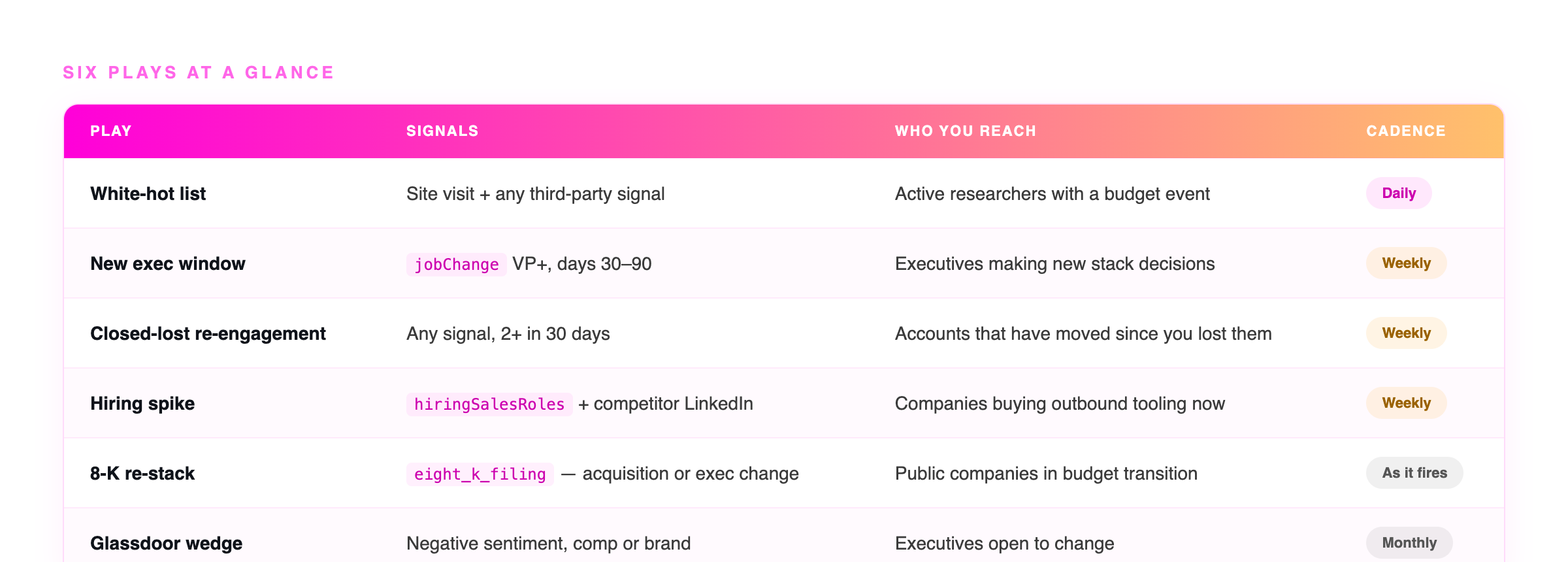
The Plays at a Glance
How the Credits Work
Third-party signals are the only part of Warmly that draws credits. Everything else, site visitors, warm accounts, credit checks, is free.
- 1 credit per new company per month
- 1 credit per new contact per month
- 0 credits for preview: true calls (always free)
- 0 credits for re-pulls of companies already paid for this month
New accounts get 250 free credits. Start with the preview pulls. Run Step 2 with preview: true and you will see exactly how many accounts in your ICP are showing signals right now.
The Result
Get Started in 5 Minutes
- Install the MCP (one terminal command above)
- Open Claude Code and tell it your ICP
- Run Step 2 with preview: true to see your signal universe
- Pull your top 50, stack with site visitors from Step 3
- Draft outreach for your top 10 accounts
The first run takes less time than your next pipeline review meeting.
Questions or want to see this live? alan@warmly.ai
250 credits per month, no credit card required.
Questions?
Schedule a demo with our team to see our playbooks in action. Or, view more of our plays here.