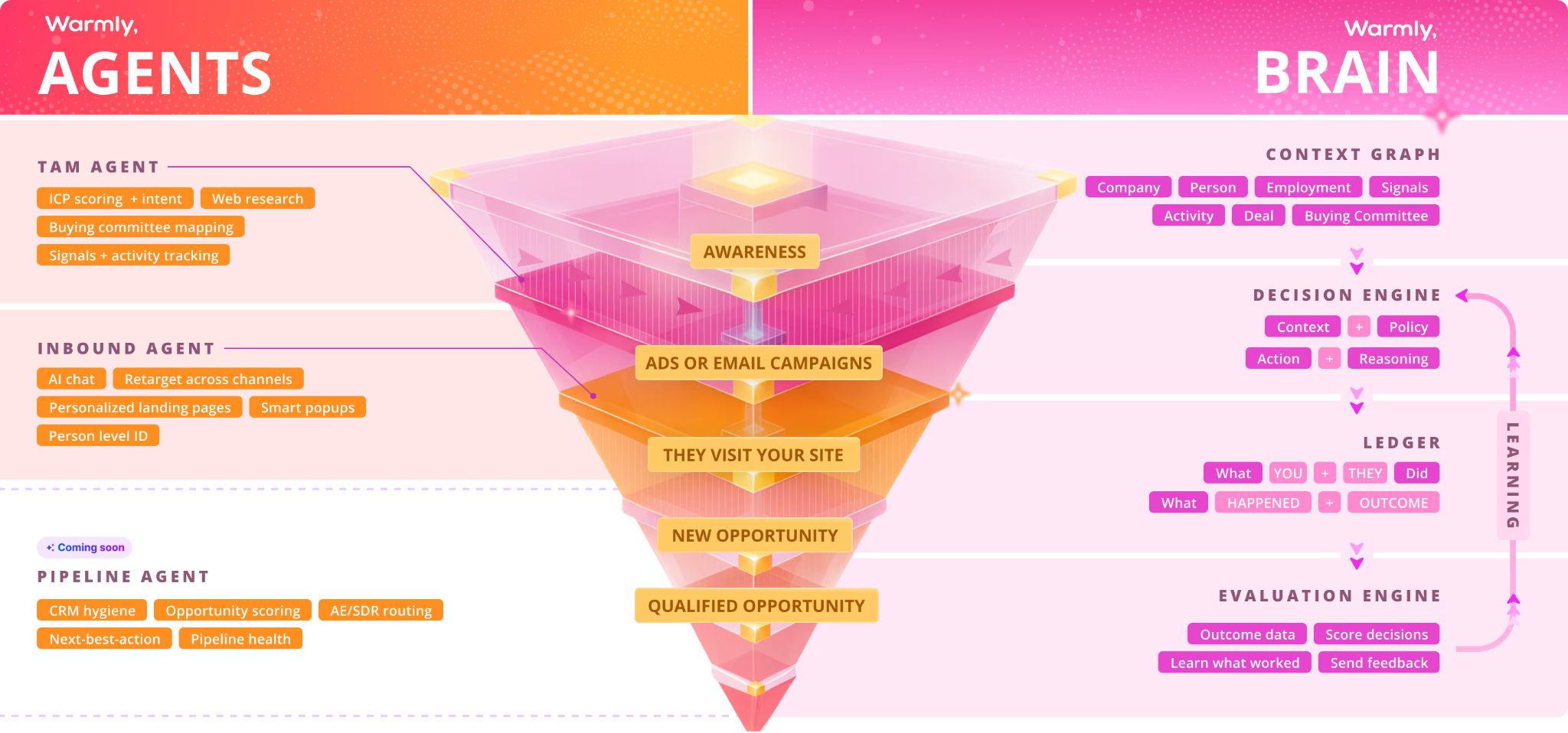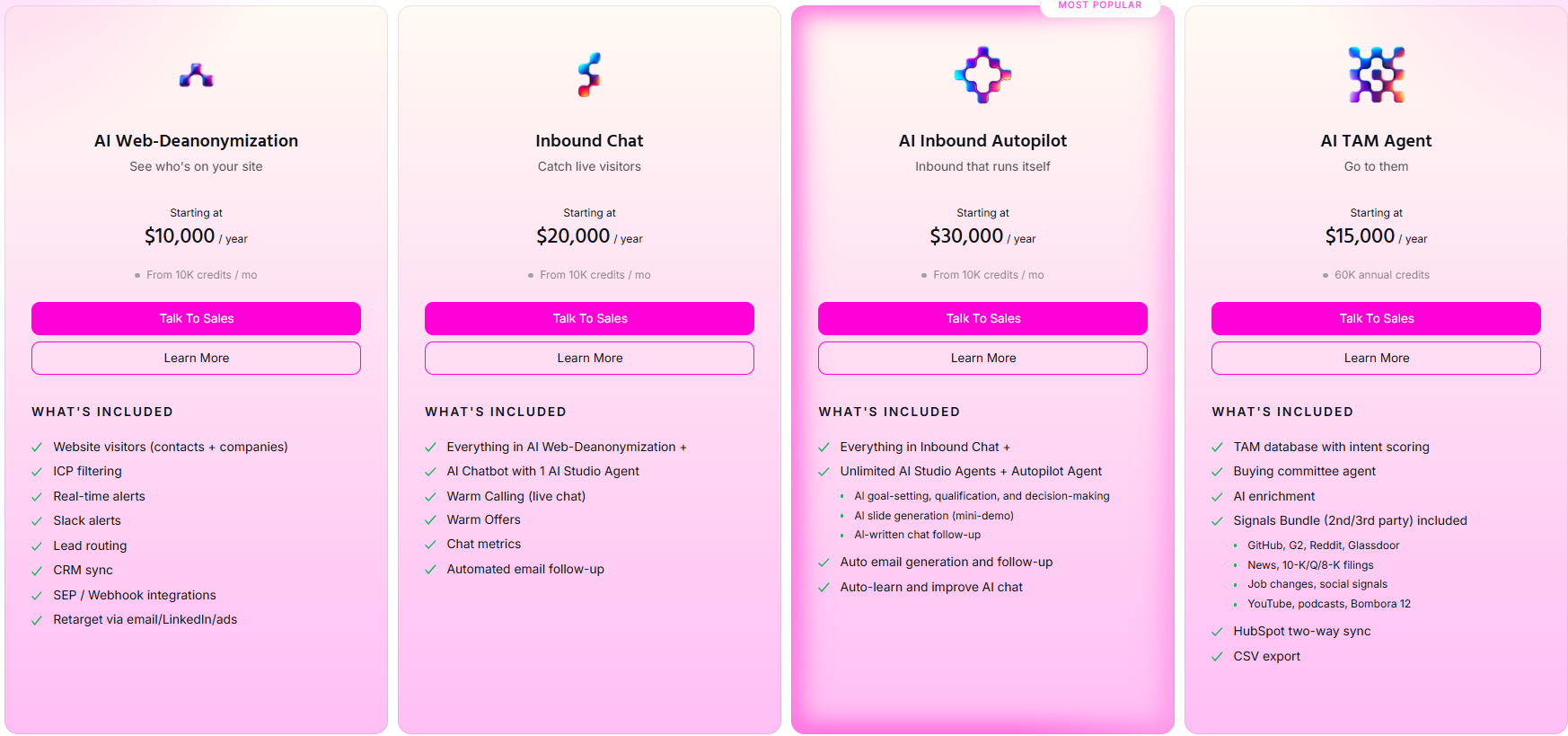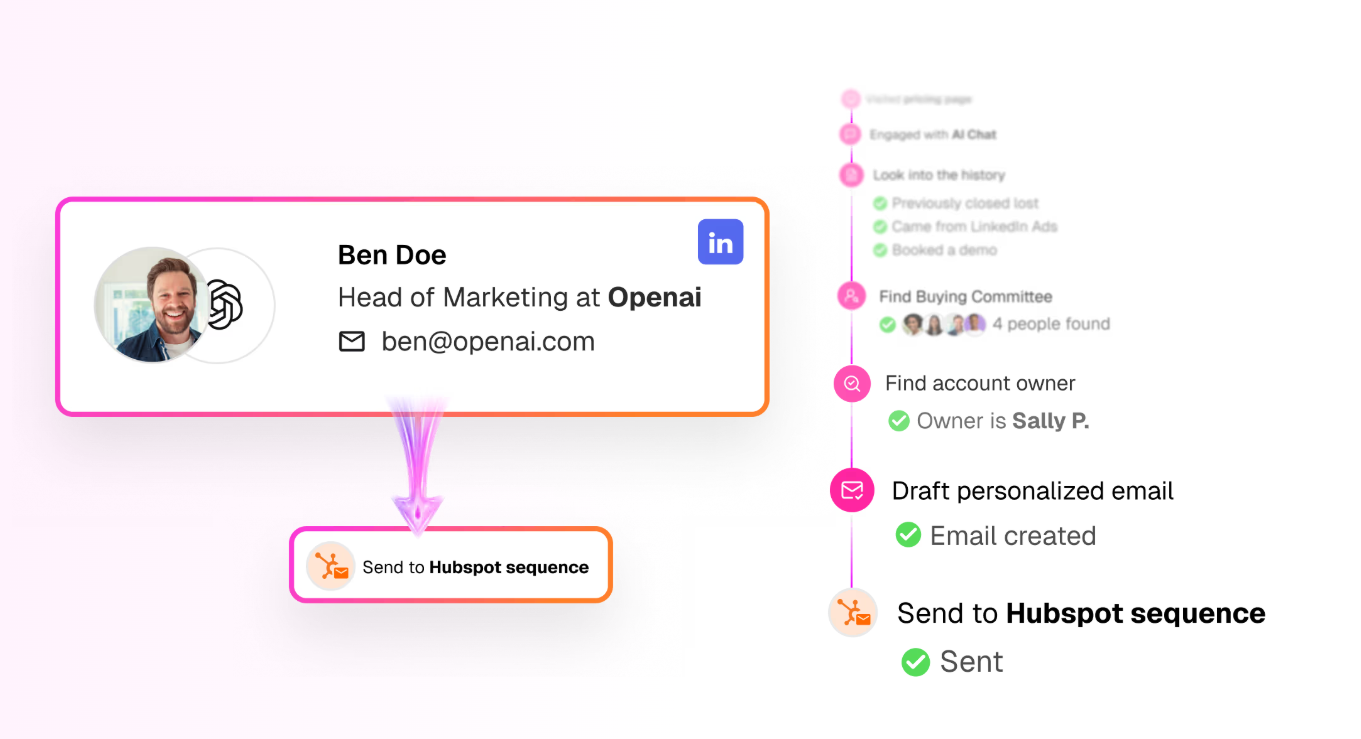
Alan Zhao

logo LinkedIn
Co-founder & Head of Product & Marketing

I believe that brand (reputation) is the only defensible moat left in B2B marketing. Quality content is the mechanism to build your company's reputation. Follow me to learn about how to build your company's brand and dominate your category.

Articles

Showing 0 of 0 items

Category

Resources
Resources
Resources
Resources
Supercharge Outreach, Apollo, SalesLoft & More With Warmly's Contextual Website Engagement Insights

Supercharge Outreach, Apollo, SalesLoft & More With Warmly's Contextual Website Engagement Insights

Time to read

Keegan Otter

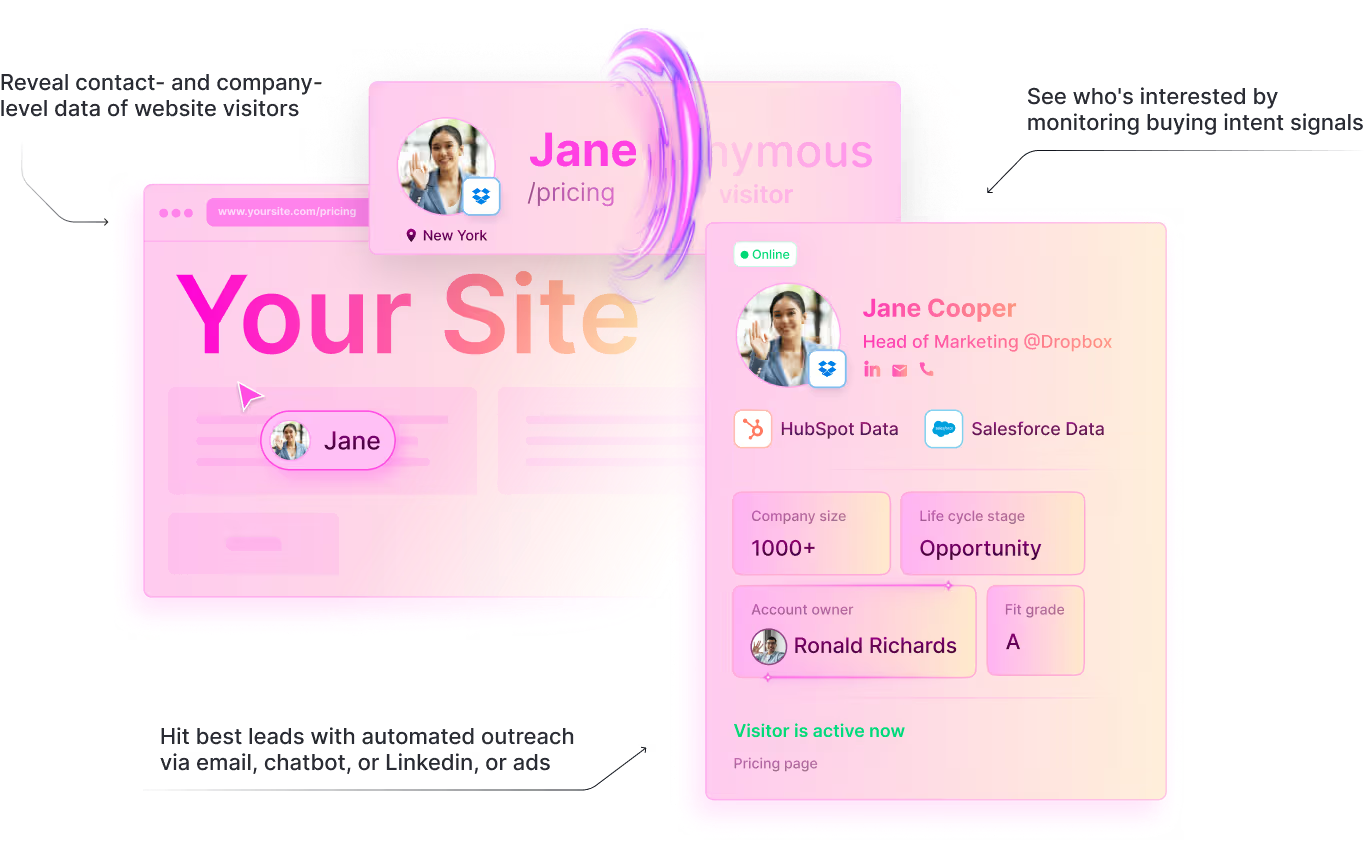
Identifying your website visitors isn't enough. What matters is knowing who they are, what they viewed, and how to follow up - automatically and effectively. Warmly turns anonymous website traffic into contextual, behavior-rich signals that flow directly into your CRM and sales engagement platforms like Outreach, Apollo, and SalesLoft - so your reps always have the right context at the right time.


In today's competitive B2B landscape, identifying your website visitors isn't enough. What matters is knowingwho they are, what they viewed, and how to follow up - automatically and effectively.

That's where Warmly steps in.

Most B2B teams are flying blind. Over 95% of website visitors remain anonymous and never fill out a form (iBeam Consulting). Even when companies invest in paid campaigns, SEO, and content marketing to drive traffic, the vast majority of that traffic leaves without a trace.

The visitor saw your pricing page, read a case study, browsed your integrations - and your sales team has no idea.

Meanwhile, the data is clear: 99% of businesses that implement intent data strategies report an increase in sales or ROI (The Insight Collective). Teams leveraging intent data achieve up to 70% higher conversion rates(Vidico).

And intent-qualified leads reduce sales cycles by 20–40% compared to traditional MQLs (Landbase).

The problem isn't that the data doesn't exist. It's that most teams can't capture it, enrich it, or act on it fast enough.

Warmly solves that.


From Anonymous Visit to Actionable Insight

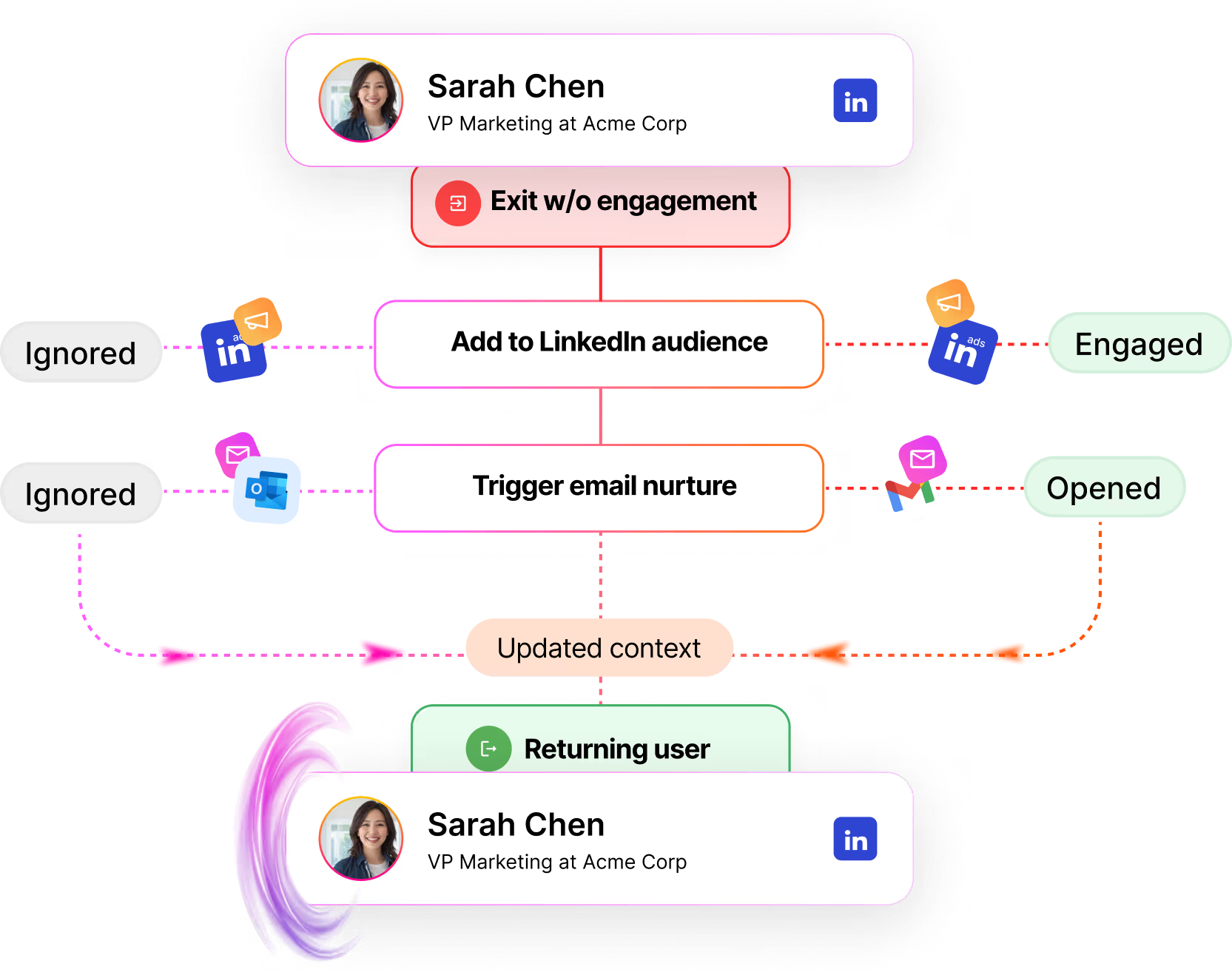
When a lead lands on your site from a marketing campaign - whether through email, LinkedIn, or PPC -

Warmly tracks their journey in real time. You don't just get identity data. You get contextual behavior insights:

what pages they hit, how long they stayed, what content caught their interest, and where they are in the buying journey.

This isn't just analytics - it's fuel for your CRM and your entire revenue team.

Here's what Warmly captures that most tools miss:

  • Company and contact-level identification - who's visiting, not just which company
  • Page-level engagement - pricing page vs. blog post vs. case study vs. integrations page
  • Session depth and frequency - first visit, or fifth visit this month?Intent scoring - is this visitor browsing casually or evaluating seriously?
  • CRM match - is this visitor already in your pipeline, a closed-lost deal, or brand new?

This behavioral context is what turns a name in your CRM into an actionable, qualified signal.


Push Web Engagement Data Into HubSpot, Salesforce & Your CRM

Warmly syncs this data directly into your CRM platform - whether that's HubSpot, Salesforce, or another system - attaching rich behavioral insights to each contact or company record.

Sales and marketing teams gain immediate context. Instead of a rep opening a contact record and seeing a name and email, they see: "This VP of Marketing visited our pricing page twice this week, read the [Industry] case study, and spent 4 minutes on our integrations page."

That context changes everything about the follow-up conversation.

Why this matters for pipeline velocity: Companies that respond to leads within the first hour are 7× more likely to qualify them compared to those who wait longer (ChatMetrics). When your CRM is enriched with real- time web engagement data, your reps don't just respond fast - they respond with relevance.


Retarget with Precision in Outreach, Apollo, SalesLoft & More

With contextual data now in your CRM, you can trigger workflows in sales engagement platforms like

Outreach, Apollo, SalesLoft, and others. This is where Warmly's insights become revenue.

Automatically Enroll Hot Leads Into the Right Cadences

When a visitor hits a high-intent page (pricing, demo request, comparison page), Warmly's data flows into your CRM and triggers enrollment into the right Outreach, Apollo, or SalesLoft sequence - tailored to the content

they engaged with.

No manual research. No guessing. The rep gets a qualified lead with full context, enrolled in the right cadence, within minutes of the visit.

Prioritize Contacts by Intent, Not Just Fit

Most sales engagement platforms prioritize leads by firmographic fit - company size, industry, title. Warmly adds the behavioral layer: which contacts are actively engaging with your site right now?

A Director of Revenue Operations at a 500-person SaaS company who visited your pricing page three times this week is a fundamentally different lead than the same title at the same company who hasn't visited in six months.

Warmly surfaces that distinction automatically.

91% of B2B tech marketers already use intent data to prioritize accounts (Martal Group). Warmly makes that first-party intent data - the most accurate kind - available to every rep in your team's existing workflow.

Retarget Cold Leads Who Re-Engage

Here's a pipeline source most teams miss entirely: cold or stalled leads who come back to your website.

A prospect who went dark three months ago just visited your pricing page and read a new case study. That's not a coincidence - it's a buying signal. But without Warmly, your team would never know it happened.

With Warmly's engagement data synced to your CRM, you can automatically:

  • Re-enroll returning contacts into fresh Outreach, Apollo, or SalesLoft sequences
  • Alert the assigned rep in real time via Slack or email
  • Trigger a personalized Warm Offer on-site acknowledging their return (e.g., "Welcome back - here's
  • what's new since we last spoke")
  • Update lead scoring in your CRM to reflect renewed intent

This is especially powerful for closed-lost deals returning to the site. Research shows the probability of re- engaging a lost customer is 20–40%, compared to just 5–20% for new acquisition (Mannheim University via Visable).

And with the average B2B SaaS win rate sitting around 21% - meaning 79% of deals end up closed-

lost (The Digital Bloom) - there's a massive pool of warm contacts who already know your product. When they return, Warmly catches them.

Activate Multi-Channel Plays

Warmly's data doesn't just feed email cadences. It enables true multi-channel orchestration:

  • Outreach/SalesLoft - trigger email + call sequences with behavioral context
  • Apollo - enrich contact records and prioritize based on real-time website engagement
  • LinkedIn (via Sales Navigator) - alert reps to connect with visitors showing high intent
  • Slack - send instant notifications when target accounts or key contacts visit
  • Warm Offers - trigger on-site popups personalized to the visitor's segment and intent

It's like having a virtual SDR working behind the scenes - 24/7 - routing the right leads to the right reps with the right context.


Why Contextual Retargeting Beats Traditional Retargeting

Traditional retargeting is broad and impersonal. You cookie a visitor, then blast them with generic display ads across the web. It works, but it's blunt.

Warmly makes retargeting contextual and timely. Instead of showing every visitor the same ad, you can:

  • Enroll a pricing page visitor into a demo-focused Outreach sequence
  • Trigger a case study follow-up for someone who spent 5 minutes on your customer stories page
  • Alert a rep to call a key account stakeholder who just returned to the site after 90 days
  • Serve a personalized on-site Warm Offer that acknowledges exactly what the visitor cares about

The difference is precision. Traditional retargeting asks "Did they visit?" Warmly asks "Who are they, what did they do, and what should we say next?"

Organizations achieving strong sales-marketing alignment through intent data report 36% higher customer retention and 38% higher sales win rates (Landbase).

Warmly's contextual engagement data is what makes that alignment actionable.


The Full Warmly CRM Sales Engagement Workflow

Here's how the pieces fit together:

1. Visitor arrives → Warmly de-anonymizes and tracks behavior in real time

2. Engagement data syncs Contact and company records in HubSpot/Salesforce are enriched with page

views, session data, intent score, and CRM status

3. Workflows trigger Based on intent signals, contacts are automatically enrolled into the right Outreach,

Apollo, or SalesLoft cadences — or receive on-site Warm Offers

4. Reps engage with context → Every outreach touchpoint references what the prospect actually cares about,

based on their real behavior

5. Pipeline accelerates Faster follow-up, more relevant conversations, shorter sales cycles, higher win rates

This isn't hypothetical. It's the workflow B2B teams are using right now to convert more of their existing traffic into pipeline - without spending more on ads or hiring more reps.


Why This Matters for B2B Teams

By combining real-time web behavior with CRM data and outbound tools, B2B teams can:

  • Shorten the sales cycle - reps engage at the moment of highest intent with full context
  • Reduce wasted outbound effort - stop spraying sequences at cold accounts; focus on the ones showing
  • real engagementImprove conversion rates from existing web traffic - you're already paying for this traffic; Warmly
  • ensures you actually capitalize on it
  • Re-activate stalled and closed-lost pipeline - catch returning visitors before they evaluate competitors
  • Align sales and marketing on shared signals - both teams see the same real-time intent data


The Takeaway

If you're investing in marketing campaigns to drive website traffic, Warmly ensures you're not leaving insights - or revenue - on the table.

Every website visit is a signal. Every page view is context. Every return visit is an opportunity. Warmly captures all of it, enriches your CRM, and activates your sales engagement platforms - turning anonymous traffic into qualified pipeline with meaningful context that drives results.

Warmly identifies. Your sales stack converts.


Sources

95%+ of B2B visitors are anonymous: iBeam Consulting

99% of businesses report increased sales/ROI with intent data: The Insight Collective

Intent data drives up to 70% higher conversion rates: Vidico

Intent-qualified leads reduce sales cycles by 20–40%: Landbase

91% of B2B tech marketers use intent data to prioritize accounts: Martal Group

Companies responding within 1 hour are 7× more likely to qualify leads: ChatMetrics

36% higher retention and 38% higher win rates with intent alignment: Landbase

20–40% win-back probability vs 5–20% new acquisition: Mannheim University via Visable

Average B2B SaaS win rate ~21% (79% closed-lost): The Digital Bloom


👉 Ready to turn website traffic into qualified pipeline? Start with Warmly for free or book a demo to see how

engagement insights power your sales stack.


Last updated: February 2026

AI Inbound Agent: How Chat + Popups Drive B2B Conversions

AI Inbound Agent: How Chat + Popups Drive B2B Conversions

Time to read

Keegan Otter

Companies like Outreach use chatbots and popups together to convert more website visitors. Warmly's AI Inbound Agent takes this further - combining real-time visitor identification, behavior-based triggers, and AI- powered conversations to engage the right visitors at the right moment.

Here's the playbook and the databehind it.


In B2B SaaS, every click matters. Converting a visitor into a customer often comes down to one thing: meeting them at the right moment with the right message.

That's why tech giants like Outreach combine chatbots + popups to create seamless, high-converting experiences for their users.

It's a proven approach - websites using AI chatbots see conversion rates increase by 23% compared to those without (Glassix), and businesses that implement live chat report a 20% increase in overall website conversions (LiveChat).

The good news? You don't need a giant product team to run this strategy. With Warmly's AI Inbound Agent, you can go further than Outreach - combining visitor intelligence, precision-triggered popups, and AI-powered conversations in a single platform.


Why Chatbots + Popups Work Together

Alone, each tool has strengths. Chatbots are great for real-time conversations, FAQs, and routing leads. Popups grab attention, highlight offers, and guide users toward specific actions.

But together, they're a powerhouse.

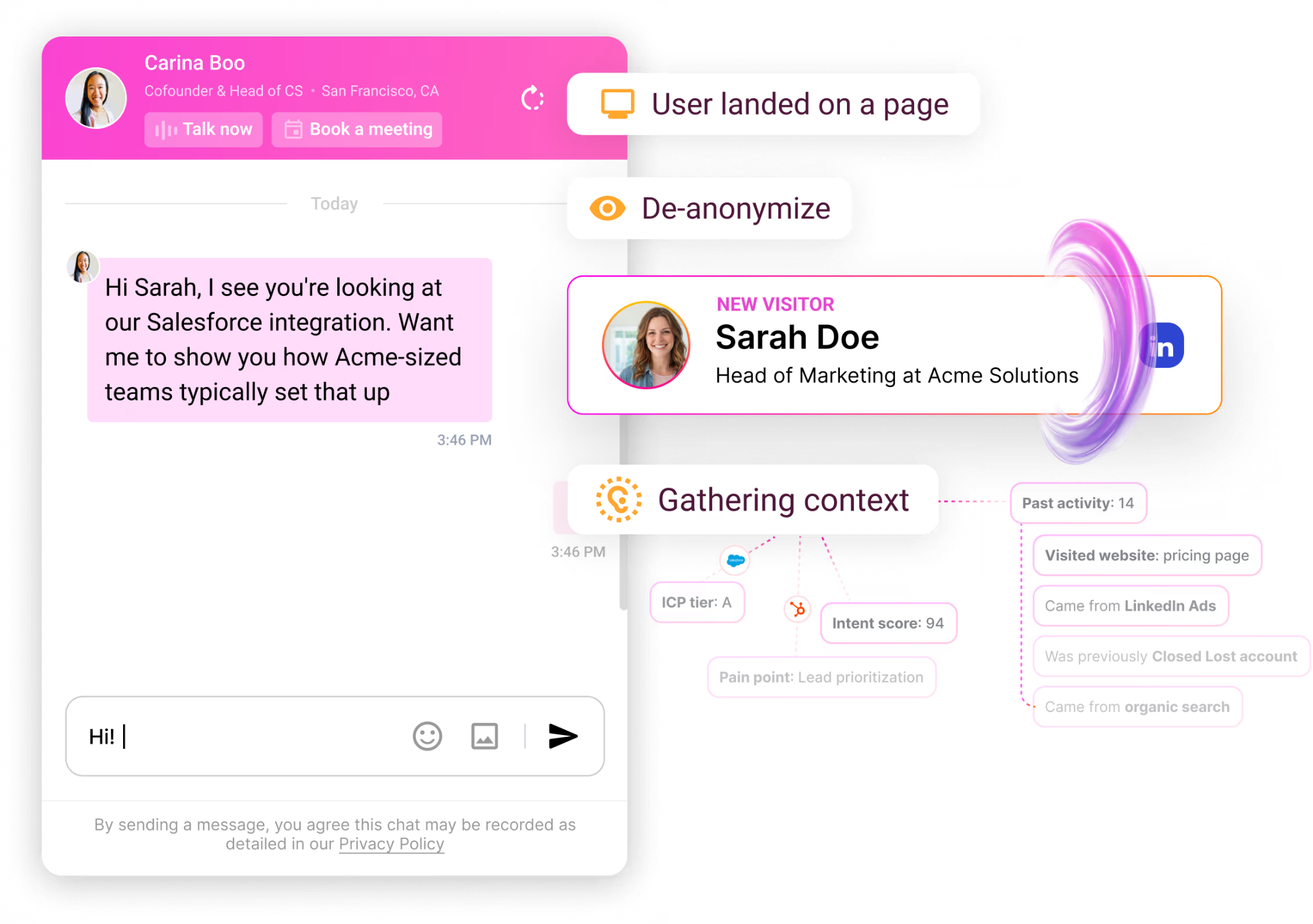
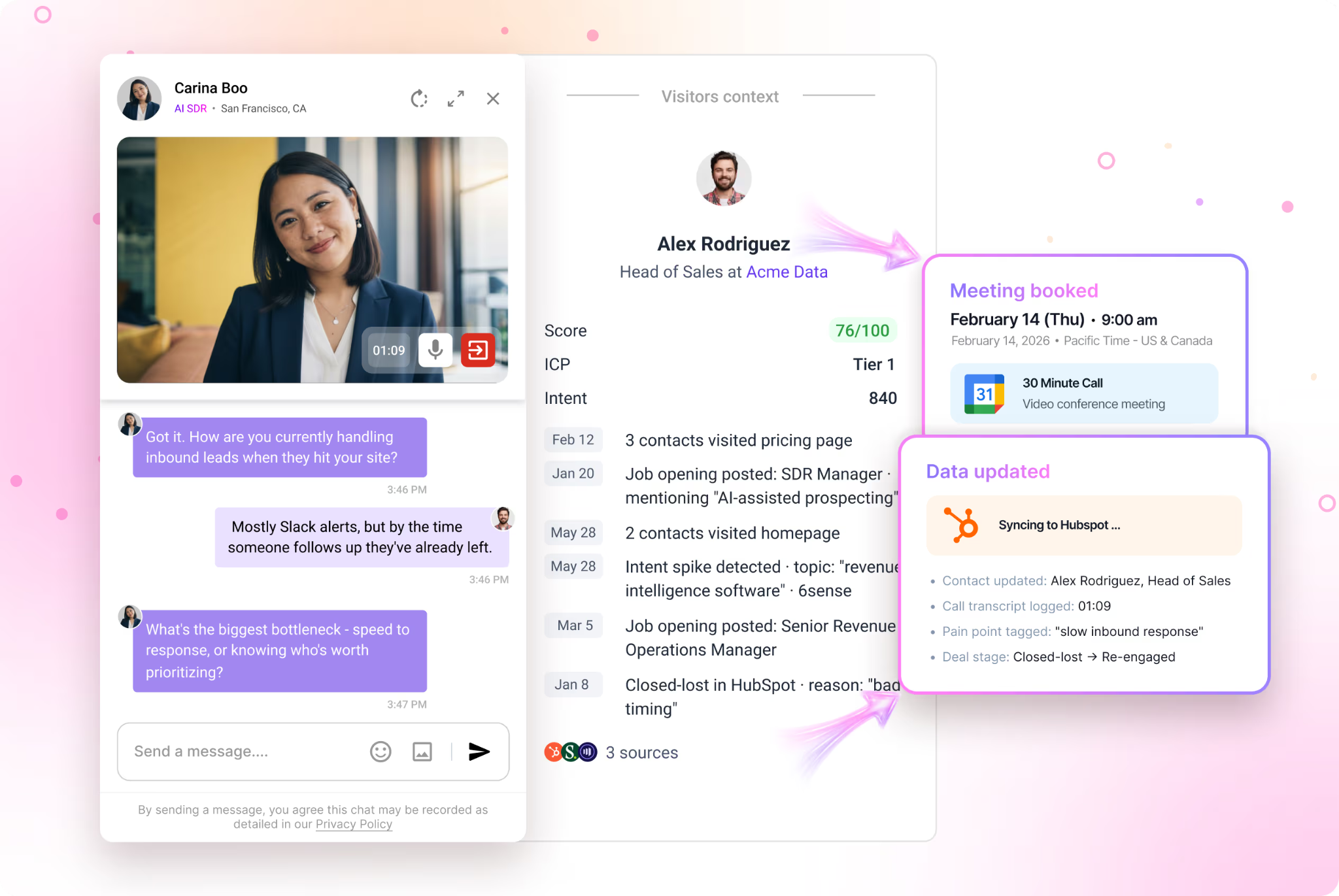
Imagine this: a visitor is exploring your pricing page. A subtle popup offers them a personalized demo. If they're hesitant or have questions, an AI-powered chat opens instantly to guide them through - answering product questions, qualifying intent, and booking a meeting in real time.

It's proactive and interactive, meeting the user exactly where they are.

The data supports combining these approaches. Businesses using AI chatbots report 3× better conversion into sales than those relying on website forms alone (Dashly). And personalized CTAs - like well-timed popups - convert 202% better than generic ones (HubSpot).

When you layer conversational AI on top of targeted popups, the compounding effect is significant.


Outreach's Playbook

Outreach uses this combination in smart ways to increase conversions:

Contextual Prompts: Popups appear when users hit key actions, like viewing pricing or reaching usage limits. These aren't random interruptions — they're timed to the moment of highest intent.

Instant Support: A chatbot is always available to answer questions without making users leave the page. This reduces friction at the exact point where most visitors drop off.

Conversion Nudges: Together, popups and chat reduce the gap between "maybe later" and "yes, let's try it." They turn passive browsing into active engagement.

The result? Outreach doesn't just inform visitors - it engages them in real time, leading to higher demo requests, signups, and upgrades.


The Challenge for Most B2B Teams

Here's the catch: building smart, behavior-based popups and conversational AI flows usually requires engineering resources, design time, and complex integrations across multiple tools.

Most growth, marketing, and sales teams can't afford to wait on dev cycles just to test new ideas.

And even when they do ship something, the chatbot treats every visitor the same - a first-time visitor from a 50-person startup gets the same experience as a VP of Sales from a Fortune 500 account visiting your pricing page for the third time.

That's the real gap. It's not just about having chat and popups.

It's about knowing who is on your site and tailoring the experience to their specific context.


The Better Solution: Warmly's AI Inbound Agent

Warmly's AI Inbound Agent goes beyond what traditional chatbot + popup combinations can do. It's not just a chat widget or a popup tool - it's an intelligent system that combines three capabilities that most platforms keep separate:

1. Real-Time Visitor Identification

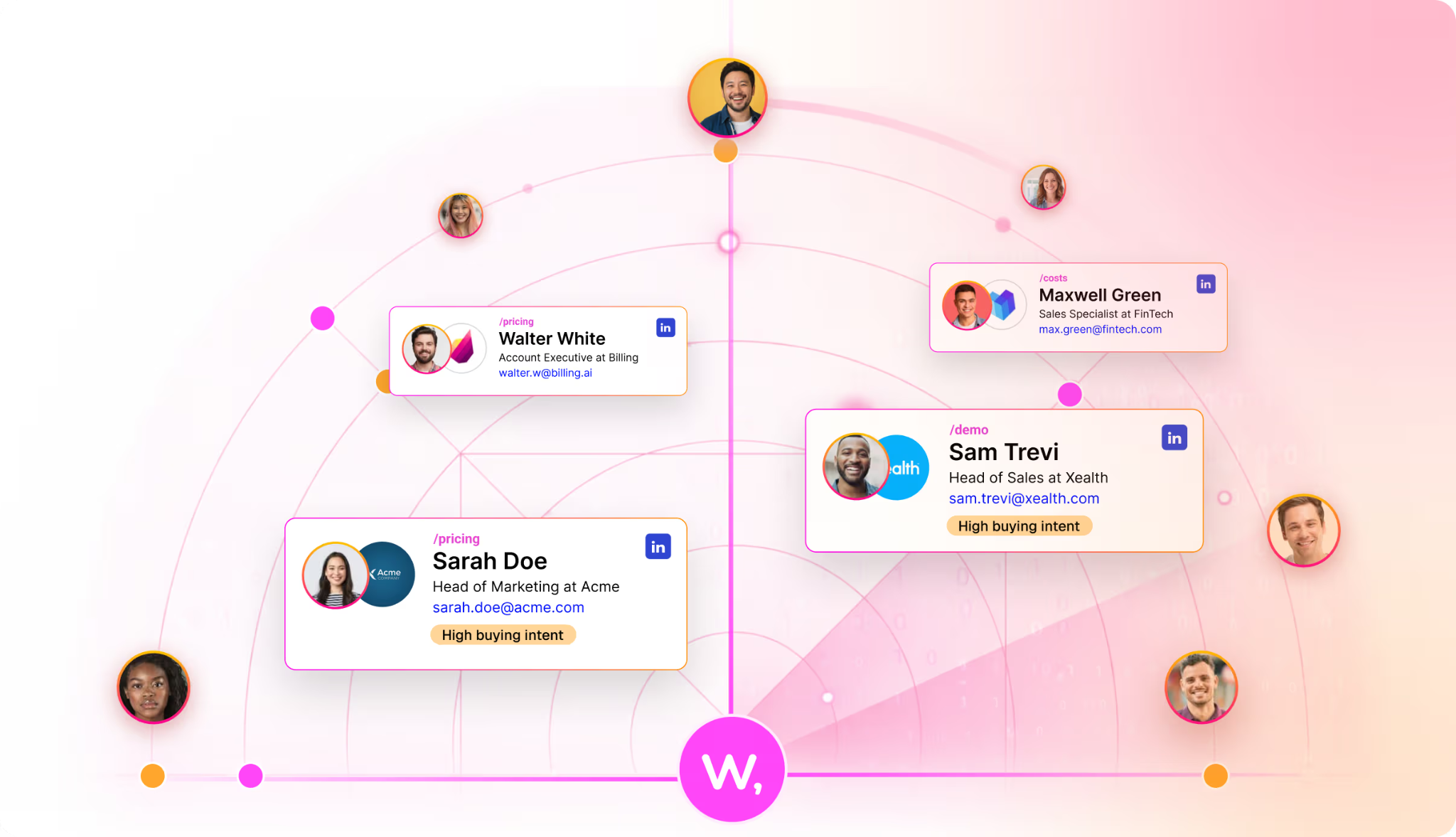
Warmly de-anonymizes website traffic, revealing who's visiting - company name, industry, size, seniority, and intent level - before they ever fill out a form. Over 95% of B2B website visitors remain anonymous without this kind of de-anonymization (iBeam Consulting).

Warmly turns that invisible traffic into actionable intelligence.

2. Behavior-Based, Segment-Aware Triggers

Unlike generic chatbots that fire the same message to everyone, Warmly's AI Inbound Agent triggersconversations and offers based on who the visitor is and what they're doing:

  • A known prospect in active pipeline? The agent surfaces relevant case studies and offers to book a follow-
  • up with their assigned AE.
  • A new ICP account hitting the pricing page? A personalized popup offers a tailored demo.
  • An executive (CEO, CMO, CRO) browsing your site? The agent extends an exclusive invitation or routes
  • them directly to a senior rep.
  • A repeat visitor who hasn't converted? A "welcome back" message acknowledges their previous engagement and addresses likely objections.

3. AI-Powered Conversations That Qualify and Convert

Warmly's AI Inbound Agent doesn't just say "How can I help?" - it has context. It knows the visitor's company,

their likely use case, and where they are in the buying journey. It can answer product questions, qualify intent in real time, and book meetings directly on your team's calendar - all without requiring a human rep to be online.

This matters because speed is everything: companies that respond to leads within the first hour are 7× more likely to qualify them (ChatMetrics). Warmly's AI Inbound Agent responds in seconds.


What Warmly's AI Inbound Agent Can Do That Outreach's Approach Can't

Outreach's chatbot + popup combination is effective - but it still treats most visitors as unknown. Without de-

anonymization and intent data, even well-timed popups are making educated guesses about who they're talking to.

Warmly's AI Inbound Agent closes that gap:

CapabilityTraditional Chatbot + PopupWarmly's AI Inbound Agent
Real-time visitor identification✅ Company, title, intent
Segment-based triggers Basic (page/behavior) Advanced (CRM status, seniority, deal stage)
AI-powered conversations Scripted or basic AI Context-aware, trained on your product
Meeting bookingForm-based or redirectInstant calendar booking in-chat
Personalized CTAs by visitor ✅ By company, industry, persona
Integration with CRM/pipeline dataLimited Native (Salesforce, HubSpot, etc.)
The difference isn't incremental. It's the difference between a chatbot that says "How can I help?" and an AI agent that says "Hi [Name], I see you're evaluating us for [Use Case].

Here's a case study from a company like yours - want me to book time with your AE?"


The Data Behind Combining Chat + Popups + Intelligence

The numbers make the case clearly:

  • Websites using AI chatbots see a 23% increase in conversion rates (Glassix)
  • Live chat drives a 20% increase in website conversions and a 305% ROI within six months (American Marketing Association via ChatMetrics)
  • Businesses using AI chatbots report 3× better conversion than those using website forms alone (Dashly)
  • Personalized CTAs convert 202% better than generic ones (HubSpot)
  • 80% of sales and marketing leaders have implemented or plan to implement chatbots into customer
  • experiences (Zoho)
  • Visitors who engage via live chat are 2.8× more likely to convert than those who don't (LiveChat)
  • 61% of live chat users are B2B companies - it's the largest segment adopting this technology (SQ Magazine)

When you add visitor intelligence on top of these channels - knowing who's on the site, what they care about,

and where they are in the buying journey - the lift compounds significantly.


The Takeaway

Tech giants like Outreach use chatbots + popups because they work. They grab attention, start conversations, and remove friction from the path to conversion.

But the real competitive advantage isn't just having chat and popups. It's having intelligence behind them - knowing who your visitors are, what stage they're in, and what message will move them to action.

That's what Warmly's AI Inbound Agent delivers. It combines de-anonymization, behavior-based triggers, and

AI-powered conversations into a single system that turns anonymous traffic into qualified pipeline - without waiting on dev cycles, without treating every visitor the same, and without letting your best prospects slip away.

Because great conversions shouldn't just be for tech giants.


Sources


👉 Ready to turn anonymous visitors into pipeline? Start with Warmly for free or book a demo to see the AI

Inbound Agent in action.


Last Updated February 2026

Warm Offers for B2B: The Smarter Way to Boost Website Conversions

Warm Offers for B2B: The Smarter Way to Boost Website Conversions

Time to read

Keegan Otter

Most B2B websites convert just 1–2% of visitors. Warm Offers - Warmly's personalized, signal-triggered popups - change that by delivering the right message to the right visitor at the right moment.

Here's why they work, what the data says, and how to use them effectively.


The Data Behind Popups: Why They Still Work in 2025

The numbers on popups have only gotten stronger — especially for teams that prioritize targeting and timing over volume.

Average popup conversion rates are climbing. According to Wisepops' analysis of over 1 billion popup displays, the average popup conversion rate in 2025 is 4.65%, up from 4.01% in 2024 (Wisepops).

That's a meaningful year-over-year increase driven by better targeting and UX improvements.

Top performers are in a different league. The top 10% of popup campaigns averaged a 19.77% conversion rate in 2025 - nearly five times the average (Wisepops).

This proves that when popups are done right, they're one of the highest-converting tools on any website.

Targeting is the multiplier. URL-targeted popups achieve a 5.80% conversion rate compared to just 2.30% for untargeted campaigns - a 152% improvement from basic personalization alone (Wisepops via IvyForms).

And HubSpot's research shows personalized CTAs convert 202% better than generic ones (HubSpot).

Exit-intent popups recapture leaving visitors. Research from Conversion Sciences shows well-crafted exit-intent messages can save 10–15% of abandoning visitors (Conversion Sciences via IvyForms).

Cart abandonment popups specifically convert at 17.12% on average (OptiMonk).

The takeaway: popups aren't the problem. Bad popups are the problem. When you add intelligence - knowing who's on your site and what they care about - conversion rates climb dramatically.


Why B2B Teams Should Use Warm Offers (Not Generic Popups)

Most popup tools treat every visitor identically. A first-time blog reader gets the same popup as a VP of Sales

from a target account visiting your pricing page for the third time. That's a wasted opportunity.

Warm Offers are powered by Warmly's de-anonymization and intent signals, which means they can be

segmented and triggered based on who the visitor actually is. Here's why that matters for B2B:

1. Targeted Messaging by Visitor Identity

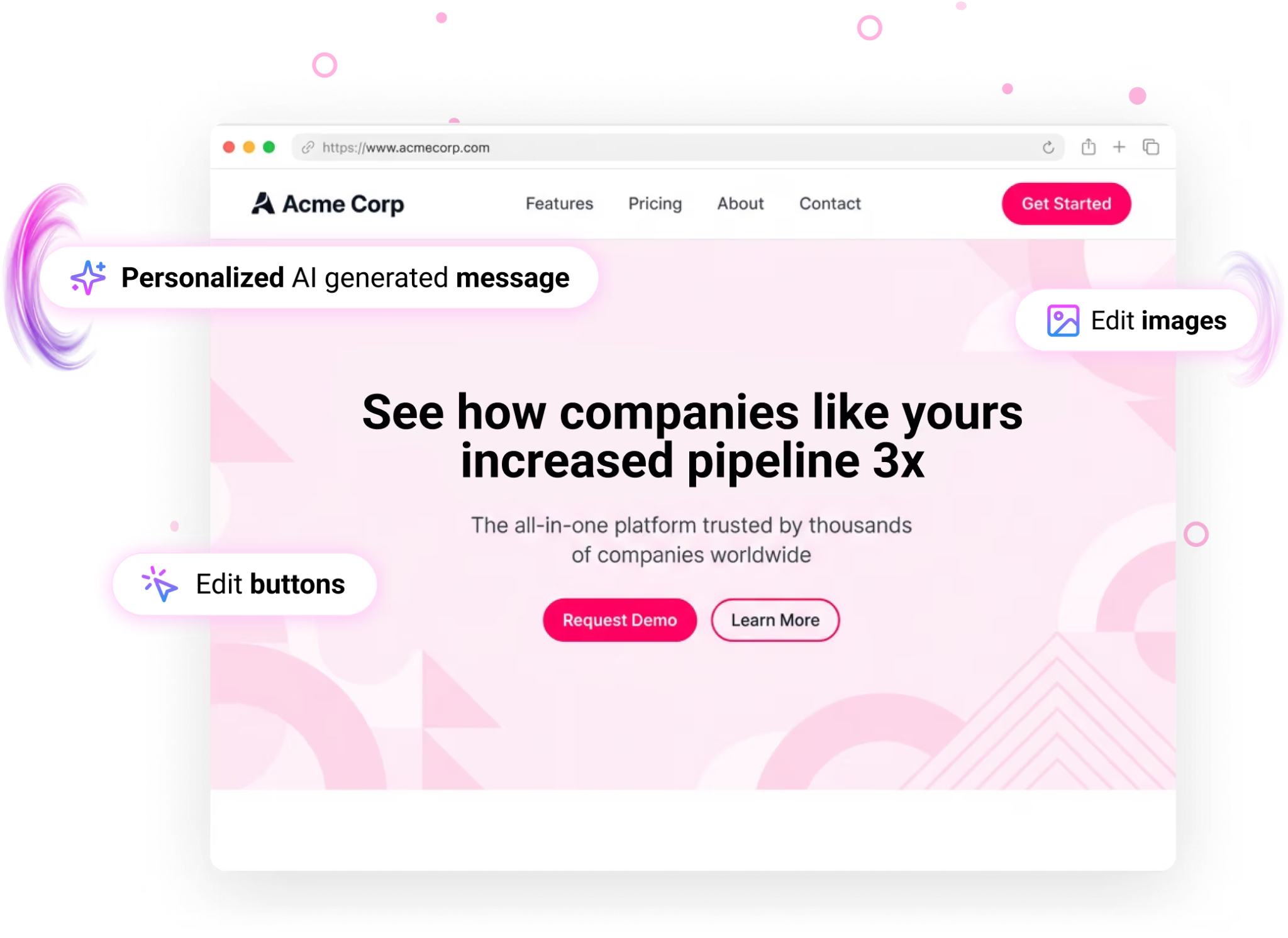
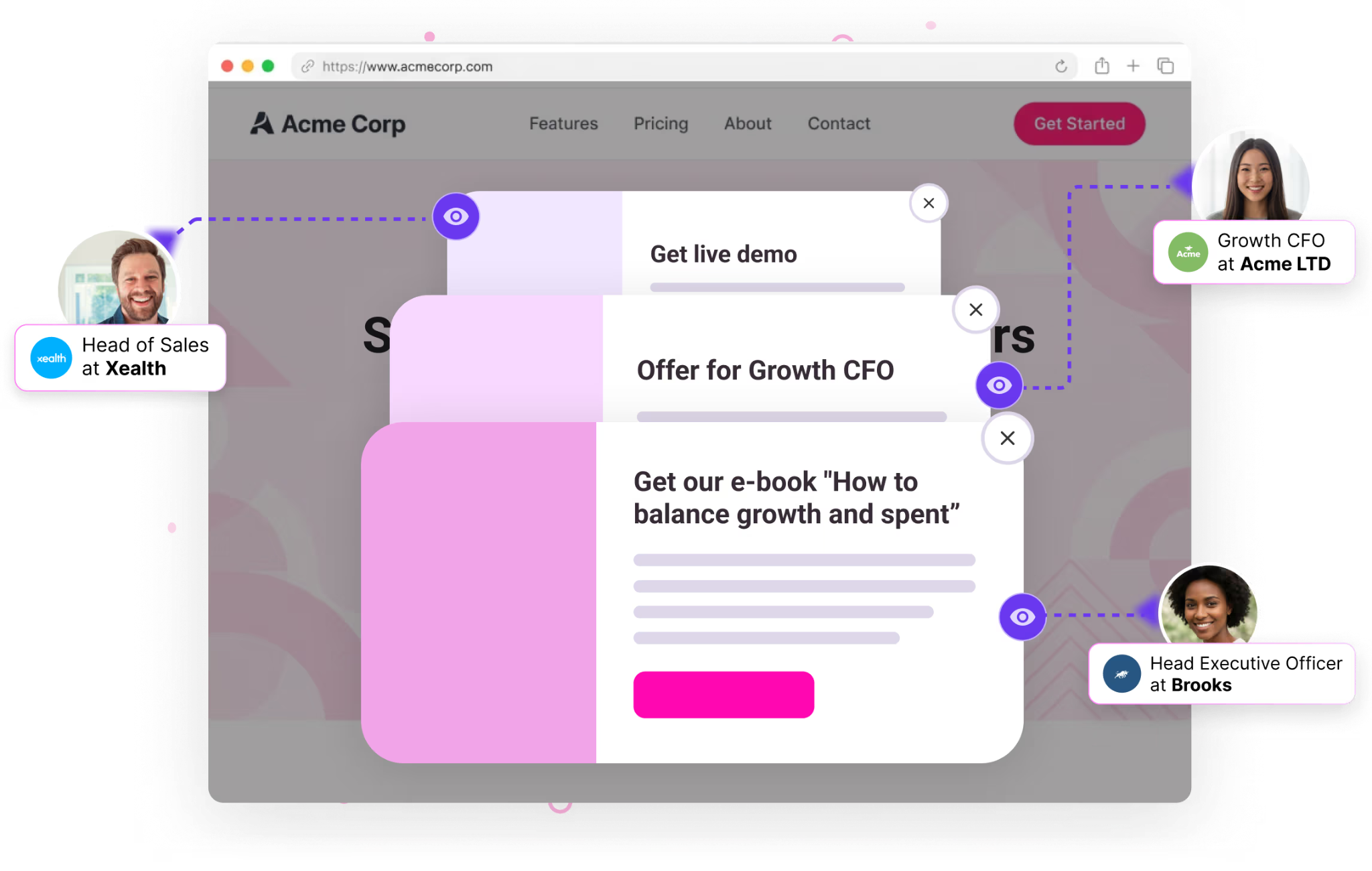
Warm Offers allow you to deliver highly targeted messages to specific segments of your audience - not just based on the page they're viewing, but based on their company, title, industry, deal stage, and CRM status.

A generic popup says: "Download our whitepaper." A Warm Offer says: "See how [Similar Company in Your Industry] reduced sales cycle time by 40%. Get the case study."

That level of relevance is only possible when you know who you're talking to.

2. Clear, Contextual Calls-to-Action

Warm Offers present clear and immediate CTAs that match where the visitor is in the buying journey:

  • Top-of-funnel visitors → content offers, guides, industry reports
  • Mid-funnel ICP accounts → personalized demo offers, comparison pages
  • Bottom-of-funnel prospects → "Book a call with your AE" or "See pricing for your team size"
  • Returning visitors → "Welcome back - here's what's changed since your last visit"

Because Warmly knows the visitor's intent level, every CTA is contextually appropriate - not a random guess.

3. Higher Engagement Through Relevance

Interactive Warm Offers - including embedded video messages, quizzes, and surveys - boost engagement and provide valuable insights into your audience's needs. But the real engagement lift comes from relevance.

A popup that addresses the visitor's actual use case or pain point gets attention. A generic one gets dismissed.

4. Re-Engagement of Stalled and Closed-Lost Pipeline

One of the highest-value uses of Warm Offers is triggering specific messages for visitors from closed-lost deals or stalled pipeline returning to the site. Research shows that winning back a lost customer has a 20 - 40% probability compared to just 5–20% for acquiring a new one (Mannheim University via Visable).

Example Warm Offers for returning closed-lost contacts:

"Welcome back. We've shipped 3 major features since we last spoke - worth another look?""

Teams like [Similar Company] switched this quarter. See what changed."

Without de-anonymization, these visitors are invisible. With Warmly, they're pipeline waiting to be reactivated.

5. Executive-Level Offers for C-Suite Visitors

When Warmly identifies a CEO, CMO, or CRO on your site, Warm Offers can trigger exclusive experiences:

  • Invitations to intimate executive dinners or roundtables
  • Direct routing to a senior rep
  • Personalized messaging that acknowledges their seniority

Executive dinners with 20 C-suite attendees often deliver more ROI than large-scale conferences (Engineerica).

Using a Warm Offer to extend that invitation at the moment of on-site intent is dramatically more effective than blasting it via cold email.

6. Valuable Data Collection Without Forms

Warm Offers can help you gather data about your visitors - email, role, use case, team size - in a way that feels natural rather than gated.

Because Warmly already knows the visitor's company and likely title, Warm Offers can ask for less and still give your team more context.

Shorter forms with pre-filled context convert better and create better leads.


Best Practices for B2B Warm Offers

Timing Is Everything

Don't fire a Warm Offer the instant someone lands on your site. Research shows popups displayed between 11 - 15 seconds perform best for user experience while maintaining high conversion (Wisepops).

Top-performing popups are displayed after at least 4 seconds - and the lowest performers fire between 0 and 4 seconds(Campaign Monitor).

Give visitors time to engage before you interrupt.

Better yet, use Warmly's behavioral triggers: fire the Warm Offer when the visitor hits a high-intent page (pricing, case studies, integrations) rather than on a blanket timer.

Relevance Over Volume

The single biggest predictor of popup performance is relevance. Targeted popups convert at 5.80% vs 2.30% for untargeted - that's not a marginal difference, it's 152% higher (Wisepops via IvyForms).

Use Warmly's segments to ensure every Warm Offer speaks to the visitor's actual situation.

Mobile Optimization

Over 70% of web traffic now comes from mobile devices. Warm Offers must be responsive, easily dismissible, and non-intrusive on smaller screens.

Wisepops data shows mobile-only popup campaigns actually outperform desktop-only ones - 3.75% vs 2.67% conversion rate (Wisepops).

Mobile isn't an afterthought; it's where most of your visitors are.

Easy Exit

Always provide a clear and easy way for visitors to close a Warm Offer. Popups with an opt-out button actually convert 14.34% higher than those without one (GetSiteControl).

Respect drives trust. Trust drives conversion.

A/B Test Relentlessly

The top 10% of popup campaigns using A/B testing converted 22.02% of visitors on average (Wisepops).

Test headlines, CTAs, offers, timing, and placement. Small changes compound into significant lift over time.


The Warmly Difference: Intelligence-Powered Warm Offers

Here's what separates Warm Offers from every other popup tool on the market:

CapabilityGeneric Popup ToolsWarmly's Warm Offers
Visitor identification❌ Anonymous✅ Company, title, intent level
Segment-based triggers Basic (page/timer) Advanced (CRM status, seniority, deal stage, industry)
Personalized messagingTemplate-basedContext-aware based on visitor identity
Closed-lost re-engagement ✅ Trigger specific offers for returning lost deals
Executive-level offers✅ C-suite invitations, senior rep routing
CRM integrationLimitedNative (HubSpot, Salesforce)
Intent scoring✅ Real-time behavioral + firmographic signal

Generic popup tools ask: "What page are they on?" Warm Offers ask: "Who are they, what do they care about, and what should we say right now?"


The Takeaway

Popups aren't dead. Bad popups are dead. The era of generic, spray-and-pray website popups is over.

Warm Offers - powered by Warmly's visitor intelligence - represent the next generation of on-site engagement for B2B teams.

By combining de-anonymization, intent signals, and segment-based triggers, they deliver the right message to the right person at the right moment.

The data is clear: the average popup converts at 4.65%, but the top 10% convert at nearly 20%.

The difference between those two numbers isn't design or copy - it's intelligence. Knowing who's on your site and what they need changes everything.

Don't underestimate the power of a well-timed, well-targeted offer.

With Warm Offers, every website visit becomes an opportunity to engage, convert, and grow.


Sources

Average popup CVR 4.65% (2025), top 10% at 19.77%: Wisepops

Targeted popups convert 152% better (5.80% vs 2.30%): Wisepops via IvyForms

Personalized CTAs convert 202% better: HubSpot

Exit-intent popups save 10–15% of abandoning visitors: Conversion Sciences via IvyForms

Cart abandonment popups convert at 17.12%: OptiMonk

Top-performing popups display after 4+ seconds: Campaign Monitor

Mobile popups outperform desktop (3.75% vs 2.67%): Wisepops

Opt-out button increases CVR by 14.34%: GetSiteControl

A/B tested popups convert at 22.02% (top 10%): Wisepops

20–40% win-back probability vs 5–20% new acquisition: Mannheim University via Visable

Executive dinners outperform large events for B2B: Engineerica

B2B websites convert 1–2%: Martal Group


👉 Ready to turn generic popups into intelligent pipeline machines? Start with Warmly for free or book a demo

to see Warm Offers in action.


Last updated: February 2026

Context Graphs for Go-to-Market: The Data Foundation AI Revenue Teams Actually Need

Context Graphs for Go-to-Market: The Data Foundation AI Revenue Teams Actually Need

Time to read

Alan Zhao

How unified entity models and decision ledgers are replacing fragmented GTM data stacks - and what it actually takes to build one

Last updated: January 2026 | Reading time: 20 minutes

This is part of a 3-post series on AI infrastructure for GTM:
1. Context Graphs - The data foundation (memory, world model (you are here)

2. Agent Harness - The coordination infrastructure (policies, audit trails)

3. Long Horizon Agents - The capability that emerges when you have both


Quick Answer: What is a Context Graph for GTM?

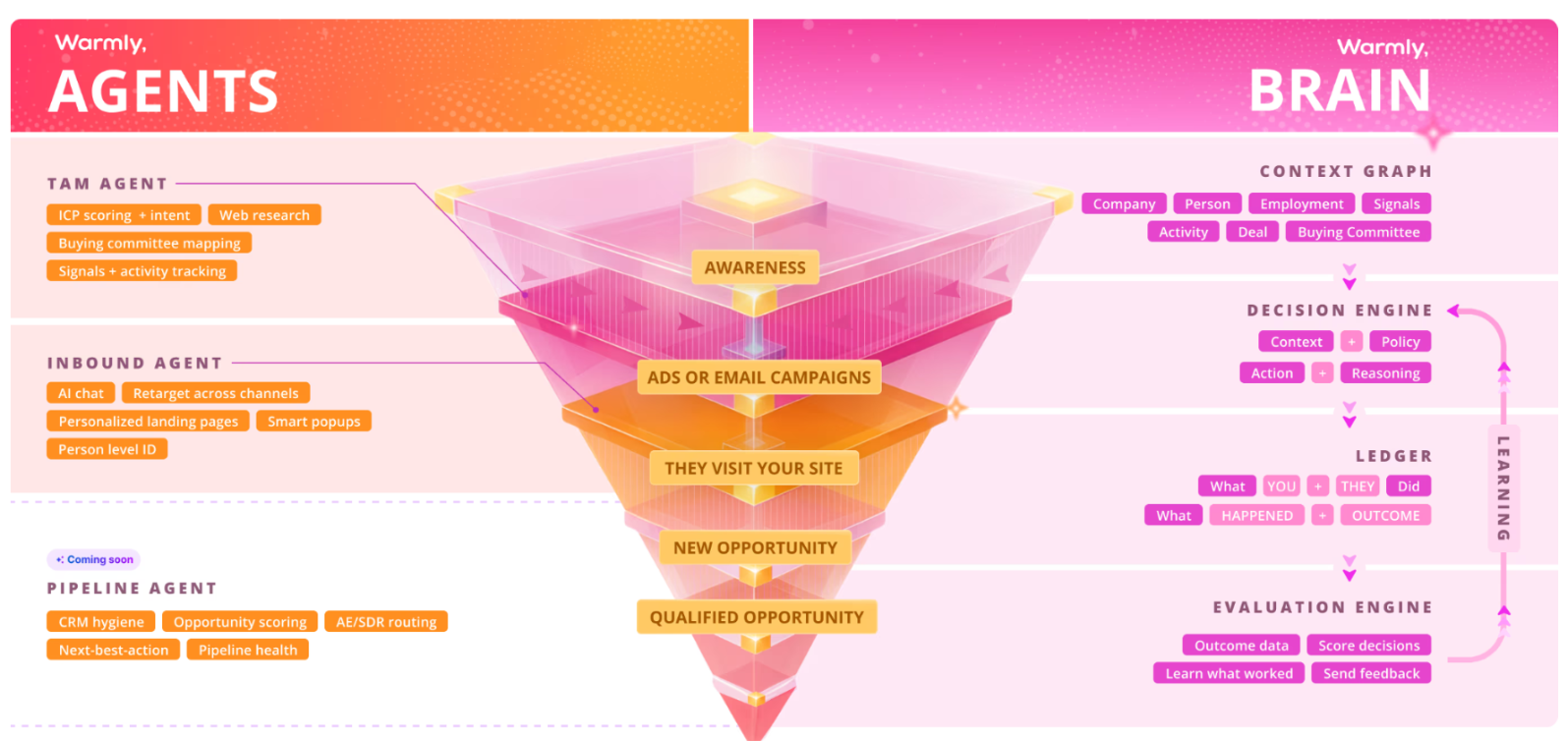
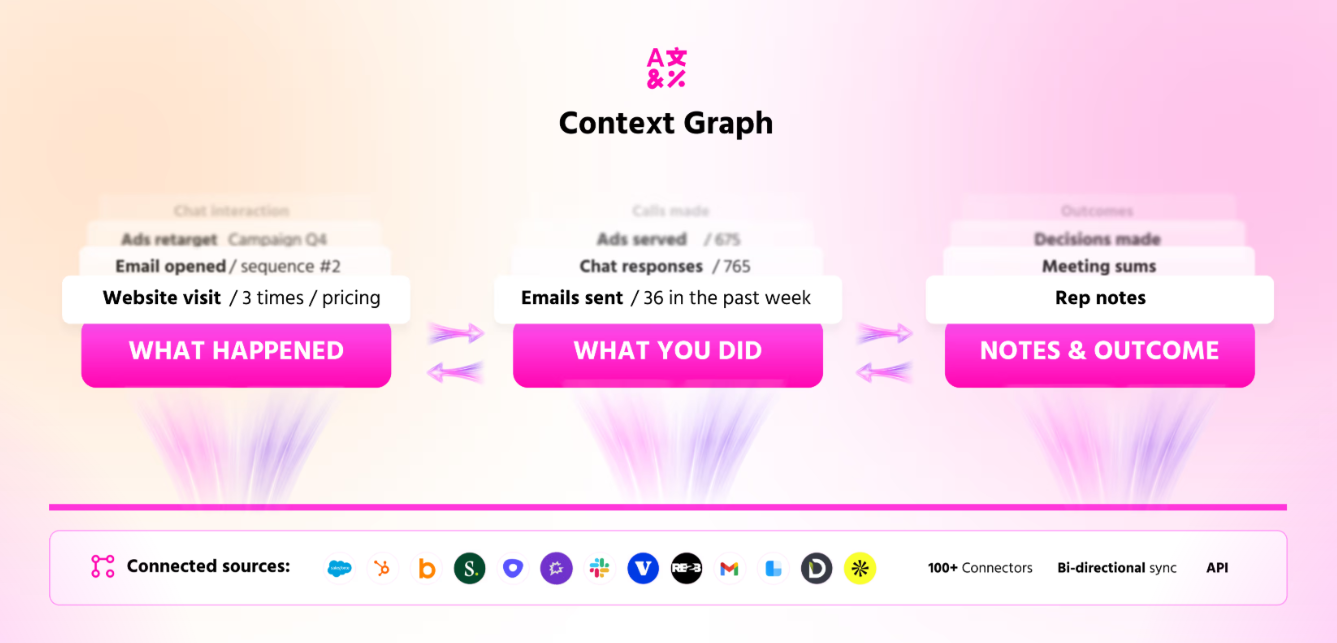
A context graph is a unified data architecture that connects every entity in your go-to-market ecosystem - companies, people, deals, activities, and outcomes - into a single queryable structure that AI agents can reason over.

In December 2025, Foundation Capital called context graphs "AI's trillion-dollar opportunity" - arguing that enterprise value is shifting from "systems of record" to "systems of agents." The new crown jewel isn't the data itself; it's a living record of decision traces stitched across entities and time, where precedent becomes searchable.

Best Context Graph by Use Case

Best for SMB revenue teams (50-200 employees): A lightweight implementation using PostgreSQL with good indexing, focusing on Company → Person → Employment relationships. You don't need a graph database to start—most B2B SaaS teams can get to first value in 4 weeks with existing infrastructure.

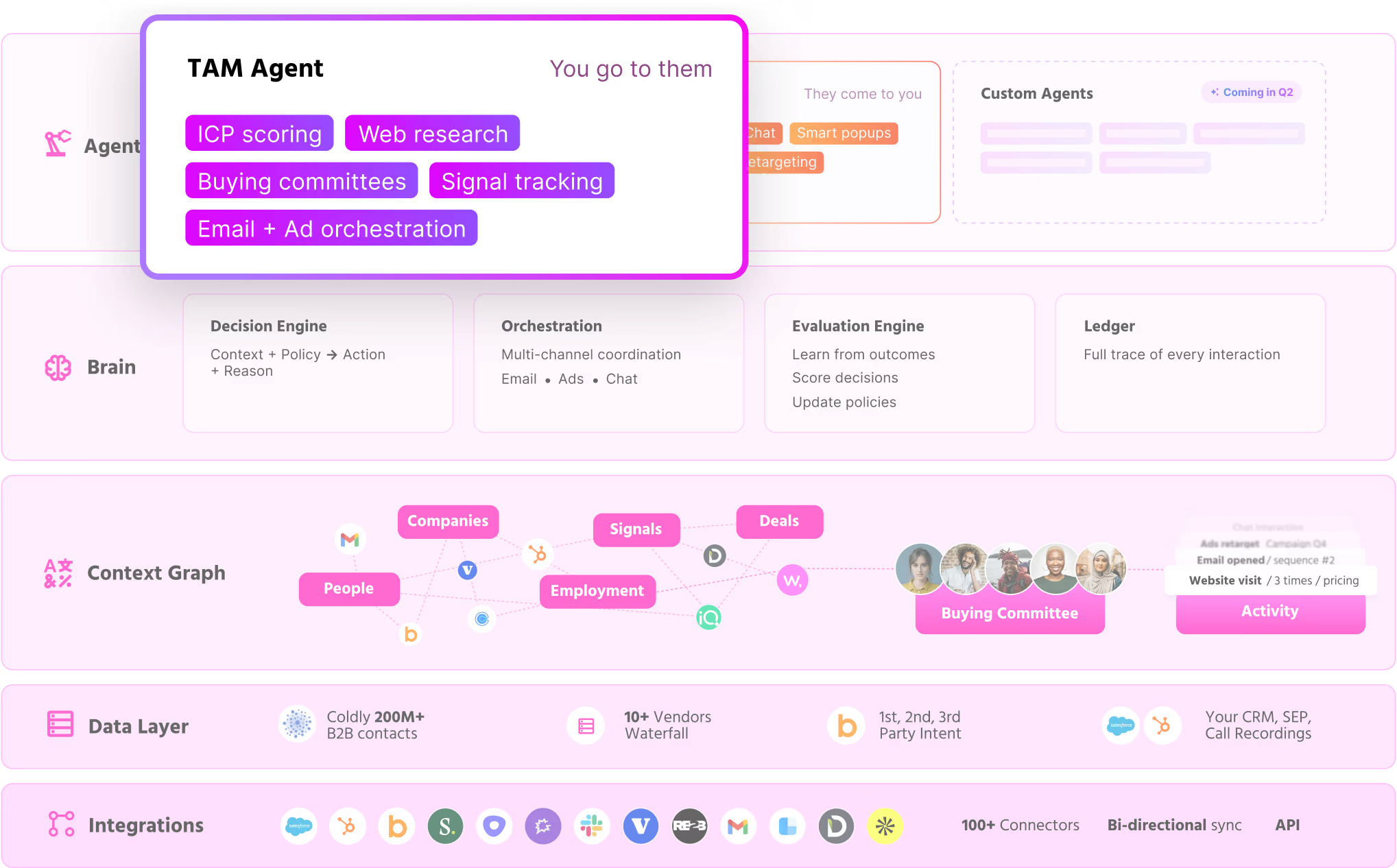
Best for mid-market with AI agents: A 5-layer architecture combining entity resolution, activity ledgers, and policy engines. This enables AI marketing ops agents to make autonomous decisions with full traceability. Teams report saving 40-60 minutes daily per rep on research and routing.

Best for enterprise RevOps: A full context graph with multi-vendor identity resolution, computed columns for AI efficiency, and CRM bidirectional sync. Companies at this stage typically see 30% improvement in win rates and 300% improvement in meeting booking rates from high-intent accounts.

Best use case for context graphs: Replacing the fragmented "intent signal → manual routing → CRM update" workflow with a closed-loop system where every decision (who to contact, what to say, when to engage) is logged, executed, and evaluated automatically.

Why context graphs matter now: Traditional GTM tools give you signals without structure. You get 1,000 website visitors but no way for AI to understand that visitor A works at company B which has deal C with champion D who just changed jobs. Context graphs solve this by making relationships first-class citizens in your data model.

What this guide covers: This is the definitive guide to context graphs specifically for go-to-market teams. While most context graph content focuses on general enterprise use cases, we'll show you exactly how to build a world model for your revenue ecosystem - with real entity examples, GTM-specific decision traces, and implementation guidance.


The Problem: GTM Data is a Mess of Disconnected Signals

Every revenue team knows this pain:

  • Your website intent data shows Company X visited your pricing page
  • Your Bombora research signals show they're researching your category
  • Your CRM shows you talked to them 6 months ago
  • Your LinkedIn shows their VP of Sales just got promoted
  • Your outbound tool has 3 SDRs sending conflicting messages

None of these systems talk to each other. And when you try to add AI agents on top, they hallucinate because they lack the connected context to make good decisions.

This is the fundamental problem context graphs solve: creating a world model for your go-to-market ecosystem that AI can actually reason over.


What Makes a Context Graph Different from a Data Warehouse?

AspectData WarehouseCDPContext Graph
Primary unitTables/rowsUser profilesEntities + relationships
Query patternSQL aggregationsAudience segmentsGraph traversal
Real-timeBatch (hours/days)Near real-timeReal-time events
AI readinessRequires heavy transformationLimited to known schemasNative entity resolution
Decision loggingNot built-inNot built-inImmutable ledger layer
Best forReportingMarketing automationAI agent orchestration

The key insight: Data warehouses store facts. Context graphs store meaning.

When an AI agent asks "Who should I contact at Acme Corp about our new product?", a data warehouse returns rows. A context graph returns:

- The buying committee with roles and relationships

- Historical engagement with each person

- Related deals and their outcomes

- The last 10 decisions made about this account and what happened


The 5-Layer Context Graph Architecture

After building AI agents for GTM that actually work in production, we've converged on a 5-layer architecture:

Layer 1: Data Layer (The World Model)

This is your unified entity graph containing:

Core Entities:

  • Company - Firmographic data, technographic signals, ICP scoring
  • Person - Contact data, role identification, social presence
  • Employment - Links people to companies with titles, seniority, tenure
  • Deal - Opportunities with stages, amounts, probability
  • Activity - Every touchpoint: emails, calls, meetings, page views
  • Audience - Dynamic segments based on rules or ML models

The magic is in the relationships. Unlike flat CRM records, a context graph knows that:

  • Person A works at Company B
  • Person A is champion on Deal C
  • Person A previously worked at Company D (which is your customer)
  • Company B competes with Company E

This relationship-first structure is what enables person-based signals to actually drive intelligent action.

Real GTM Example: The Buying Committee Query

When your AI agent asks "Who should I contact at Acme Corp?", here's what the context graph returns:


Company: Acme Corp (acme.com)
├── ICP Tier: 1 (Strong Fit)
├── Intent Score: 85/100
├── Recent Activity: Pricing page (3x), Case studies (2x)
│
├── Buying Committee:
│   ├── Sarah Chen (VP of Sales) — CHAMPION
│   │   ├── LinkedIn: Active, 5K followers
│   │   ├── Previous company: [Your Customer]
│   │   └── Last contact: 45 days ago (email opened)
│   │
│   ├── Mike Rodriguez (CRO) — DECISION MAKER
│   │   ├── Started role: 3 months ago (new hire signal)
│   │   └── Last contact: Never
│   │
│   └── Jessica Liu (Director RevOps) — INFLUENCER
│       ├── Tech stack owner
│       └── Last contact: Demo request form (2 weeks ago)
│
├── Related Deals:
│   └── Closed Lost: $45K (6 months ago, "timing")
│
└── Similar Accounts (won):
    └── Beta Corp, Gamma Inc (same industry, similar size)

This is what it means to have a world model for GTM. The agent doesn't just know that someone visited your website - it knows the full context of who they are, how they relate to the account, and what happened before.

Layer 2: Ledger Layer (Decision Memory)

Every decision your GTM system makes gets logged immutably:

DecisionRecord {
  timestamp: "2026-01-15T10:30:00Z"
  decision_type: "outreach_channel_selection"
  entity: "person:uuid-123"
  context_snapshot: { ... full entity state at decision time ... }
  decision: "linkedin_message"
  reasoning: "High LinkedIn engagement score, email bounced previously"
  policy_version: "v2.3.1"
  outcome: null  // Filled in later when we observe result
}

Why this matters: When your AI orchestrator makes a decision, you need to know:

  1. What it decided
  2. Why it decided that
  3. What information it had at the time
  4. What happened afterward Without a ledger, AI agents become black boxes. With a ledger, you get full auditability and - critically - the ability to learn from outcomes.

Layer 3: Policy Layer (The Rules Engine)

Policies are versioned rules that govern agent behavior:

yaml
policy_name: "outreach_timing"
version: "2.3.1"
rules:
  - condition: "prospect.seniority == 'C-Level'"
    action: "delay_until_business_hours"
    reasoning: "Executives prefer professional timing"


  - condition: "prospect.recent_activity.includes('pricing_page')"
    action: "prioritize_immediate_outreach"
    reasoning: "High intent signals decay quickly"

The policy layer sits between raw AI capabilities and production execution. It encodes your business logic, compliance requirements, and learnings from past outcomes.

Key principle: Policies evolve. When the ledger shows that a certain approach isn't working, you update the policy—and the version history tells you exactly what changed and when.

Layer 4: Agent API Layer

This is the interface where AI agents interact with the context graph:

  • Query API - "Get full context for Company X including buying committee, recent activity, and similar accounts"
  • Decision API - "Log that I'm deciding to send an email to Person Y"
  • Action API - "Execute this email send through integration Z"
  • Feedback API - "Record that the email was opened/replied/bounced" The API layer abstracts the complexity of the underlying graph, presenting AI agents with clean interfaces that match how they reason about GTM problems.

Layer 5: External Systems Layer

Context graphs don't replace your existing tools—they unify them:

  • CRM integration - Salesforce, HubSpot records flow in and out
  • Engagement platforms - Outreach, Salesloft sequences sync bidirectionally
  • Data vendors - Contact database enrichment from Clearbit, ZoomInfo, Apollo
  • Intent providers - First-party web, second-party social, third-party research signals

The integration layer handles the messy reality of enterprise GTM stacks while maintaining the clean entity model internally.


The Identity Resolution Problem (And How Context Graphs Solve It)

Before you can build a context graph, you need to answer: "Is this the same person/company across all my systems?"

This is harder than it sounds:

  • CRM has "Acme Corp"
  • Website tracking has "acme.com"
  • LinkedIn has "Acme Corporation"
  • Email domain is "acme.io"

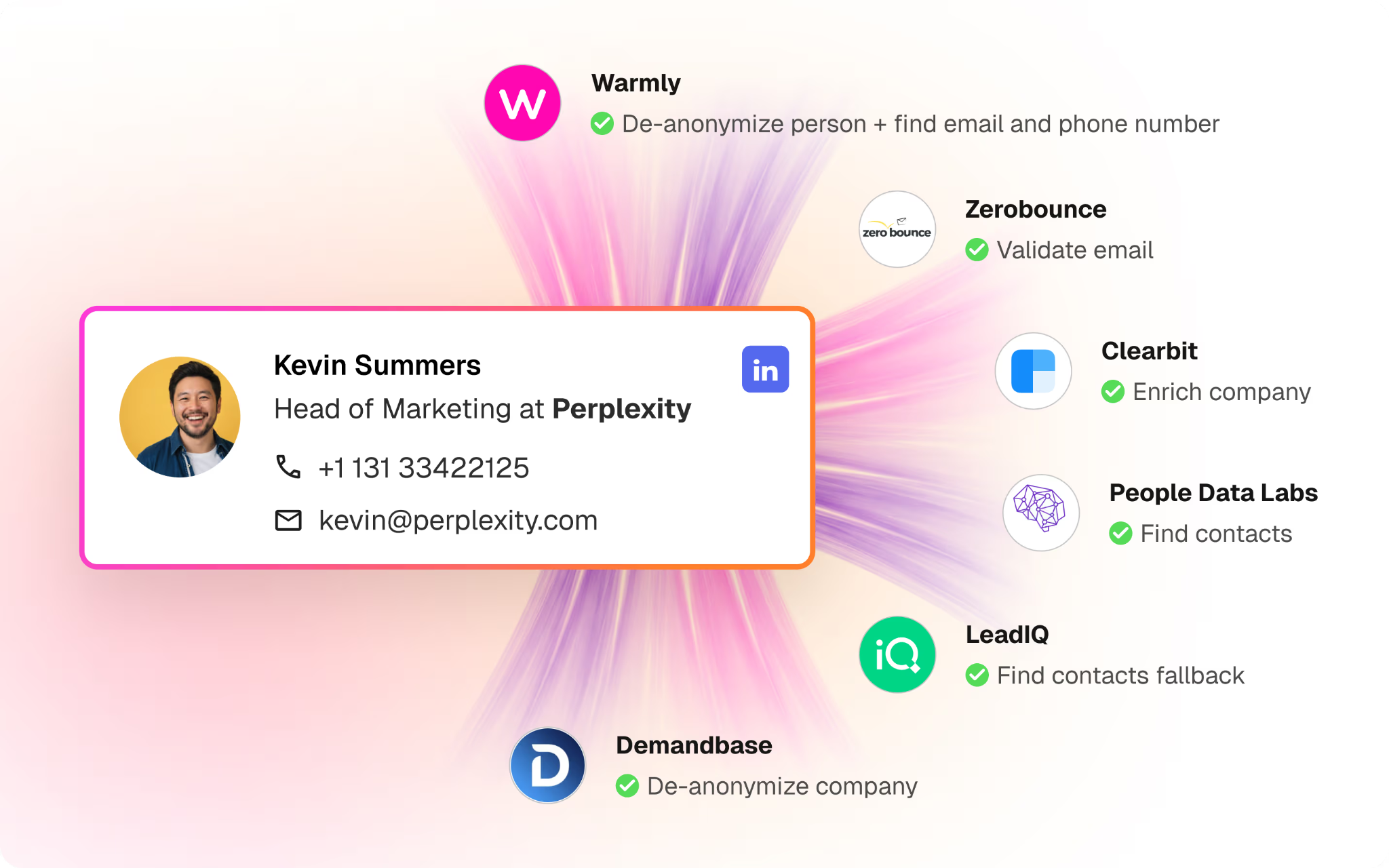
Multi-vendor consensus approach: Instead of trusting any single data provider, context graphs use a waterfall of vendors and vote on matches:

  1. Query Clearbit, ZoomInfo, PDL, Demandbase for the same entity
  2. Compare returned data across vendors
  3. Accept matches where 2+ vendors agree
  4. Flag conflicts for human review

This approach achieves ~90% accuracy on identity resolution - good enough for AI agents to operate autonomously while flagging edge cases.


Why Computed Columns Matter for AI Efficiency

Here's a non-obvious insight from building production AI systems: Raw data is too expensive for LLMs to process.

If you send an AI agent the full activity history for a company (1,000+ events), you're burning tokens and getting worse decisions. The model gets lost in noise.

Solution: Computed columns that pre-digest data. Instead of:

json
{
  "activities": [
    {"type": "page_view", "url": "/pricing", "timestamp": "..."},
    {"type": "page_view", "url": "/features", "timestamp": "..."},
    // ... 998 more events
  ]
}
```


The context graph provides:
```json
{
  "engagement_score": 85,
  "buying_stage": "evaluation",
  "last_pricing_view": "2 days ago",
  "total_sessions_30d": 12,
  "key_pages_viewed": ["pricing", "vs-competitor", "case-studies"],
  "engagement_trend": "increasing"
}

The AI agent gets the meaning without the noise. This reduces token consumption by 10-100x while actually improving decision quality.


The Decision Loop: From Signals to Outcomes

Traditional GTM is linear: Signal → Action → Hope.

Context graph-powered GTM is a closed loop:


Three Levels of Evaluation

Not all decisions are equal. Context graphs support evaluation at three levels:

Turn-Level (Individual Actions)

  • Did this specific email get opened?
  • Did this LinkedIn message get a reply?
  • Was this the right person to contact?

Thread-Level (Conversation Sequences)

  • Did this outreach sequence generate a meeting?
  • How many touches did it take?
  • Which channels performed best for this persona?

Outcome-Level (Business Results)

  • Did this account become a customer?
  • What was the deal value?
  • What was the time from first touch to close?

Evaluation connects decisions to outcomes across time:

The email you sent on Day 1 contributed to the meeting on Day 14 which contributed to the closed deal on Day 90. Context graphs maintain these connections so you can attribute outcomes to the decisions that actually mattered.


Context Graphs vs. 6sense, Demandbase, and Traditional ABM

If you're evaluating ABM platforms, you might wonder: don't 6sense and Demandbase already provide intent data and orchestration?

Capability6sense/DemandbaseContext Graph Approach
Intent signalsYesYes (multi-source)
Account identificationYesYes (with identity resolution)
Audience segmentationYesYes (real-time)
AI-powered actionsLimitedFull agent autonomy
Decision loggingNoImmutable ledger
Outcome attributionPartialFull loop
Custom entity modelsNoFully extensible
Token-efficient AINoComputed columns

The fundamental difference: Traditional ABM platforms are signal providers. Context graphs are reasoning infrastructure.

You can (and should) feed 6sense intent data into your context graph. The graph provides the structure for AI agents to actually act on those signals intelligently.


Building Your Own Context Graph: Key Decisions

If you're building GTM infrastructure, here are the critical choices:

1. Entity Model Design

Start with Company → Person → Employment as your core triangle. Everything else connects to these three entities.

Don't:

  • Create separate "Lead" and "Contact" entities (they're the same person)
  • Store activities as disconnected events (link them to entities)
  • Treat accounts as flat records (model the buying committee)

2. Identity Resolution Strategy

Decide your accuracy vs. speed tradeoff:

  • Fast and approximate: Single-vendor matching (70% accuracy)
  • Accurate and slower: Multi-vendor consensus (90% accuracy)
  • Maximum accuracy: Human-in-the-loop for high-value accounts (98%+)

3. Ledger Granularity

What gets logged?

  • Minimum: All AI agent decisions
  • Recommended: All decisions + context snapshots
  • Maximum: Every state change in the system More logging = better learning, but higher storage costs.

4. Policy Versioning

Treat policies like code:

  • Git-versioned rule definitions
  • Rollback capability for bad deployments
  • A/B testing between policy versions


How to Get Started: 4-Week Implementation Path

Based on our experience and industry frameworks, here's a practical path to your first context graph.

What to Expect: Effort vs. Outcomes

WeekEffort RequiredWhat You Get
Week 120-30 hours (data eng)Core entity model, can query buying committees
Week 215-20 hours (data eng + RevOps)Identity resolution, ~90% match accuracy
Week 310-15 hours (RevOps)Activity tracking, intent signals flowing
Week 415-20 hours (data eng)First AI agent connected, decision logging
Total investment: ~60-85 hours of specialized work over 4 weeks.

By week 4 you should see:

  • AI agents answering "Who should we contact at Company X?" with full context
  • 40-60 minutes saved per rep daily on research and routing
  • Foundation for outcome-based learning (though outcomes take time to accumulate) This isn't magic—it's infrastructure. The payoff compounds as your ledger accumulates decision traces and outcomes.

Week 1: Entity Model Foundation

Start with the core triangle: Company → Person → Employment

sql
-- Minimum viable schema
CREATE TABLE company (
    id UUID PRIMARY KEY,
    domain TEXT UNIQUE,
    name TEXT,
    icp_tier TEXT,
    employee_count INT
);


CREATE TABLE person (
    id UUID PRIMARY KEY,
    full_name TEXT,
    linkedin_handle TEXT,
    email TEXT
);


CREATE TABLE employment (
    id UUID PRIMARY KEY,
    person_id UUID REFERENCES person(id),
    company_id UUID REFERENCES company(id),
    title TEXT,
    seniority TEXT,  -- C-Level, VP, Director, Manager, IC
    is_current BOOLEAN,
    started_at TIMESTAMP
);

Don't over-engineer. You can run effective AI agents on PostgreSQL with good indexing. Graph databases add value later when you need complex traversals.

Week 2: Identity Resolution Pipeline

Connect your data sources and start matching entities:

  1. Ingest from CRM - Pull companies, contacts, deals from Salesforce/HubSpot
  2. Enrich with vendors - Query Clearbit, ZoomInfo, or Apollo for additional data
  3. Match and merge - Use domain matching for companies, email + name matching for people
  4. Flag conflicts - Queue low-confidence matches for human review Start with domain-based company matching (highest accuracy) before tackling person matching.

Week 3: Activity and Intent Layer

Add the engagement signals that make the graph dynamic:

sql
CREATE TABLE activity (
    id UUID PRIMARY KEY,
    entity_type TEXT,  -- 'person' or 'company'
    entity_id UUID,
    activity_type TEXT,  -- 'page_view', 'email_open', 'meeting', etc.
    payload JSONB,
    occurred_at TIMESTAMP
);


-- Computed column example
CREATE VIEW company_engagement AS
SELECT
    company_id,
    COUNT(*) FILTER (WHERE occurred_at > NOW() - INTERVAL '30 days') as sessions_30d,
    COUNT(DISTINCT entity_id) FILTER (WHERE entity_type = 'person') as known_visitors,
    MAX(occurred_at) as last_activity
FROM activity
GROUP BY company_id;

Week 4: Decision Logging and First Agent

Add the ledger layer and connect your first AI agent:

1. Create decision table - Log every agent decision with context snapshot

2. Build query API - Simple endpoint: "Get full context for company X"

3. Connect one agent - Start with a single use case (e.g., meeting prep, outreach prioritization)

4. Measure outcomes - Track what the agent decided vs. what actually happened

First milestone: An AI agent that can answer "Who should we contact at Company X and why?" with full traceability.


How Warmly Implements Context Graphs

At Warmly, we built our context graph to power AI agents that handle inbound, outbound, and marketing ops autonomously. We're sharing what works (and what's still hard) because context graphs are emerging infrastructure - everyone's learning.

Our data layer includes:

Our ledger captures:

  • Every orchestration decision
  • Every AI-generated message
  • Every routing choice
  • Every outcome (reply, meeting, deal)

Our policy layer encodes:

  • ICP definitions and scoring
  • Buying committee identification rules
  • Channel selection preferences
  • Timing and frequency constraints

What We've Seen Work

Teams using our context graph infrastructure report:

  • 20% more pipeline capacity - SDR teams cover more accounts without adding headcount
  • 50% higher close rates on MQLs from context-enriched routing vs. standard form fills
  • 30% faster sales cycles when AI surfaces the right buying committee members upfront
  • Some teams have replaced the work of 1-2 SDRs with automated outreach to high-intent accounts

Where Context Graphs Are Still Hard (Honest Assessment)

Let's be real about the limitations:

Data quality requires ongoing work. B2B contact data decays 25-30% annually. Job changes, title updates, company acquisitions - the graph needs constant maintenance. We've invested heavily in multi-vendor consensus to stay accurate, but it's not "set and forget."

CRM sync takes configuration. Every Salesforce and HubSpot instance is customized. Getting bidirectional sync right - especially with custom objects and complex ownership rules - takes time. Budget 2-3 weeks for production-grade CRM integration.

Trust builds gradually. AI agents making autonomous decisions feels risky. Most teams start with "recommend but don't act" mode before enabling full autonomy. This is healthy - you should understand what the AI would do before letting it do it.

Not a fit for pure PLG. If you don't have a sales team, context graphs add complexity you don't need. They're built for teams with SDRs, AEs, and outbound motions.

The result: AI agents that can answer "Who should we contact at this account, what should we say, and why?" - with full auditability of how they reached that conclusion. But getting there takes investment.


FAQs: Context Graphs for GTM

What is a context graph in the context of B2B sales?

A context graph is a unified data structure that represents all entities (companies, people, deals, activities) and their relationships in your go-to-market ecosystem. Unlike flat CRM records, context graphs model the connections between entities - like which people work at which companies, who the buying committee is, and how past activities relate to current opportunities. This structure enables AI agents to reason about complex GTM scenarios rather than just retrieving individual records.

How is a context graph different from a Customer Data Platform (CDP)?

CDPs are designed for marketing automation around known user profiles. Context graphs are designed for AI agent orchestration across the full GTM motion. Key differences:

  1. CDPs organize around user profiles; context graphs organize around entity relationships
  2. CDPs segment audiences; context graphs enable graph traversal queries
  3. CDPs don't typically log AI decisions; context graphs include an immutable ledger layer
  4. CDPs are optimized for campaign execution; context graphs are optimized for autonomous agent reasoning

What data sources feed into a GTM context graph?

A comprehensive context graph ingests:

  • First-party signals: Website visits, chat conversations, form fills
  • Second-party signals: Social engagement, community participation
  • Third-party signals: Research intent (Bombora), firmographic data (Clearbit, ZoomInfo)
  • CRM data: Deals, activities, historical relationships
  • Enrichment data: Contact information, job changes, company news

The context graph's job is to unify these sources through identity resolution and present a coherent entity model.

How do context graphs improve AI agent performance?

Context graphs improve AI performance in three ways:

  1. Reduced hallucination: Agents have access to real entity relationships instead of guessing
  2. Better decisions: Computed columns pre-digest complex data into meaningful signals
  3. Continuous learning: The ledger layer enables feedback loops that improve policies over time

What is the ledger layer and why does it matter?

The ledger layer is an immutable log of every decision made by the GTM system. Each decision record includes:

  • What decision was made
  • What context existed at decision time
  • What policy version was active
  • What outcome resulted (filled in later)

This matters because it enables: auditability (why did the AI do that?), debugging (what went wrong?), and learning (what works?).


How do you handle identity resolution in a context graph?

Identity resolution is the process of determining whether records across different systems refer to the same entity. Modern context graphs use multi-vendor consensus:

  1. Query multiple data providers for the same entity
  2. Compare returned data across providers
  3. Accept matches where 2+ providers agree
  4. Flag conflicts for human review This approach achieves ~90% accuracy while identifying edge cases that need attention.

Can I use a context graph with my existing CRM?

Yes. Context graphs integrate with Salesforce, HubSpot, and other CRMs bidirectionally. The CRM remains your system of record for deals and activities, while the context graph provides the unified entity model and AI reasoning layer. Data flows both ways—CRM updates feed the graph, and graph-driven actions update the CRM.

What's the difference between a context graph and a knowledge graph?

Knowledge graphs typically represent static facts and relationships (like Wikipedia's structured data). Context graphs are designed for dynamic, time-series data with a focus on decision-making:

  • Context graphs include temporal information (when things happened)
  • Context graphs have a ledger layer for decision logging
  • Context graphs have computed columns optimized for AI consumption
  • Context graphs are built for real-time queries, not just knowledge retrieval

How do policies work in a context graph architecture?

Policies are versioned rules that govern how AI agents behave. They sit between raw AI capabilities and production execution, encoding:

  • Business logic (ICP definitions, routing rules)
  • Compliance requirements (outreach limits, opt-out handling)
  • Learned preferences (channel selection, timing) Policies evolve based on outcomes - when the ledger shows something isn't working, you update the policy and track the version change.
What infrastructure do I need to build a context graph?

Minimum infrastructure:

  • Graph database or relational DB with good join performance
  • Event streaming (Kafka, etc.) for real-time updates
  • API layer for agent interactions
  • Storage for ledger (append-only, high durability)

You can start simple with PostgreSQL and add specialized infrastructure as you scale.

How much does it cost to build a context graph?

The honest answer: it depends on your approach. DIY build (4 weeks):

  • Engineering time: ~60-85 hours of data engineering work
  • Infrastructure: $200-500/month for databases, streaming, storage
  • Data vendors: $5K-50K/year depending on enrichment needs
  • Ongoing maintenance: ~5-10 hours/month

Buy vs. build tradeoffs:

  • Building gives you full control but requires dedicated data engineering
  • Buying from a vendor (like Warmly) gets you to value faster but less customization
  • Hybrid approach: use vendor for identity resolution, build your own ledger layer

Most teams that build internally already have data engineers on staff. If you're hiring specifically for this, factor in 1-2 full-time equivalent effort for the first year.

What is a decision trace and why does it matter for sales?

A decision trace captures the full reasoning chain behind every GTM decision: what inputs were gathered, what policies applied, what exceptions were granted, and why. As Arize AI notes, "agent traces are not ephemeral telemetry - they're durable business artifacts." For sales, this means:

  • Knowing why an account was prioritized (or deprioritized)
  • Understanding which signals triggered outreach
  • Auditing why a specific message was sent
  • Learning from outcomes to improve future decisions

How is a context graph different from a semantic layer?

A semantic layer defines what metrics mean (revenue = X + Y - Z). A context graph captures how decisions get made using those metrics. As the Graphlit team explains, you need both: operational context (identity resolution, relationships, temporal state) and analytical context (metric definitions, calculations). Context graphs extend semantic layers by adding:

  • Decision logging (why was this number used?)
  • Temporal qualifiers (what was the value at decision time?)
  • Precedent links (what similar decisions were made before?)

Who owns the context graph - vendor or enterprise?

This is an active debate in the industry. As Metadata Weekly discusses, enterprises learned from cloud data warehouses that handing over strategic assets creates vendor leverage. For GTM context graphs specifically:

  • Decision traces are yours - The reasoning connecting your data to actions is enterprise IP
  • Entity models can be shared - Company/person matching benefits from vendor scale
  • Policies must be enterprise-controlled - Your business rules define your competitive advantage

Look for vendors that let you export decision traces and don't lock you into proprietary formats.

What's the difference between context graphs and RAG (Retrieval-Augmented Generation)?

RAG retrieves relevant text chunks to augment LLM prompts. Context graphs go further by modeling entity relationships and decision traces.

AspectRAGContext Graph
ReturnsText chunksStructured entities + relationships
UnderstandsText similarityEntity identity across systems
LogsNothingEvery decision with context
LearnsDoesn'tFeedback loops improve policies

You can use RAG within a context graph - for example, to retrieve relevant case studies when crafting outreach. But the graph provides the structure that makes RAG outputs actionable.

How do context graphs handle real-time vs. batch data?

Context graphs support both through a tiered approach, as Merge describes:

  1. Live API data - Real-time queries for current state (is this person still employed here?)
  2. Cached data - Recent snapshots for speed (last 30 days of activity)
  3. Derived summaries - Computed aggregates for AI efficiency (engagement score, buying stage)

The key is balancing freshness against latency. Intent signals need real-time; firmographic data can be cached.


Context Graphs Enable Long Horizon Agents

Everything we've described - unified entities, decision ledgers, computed columns - culminates in one capability: long horizon agents.

Long horizon agents are AI systems that complete complex, multi-step tasks spanning hours, days, or weeks. They're the opposite of the "AI SDRs" that send a sequence and forget. They remember. They learn. They improve.

Why context graphs are the foundation: Without a context graph, long horizon agents are impossible:

  • No entity memory → Agent can't remember talking to Sarah 3 weeks ago
  • No relationship awareness → Agent doesn't know Sarah is the champion on an active deal
  • No decision traces → Agent can't learn from what worked (or didn't)
  • No computed context → Agent burns tokens on raw data instead of meaning

With a context graph, agents can:

  • Track that John visited pricing 3 times, his boss Sarah is the CRO, and they lost a deal 6 months ago to "timing"
  • Coordinate outreach across the buying committee over weeks
  • Remember objections from previous conversations
  • Learn that re-engaging closed-lost accounts after leadership changes works

The technical enablement: The agent harness provides the coordination and policy infrastructure. The context graph provides the world model the harness operates on. Together, they enable the "agentic loop" that defines long horizon agents:

CapabilityWhat Context Graph Provides
PerceiveUnified entity view across all signals
ThinkComputed columns with meaning, not noise
ActDecision API with full context
ReflectLedger layer connecting decisions to outcomes

According to METR research, AI agent task completion capability is doubling every ~7 months. The companies building context graphs now will have the infrastructure for the next generation of autonomous GTM.


Conclusion: Context Graphs Are GTM Infrastructure for the AI Era

The shift from "AI as a feature" to "AI as the operator" requires a fundamental rethinking of GTM data infrastructure.

Traditional tools give you signals. Context graphs give you meaning.

Traditional tools execute actions. Context graphs execute decisions and remember why.

Traditional tools measure activity. Context graphs close the loop from decision to outcome to learning.

Is It Worth the Investment?

Honestly? It depends on your stage and resources.

If you have:

  • SDR/AE teams doing manual research and routing
  • Multiple disconnected data sources (CRM, intent, enrichment)
  • Plans to use AI agents for GTM automation
  • Data engineering capacity or budget Then yes - context graphs will pay off. Teams report 40-60 minutes saved daily per rep, 20%+ pipeline capacity improvements, and the ability to scale outbound without scaling headcount.

If you don't have:

  • Dedicated data engineering resources
  • An outbound sales motion
  • Multiple data sources to unify

You might be better off starting with simpler intent tools and revisiting context graphs when you scale.

If you're building AI agents for GTM - whether for inbound, outbound, or marketing ops - the context graph is your foundation. It's the world model that enables AI to reason about your business instead of just pattern-matching on disconnected data.

Next steps:

  • DIY path: Start with Week 1 of our implementation guide above. PostgreSQL + the core entity model gets you surprisingly far.
  • See it in action: Book a demo to see how Warmly's AI agents operate on context graph infrastructure.
  • Go deeper: Explore our AI Signal Agent to see unified entity resolution in practice.


Context Graph Tools and Vendors (2026)

The context graph space is evolving rapidly. Here's a landscape view:

CategoryVendorsGTM Focus
GTM-Specific Context GraphsWarmly, Writer✅ Built for revenue teams
General EnterpriseAtlan, Graphlit, FluencyBroad enterprise, not GTM-specific
Intent Data + Orchestration[6sense](/p/comparison/vs-6sense), [Demandbase](/p/comparison/warmly-vs-demandbase)Signals without decision traces
Graph DatabasesNeo4j, TrustGraphInfrastructure, not applications
Data PlatformsSnowflake, DatabricksWarehouse, not context graph
Agent InfrastructureAWS AgentCore, LangChainAgent tooling, no GTM entity model
Key evaluation criteria:

1. Does it model GTM entities (Company, Person, Employment, Deal)?

2. Does it log decisions with context snapshots?

3. Does it support computed columns for AI efficiency?

4. Does it integrate with your CRM bidirectionally?

5. Can you export your decision traces?


Further Reading

The AI Infrastructure Trilogy

From Warmly

External Resources


Last updated: January 2026

The Agent Harness: What We Learned Running 9 AI Agents in Production

The Agent Harness: What We Learned Running 9 AI Agents in Production

Time to read

Alan Zhao

This is part of a 3-post series on AI infrastructure for GTM:
1. Context Graphs - The data foundation (memory, world model)

2. Agent Harness - The coordination infrastructure (policies, audit trails) (you are here)

3. Long Horizon Agents - The capability that emerges when you have both

Everyone's building AI agents. Almost no one's building the infrastructure to run them.

An agent harness is the infrastructure layer that provides AI agents with shared context, coordination rules, and audit trails. Without one, your agents will fail 3-15% of the time, contradict each other, and operate as black boxes you can't debug. We run 9 AI agents in production every day at Warmly. Here's what we learned about building the harness that makes them reliable.

The market is obsessed with making agents smarter. But intelligence isn't the bottleneck. Infrastructure is.


Quick Answer: Agent Harness Components by Use Case

Best for multi-agent coordination: Event-based routing with Temporal workflows - prevents agents from colliding or duplicating work.

Best for decision auditability: Decision ledger with full traces - every agent decision logged with reasoning, confidence scores, and context snapshots.

Best for context management: Unified context graph - single source of truth across CRM, intent signals, and website activity.

Best for policy enforcement: YAML-based policy engine - define rules once, enforce across all agents.

Best for continuous improvement: Outcome loop - link decisions to business results (meetings booked, deals closed) and learn from patterns.

Best for GTM teams getting started: Warmly's AI Orchestrator - production-ready agent harness with 9 workflows already built.


The Problem Nobody Talks About

Here's a stat that should worry you: tool calling - the mechanism by which AI agents actually do things - fails 3-15% of the time in production. That's not a bug. That's the baseline for well-engineered systems (Gartner 2025).

And it gets worse. According to RAND Corporation, over 80% of AI projects fail—twice the failure rate of non-AI technology projects. Gartner predicts 40%+ of agentic AI projects will be canceled by 2027 due to escalating costs, unclear business value, or inadequate risk controls.

Why? Because most teams focus on the wrong problem.

They're fine-tuning prompts. Switching models. Adding more tools. But the agents keep failing in production because there's no infrastructure holding them together. (For more on what works, see our guide to agentic AI orchestration.)

Think about it this way: You wouldn't deploy a fleet of microservices without Kubernetes. You wouldn't run a data pipeline without Airflow. But somehow, we're deploying fleets of AI agents with nothing but prompts and prayers.

That's where the agent harness comes in.


What is an Agent Harness?

An agent harness is the infrastructure layer between your AI agents and the real world. It does three things:

  1. Context: Gives every agent access to the same unified view of reality
  2. Coordination: Ensures agents don't contradict or duplicate each other
  3. Constraints: Enforces policies and creates audit trails for every decision

The metaphor is intentional. A harness doesn't slow down a horse - it lets the horse pull. Same principle. A harness doesn't limit your agents. It gives them the structure they need to actually work.

Without a harness, you get what I call the "demo-to-disaster" gap. Your agent works perfectly in a notebook. Then you deploy it, and within a week:

  • Agent A sends an email. Agent B sends a nearly identical email two hours later.
  • A customer asks "why did you reach out?" and nobody knows.
  • Your agents burn through your entire TAM before anyone notices the personalization is broken.

With a harness, you get agents that operate like a coordinated team instead of a bunch of interns who've never met. This is the foundation of what we call agentic automation - AI that can actually run autonomously in production.


Why AI Agents Fail in Production (The Real Reasons)

Let me be specific about why agents fail. This isn't theoretical. We've seen all of these.

Failure Mode 1: Context Rot

Here's something the model spec sheets don't tell you: models effectively utilize only 8K-50K tokens regardless of what the context window promises. Information buried in the middle shows 20% performance degradation. Approximately 70% of tokens you're paying for provide minimal value (Princeton KDD 2024).

This is called "context rot." Your agent has access to everything, but can actually use almost nothing.

The fix isn't a bigger context window. It's better context engineering - giving the agent exactly what it needs, when it needs it, in a format it can actually use.

Failure Mode 2: Agent Collision

This is the second-order problem that kills most multi-agent systems. You deploy Agent A to send LinkedIn messages. Agent B to send emails. Agent C to update the CRM. Each agent works perfectly in isolation. (This is exactly the problem that AI sales automation tools need to solve.)

Then Agent A messages a prospect at 9am. Agent B emails the same prospect at 11am. Agent C marks them as "contacted" but doesn't know which agent did what. The prospect gets annoyed. Your brand looks like a spam operation.

The agents aren't broken. They just have no idea what each other are doing.

Failure Mode 3: Black Box Decisions

A prospect asks: "Why did your AI reach out to me?"

If you can't answer that question with specifics - what signals the agent saw, what rules it applied, why it chose this action over alternatives - you have a black box problem.

Black boxes are fine for demos. They're disasters for production. You can't debug what you can't see. You can't improve what you can't measure. And you definitely can't explain to your legal team why the AI sent that message.


The Agent Harness Architecture

Here's the architecture we use to run 9 production agents at Warmly. It has four layers.

Layer 1: The Context Graph

A context graph is a unified data layer that gives every agent the same view of reality.

Most companies have their data scattered across a dozen systems. Intent signals in one tool. CRM data in another. Website activity somewhere else. Each agent has to query multiple APIs, stitch together partial views, and hope nothing changed in between.

That's a recipe for inconsistent decisions. Our context graph unifies three databases:

  • Terminus (port 5444): Company data, buying committees, ICP tiers, audience memberships
  • Warm Opps (port 5441): Website sessions, chat messages, intent signals, page visits
  • HubSpot: Deal stages, contact properties, activity history

This unified view is what enables person-based signals - knowing not just which company visited, but who specifically and what they care about.

Every agent queries the same graph. When Agent A looks up a company, it sees the same data Agent B would see. No API race conditions. No stale caches. One source of truth.

The graph has four sub-layers: Entity Layer: Core objects linked together

  • Company → People → Employments → Buying Committee
  • Signals → Sessions → Page Visits → Intent Scores

Ledger Layer: Immutable event stream (the "why" behind everything)

  • Activity events: website_visit, email_sent, meeting_booked
  • Signal events: new_hire, job_posting, bombora_surge
  • State snapshots: intentscorecomputed, icp_tier_assigned

Policy Layer: Rules that govern agent behavior

  • "Only reach out if intent_score > 50 AND icp_tier IN ['Tier 1', 'Tier 2']"
  • "Never contact accounts with active deals in Negotiation stage"

API Layer: Unified interface for all agents

  • GET: getCompanyContext(), getBuyingCommittee(), getPriorityRanking()
  • POST: syncToCRM(), addToLinkedInAds(), sendEmail()
  • OBSERVE: onEvent(), recordDecision(), recordOutcome()

Layer 2: The Policy Engine

Policies are rules that constrain what agents can do.

This sounds limiting. It's actually liberating. When agents know their boundaries, they can operate with more autonomy inside those boundaries.

Here's what a policy looks like:

yaml

policy:

 name: "outbound-qualification"

 version: "2.3"

 conditions:

  - field: "icpTier"

   operator: "in"

   value: ["Tier 1", "Tier 2"]

  - field: "intentScore"

   operator: "gte"

   value: 50

  - field: "dealStage"

   operator: "not_in"

   value: ["Negotiation", "Contracting", "Closed Won"]

 actions:

  allowed:

   - "send_email"

   - "add_to_salesflow"

   - "add_to_linkedin_audience"

  blocked:

   - "create_deal"

   - "update_deal_stage"

 human_review_threshold: 0.6

The policy engine evaluates every agent action against applicable policies before execution. If an action violates a policy, it's blocked. If confidence is below the review threshold, it's queued for human approval.

This is how you deploy agents without worrying they'll burn through your TAM or message the CEO of your biggest customer. (If you're evaluating AI SDR agents, this is the first thing to check: what policies can you set?)

Layer 3: The Decision Ledger

Every agent decision gets recorded. Not just what happened - why it happened. Here's what a decision trace looks like:

json
{
  "decisionId": "dec_7f8a9b2c",
  "timestamp": "2026-01-17T14:32:18Z",
  "agent": "lead-list-builder",
  "workflowId": "manual-list-sync-a0396ff9-1737135132975",


  "decisionType": "reach_out",


  "reasoning": {
    "summary": "High intent Tier 1 account with active buying committee, no recent outreach",
    "factors": [
      {"factor": "intentScore", "value": 72, "weight": 0.3, "contribution": "high"},
      {"factor": "icpTier", "value": "Tier 1", "weight": 0.25, "contribution": "high"},
      {"factor": "buyingCommitteeSize", "value": 4, "weight": 0.2, "contribution": "medium"},
      {"factor": "daysSinceLastContact", "value": 45, "weight": 0.15, "contribution": "high"},
      {"factor": "dealStage", "value": null, "weight": 0.1, "contribution": "neutral"}
    ],
    "confidence": 0.85
  },


  "contextSnapshot": {
    "company": "acme.com",
    "intentScore": 72,
    "icpTier": "Tier 1",
    "buyingCommittee": ["Sarah Chen (CRO)", "Mike Davis (RevOps)", "Lisa Park (VP Sales)"],
    "recentSignals": ["pricing_page_visit", "competitor_research", "new_sales_hire"]
  },


  "policyApplied": {
    "policyId": "outbound-qualification",
    "version": "2.3",
    "result": "approved"
  },


  "action": {
    "type": "add_to_sdr_list",
    "parameters": {
      "listId": "high-intent-2026-01-17",
      "assignedSDR": "martin.ovcarski@gmail.com",
      "priority": "high"
    }
  },


  "methodology": {
    "approach": "Weighted scoring against closed-won deal patterns",
    "dataSourcesQueried": ["terminus", "warm_opps", "hubspot"],
    "modelUsed": "internal-scoring-v3",
    "tokensConsumed": 0
  }
}

When someone asks "why did we reach out to Acme?", you can pull up the exact decision trace. You can see the intent score was 72, the account was Tier 1, they had 4 buying committee members identified, and they hadn't been contacted in 45 days.

That's not a black box. That's a transparent, auditable decision system.

Layer 4: The Outcome Loop

The decision ledger captures what the agent decided. The outcome loop captures what actually happened.

json
{
  "decisionId": "dec_7f8a9b2c",
  "outcomes": [
    {
      "timestamp": "2026-01-18T09:15:00Z",
      "event": "email_sent",
      "details": {"to": "sarah.chen@acme.com", "template": "high-intent-cro"}
    },
    {
      "timestamp": "2026-01-19T14:22:00Z",
      "event": "email_opened",
      "details": {"opens": 3}
    },
    {
      "timestamp": "2026-01-22T11:00:00Z",
      "event": "meeting_booked",
      "details": {"type": "demo", "attendees": 2}
    }
  ],
  "businessOutcome": {
    "result": "opportunity_created",
    "value": 45000,
    "daysToOutcome": 5
  }
}

Now you can answer the question: "Did that decision work?"

Over time, this creates a feedback loop. You can see which factors actually correlate with meetings booked. You can adjust the weights. You can A/B test policies. The system gets smarter because it learns from its own decisions.


How We Coordinate 9 Agents Without Chaos

Running one agent is easy. Running nine agents that don't step on each other? That's where most teams fail.

Here's our approach.

The Second-Order Problem

When you have multiple agents operating in parallel, each agent makes locally optimal decisions that can be globally suboptimal.

Agent A sees high intent and sends an email.
Agent B sees high intent and adds them to a LinkedIn campaign.
Agent C sees the email was sent and updates the CRM.

Each agent did the right thing based on its view. But the prospect just got hit with three touches in 24 hours. That's not orchestration. That's spam.

This is the second-order problem: agents lose context of each other.

The Solution: Event-Based Coordination

We use Temporal for workflow orchestration. Every agent action publishes to a shared event stream. A routing layer watches the stream and prevents collisions.

typescript
export async function gtmDailyWorkflow(input: {
  organizationId: string;
  config: GTMAgentConfig;
}): Promise<GTMAgentResult> {


  // Step 1: Identify high-intent accounts
  const highIntent = await activities.identifyHighIntentAccounts({
    organizationId: input.organizationId,
    lookbackDays: 7,
    minIntentScore: 50
  });


  // Step 2: Filter by policies (CRM status, recent contact, etc.)
  const qualified = await activities.applyQualificationPolicies({
    accounts: highIntent,
    policies: ['no-active-deals', 'no-recent-outreach', 'icp-tier-filter']
  });


  // Step 3: Get buying committees (parallel execution)
  const withCommittees = await Promise.all(
    qualified.map(account =>
      activities.getBuyingCommittee({
        domain: account.domain,
        organizationId: input.organizationId
      })
    )
  );


  // Step 4: Route to appropriate channels (with coordination)
  const routingDecisions = await activities.routeToChannels({
    accounts: withCommittees,
    availableChannels: ['email', 'linkedin', 'linkedin_ads'],
    coordinationRules: {
      maxTouchesPerDay: 1,
      channelCooldown: { email: 72, linkedin: 48 }, // hours
      requireDifferentChannels: true
    }
  });


  // Step 5: Execute actions (parallel, with rate limiting)
  const results = await activities.executeRoutedActions({
    decisions: routingDecisions,
    recordDecisionTraces: true
  });


  // Step 6: Sync outcomes to CRM
  await activities.syncToCRM({
    results,
    updateFields: ['last_contact_date', 'outreach_channel', 'agent_decision_id']
  });


  return {
    accountsProcessed: qualified.length,
    actionsExecuted: results.filter(r => r.success).length,
    decisionsRecorded: results.length
  };
}

The coordination rules are explicit:

  • Max 1 touch per day per account
  • 72-hour cooldown after email before another email
  • 48-hour cooldown after LinkedIn
  • Require different channels if multiple touches The routing layer enforces these rules across all agents. Agent B can't send a LinkedIn message if Agent A sent an email 6 hours ago—the coordination layer blocks it.

What This Looks Like in Practice

We run 9 workflows in production:

WorkflowTriggerWhat It Does
listSyncWorkflowHourly scheduleSyncs audience memberships to HubSpot
manualListSyncWorkflowOn-demandTriggered list syncs for specific audiences
buyingCommitteeWorkflowNew high-intent accountIdentifies decision makers, champions, influencers (see [AI Data Agent](/p/ai-agents/ai-data-agent))
buyingCommitteePersonaFinderProcessingWorkflowNew company in ICPFinds people matching buyer personas
buyingCommitteePersonaClassificationProcessingWorkflowNew person identifiedClassifies persona (CRO, RevOps, etc.)
webResearchWorkflowNew target accountResearches company context for personalization
leadListBuilderWorkflowDaily 6amBuilds prioritized SDR target lists (powers [AI Outbound](/p/blog/ai-outbound-sales-tools))
linkedInAudienceWorkflowNew qualified contactAdds contacts to LinkedIn Ads audiences
crmSyncWorkflowAny outreach actionUpdates HubSpot with agent activities

All 9 workflows query the same context graph. All 9 publish to the same event stream. All 9 are constrained by the same policies.

That's how you get coordination without chaos.


Agent Harness vs. No Harness: What Changes

ScenarioWithout HarnessWith Harness
**Agent A emails prospect**No record of context or reasoningFull decision trace: signals seen, policy applied, confidence score
**Agent B wants to message same prospect**Has no idea Agent A already reached outSees Agent A's action in event stream, waits for cooldown
**Prospect asks "why did you contact me?"**"Uh... our AI thought you'd be interested?""You visited our pricing page 3 times, matched our ICP, and your company just hired a new sales leader"
**Agent makes bad decision**Black box—can't debugFull trace—see exactly what went wrong
**New policy needed**Update prompts across all agentsUpdate policy once, all agents comply
**Want to A/B test approach**Manual tracking in spreadsheetsBuilt-in—compare outcomes by policy version

When You Need a Harness (And When You Don't)

Let me be honest: not everyone needs this. You probably don't need a harness if:

  • You have one agent doing one thing
  • The agent doesn't make autonomous decisions
  • You're in demo/prototype phase
  • The cost of failure is low You definitely need a harness if:
  • You have multiple agents that could interact
  • Agents make decisions that affect customers
  • You need to explain decisions to stakeholders (legal, customers, executives)
  • You want agents to improve over time
  • The cost of failure is high (brand damage, TAM burn, compliance risk)

For most GTM teams, the answer is: you need a harness sooner than you think. (Not sure where to start? Check out our guide to AI for RevOps.)

The moment you deploy a second agent, you have a coordination problem. The moment an agent contacts a customer, you have an auditability requirement. The moment you want to improve performance, you need outcome tracking.


Build vs. Buy: What an Agent Harness Actually Costs

Let's talk numbers. Building an agent harness in-house is a significant investment.

Build It Yourself

ComponentEngineering TimeOngoing Cost
Context graph (unified data layer)2-3 months$2-5K/mo infrastructure
Event stream + coordination1-2 months$500-2K/mo (Kafka/Redis)
Policy engine1-2 monthsMinimal
Decision ledger1 month$500-1K/mo (storage)
Outcome tracking + analytics1-2 months$500-1K/mo
Workflow orchestration (Temporal)1 month$500-2K/mo
**Total****8-12 months****$4-11K/mo**
Plus: 1-2 senior engineers dedicated to maintenance, debugging, and improvements. At $200K+ fully loaded, that's $17-33K/mo in labor alone.

Realistic all-in cost to build: $250-500K first year, $150-300K/year ongoing.

Buy a Platform

Most enterprise agent platforms with harness capabilities:

Platform TypeAnnual CostWhat You Get
Point solutions (single agent)$10-25K/yrOne agent, limited coordination
Mid-market platforms$25-75K/yr2-4 agents, basic orchestration
Enterprise ABM/intent (6sense, Demandbase)$100-200K/yrIntent data + some automation
Full agent harness (Warmly)[$10-25K/yr](/p/pricing)4+ agents, full orchestration, decision traces

The math: If you have a RevOps or data engineering team that can dedicate 8+ months to building infrastructure, building might make sense. If you need agents in production in weeks, buy.

When Building Makes Sense

  • You have unique data sources no platform supports
  • You need custom compliance/audit requirements
  • You have 3+ engineers who can dedicate 50%+ time
  • You're already running Temporal or similar orchestration

When Buying Makes Sense

  • You need results in weeks, not months
  • Your team is <20 people (can't afford dedicated infra engineers)
  • You want to focus on GTM strategy, not infrastructure
  • You need proven coordination patterns (not experimenting)


Getting Started: The Minimum Viable Harness

You don't need to build all four layers on day one. Here's how to start:

Week 1: Unified Context

  • Pick your 2-3 critical data sources
  • Build a single API that queries all of them
  • Every agent calls this API instead of querying sources directly

Week 2: Event Stream

  • Every agent action publishes an event
  • Events include: agent ID, action type, target (company/person), timestamp
  • Simple coordination rule: block duplicate actions within N hours

Week 3: Decision Logging

  • For every decision, log: what the agent saw, what it decided, why
  • Doesn't need to be the full trace structure—start simple
  • Make logs queryable (you'll need them for debugging)

Week 4: Outcome Tracking

  • Link decisions to outcomes (email opened, meeting booked, deal created)
  • Start measuring: which decisions led to good outcomes?
  • Use this to refine policies That's your minimum viable harness. Four weeks of work, and your agents go from "black boxes that might work" to "observable systems you can debug and improve."


The Long Horizon Connection

Everything we've described - context graphs, coordination, decision traces, outcome loops - serves one goal: enabling long horizon agents.

Long horizon agents are AI systems that complete complex, multi-step tasks spanning hours, days, or weeks. According to METR research, AI agent task completion capability is doubling every ~7 months. By late 2026, agents may routinely complete tasks requiring 50-500 sequential steps - the kind of complex workflows that define B2B sales cycles.

Why the harness enables long horizon: Without an agent harness, long horizon agents are impossible:

  • No persistent memory → Agent forgets what it learned last week
  • No coordination → Multiple agents contradict each other across days
  • No decision traces → Can't debug why the agent went off-course
  • No outcome loops → Agent never improves from experience

With a harness, agents can:

  • Remember that they contacted Sarah 3 weeks ago and she said "not now, Q2"
  • Coordinate with marketing agents so the prospect gets a consistent experience
  • Explain why they prioritized this account over others
  • Learn that LinkedIn outreach to VPs at high-intent accounts closes 40% better than cold email

The agentic loop: Long horizon agents operate through a perceive-think-act-reflect cycle that spans weeks:

Week 1: Perceive high-intent signal → Think about buying committee → Act with targeted outreach

Week 2: Perceive reply → Think about objection handling → Act with relevant case study

Week 3: Perceive meeting request → Think about deal strategy → Act with champion enablement

Week 4+: Reflect on outcome → Update policies for future accounts

The harness provides the infrastructure for each step. The [context graph](/p/blog/context-graphs-for-gtm) provides the perceive layer. The policy engine provides the think layer. The coordination layer provides the act layer. The outcome loop provides the reflect layer.

Short-horizon agents (1-15 steps in minutes) will become table stakes. Competitive advantage comes from agents that reason across quarters.


The Bigger Picture: Why Infrastructure Wins

Here's what I believe: the AI agent wars will be won by infrastructure, not intelligence.

Model capabilities are converging. GPT-4o, Claude, Gemini - they're all good enough for most GTM use cases. The marginal gains from switching models are shrinking. That's why we focus on agentic workflows rather than model selection.

What's not converging is infrastructure. The teams that build robust harnesses - unified context, coordination, auditability, learning loops - will compound their advantage over time.

Their agents will get smarter because they learn from outcomes. Their agents will be more reliable because they're constrained by policies. Their agents will be more trustworthy because every decision is traceable.

The teams without harnesses will keep chasing the next model upgrade, wondering why their agents still fail 10% of the time.

Build the harness. The agents will thank you.


FAQ

What is an agent harness?

An agent harness is the infrastructure layer that provides AI agents with shared context, coordination rules, and audit trails. It ensures multiple agents can work together without contradicting each other, while maintaining full traceability of every decision. The harness sits between your agents and the real world, handling context management, policy enforcement, decision logging, and outcome tracking.

How do you coordinate multiple AI agents?

Coordinate multiple AI agents using event-based routing with explicit coordination rules. Every agent action publishes to a shared event stream. A routing layer watches the stream and prevents collisions—for example, blocking Agent B from emailing a prospect if Agent A already messaged them within a cooldown period. Define rules like "max 1 touch per day" and "72-hour cooldown between same-channel touches" and enforce them centrally.

Why do AI agents fail in production?

AI agents fail in production for three main reasons: (1) Context rot—models effectively use only 8K-50K tokens regardless of context window size, so critical information gets lost. (2) Agent collision—multiple agents make locally optimal decisions that are globally suboptimal, like two agents messaging the same prospect within hours. (3) Black box decisions—no audit trail means you can't debug failures or explain decisions to stakeholders.

What's the difference between AI agent orchestration and an agent harness?

Orchestration is about sequencing tasks—making sure step B happens after step A. A harness provides the infrastructure that makes orchestration reliable: shared context so agents see the same data, coordination rules so agents don't collide, policy enforcement so agents stay within bounds, and decision logging so you can debug and improve. You need both, but the harness is the foundation.

How do you debug AI agent decisions?

Debug AI agent decisions using decision traces that capture the full reasoning chain. Each trace should include: (1) the context the agent saw (intent score, ICP tier, recent signals), (2) the policy that was applied, (3) the confidence score, (4) the action taken, and (5) the outcome. When something goes wrong, pull up the trace and see exactly what the agent knew and why it made that choice.

What is a context graph for AI agents?

A context graph is a unified data layer that gives every AI agent the same view of reality. Instead of each agent querying multiple APIs and stitching together partial views, all agents query a single graph that combines data from your CRM, intent signals, website activity, and other sources. This ensures consistent decisions and eliminates the "different agents seeing different data" problem.

How many AI agents can you run in production?

There's no hard limit, but complexity scales non-linearly. We run 9 agents in production with strong coordination. The key is having infrastructure (the harness) that scales with agent count. Without a harness, 2-3 agents become unmanageable. With a harness, you can run dozens - the coordination layer handles the complexity.


Further Reading

The AI Infrastructure Trilogy

Agentic AI Fundamentals

AI Agents for Sales & GTM

RevOps & Infrastructure

Warmly Product Pages

Competitor Comparisons

External Resources


We're building the agent harness for GTM at Warmly. If you're running AI agents in production and want to compare notes, Book a demo or check out our Pricing.


Last updated: January 2026

Long Horizon Agents for GTM: Why Short-Sighted AI Fails (And How to Build Systems That Think in Quarters)

Long Horizon Agents for GTM: Why Short-Sighted AI Fails (And How to Build Systems That Think in Quarters)

Time to read

Alan Zhao

Most "AI agents" for GTM have the memory of a goldfish. Here's how to build systems that actually learn from outcomes.

This is part of a 3-post series on AI infrastructure for GTM:
1. Context Graphs - The data foundation (memory, world model

2. Agent Harness - The coordination infrastructure (policies, audit trails

3. Long Horizon Agents - The capability that emerges when you have both (you are here)


Quick Answer: Long Horizon Agents for GTM

What is a long horizon agent?
Long-horizon agents are advanced AI systems designed to autonomously complete complex, multi-step tasks that span extended periods—typically involving dozens to hundreds of sequential actions, decisions, and iterations over hours, days, or weeks. Unlike short-horizon agents that execute a handful of steps in minutes, long-horizon agents maintain persistent context, track decisions across time, and learn from outcomes to improve future performance.

Best architecture for long horizon GTM agents: A 5-layer stack combining Context Graphs (entity relationships), Decision Ledgers (immutable audit trails), and Policy Engines (rules that evolve from outcomes). This enables AI to remember past interactions, understand buying committee dynamics, and improve based on what actually closed.

Best use case for long horizon agents: Account-based revenue motions where the buying cycle spans 60-180 days and requires coordinated multi-channel engagement with multiple stakeholders. Think enterprise SaaS, not transactional e-commerce.

Who benefits most from long horizon agents:

  • B2B companies with 30+ day sales cycles
  • Teams running ABM motions across multiple channels
  • Revenue orgs that need to coordinate SDR, AE, and marketing touches
  • Companies tired of "AI SDRs" that spam without context

Who shouldn't invest in long horizon agents: PLG companies with sub-7-day sales cycles where quick automation is sufficient, or teams without the data infrastructure to feed a persistent context layer.

Best long horizon agent platforms (2026):

  • Warmly - Best for mid-market and enterprise B2B with 400M+ profile context graph and buying committee tracking
  • Clari/Salesloft - Best for revenue intelligence and forecasting in complex cycles
  • 6sense - Best for ABM-focused intent data with account identification
  • Gong - Best for conversation intelligence with deal progression insights


The Problem: Your AI Has Amnesia

Here's what happens with most AI sales automation today:

  1. Website visitor identified
  2. AI sends email sequence
  3. No response
  4. AI forgets everything
  5. Same person visits again
  6. AI sends the same sequence
  7. Prospect annoyed, account burned This isn't intelligence. It's automation with a lobotomy.

The deeper problem: GTM doesn't happen in moments. It happens over months.

A typical B2B deal involves:

  • 6-10 stakeholders in the buying committee
  • 15-20 touchpoints across channels
  • 60-180 days from first touch to close
  • Dozens of micro-decisions about who to contact, when, and with what message

When your AI can't remember what happened last week, it can't optimize for what closes next quarter.

Most agentic AI examples you'll read about are "short horizon" by design. They optimize for task completion (send this email, update this record) rather than goal achievement (close this deal, expand this account).

That's like judging a chess player by how fast they move pieces instead of whether they win games.


What Makes Long Horizon Agents Different

Long horizon agents aren't just "better AI." They're architecturally different - and the capability gap is widening fast.

According to METR (Model Evaluation & Threat Research), AI agent task completion capability is doubling approximately every 7 months. What took frontier AI systems 50+ hours to complete in 2024 now takes under an hour. The implication: long-horizon autonomous agents are coming to GTM whether you're ready or not.

Sequoia Capital's research suggests that by late 2026, AI agents may routinely complete tasks requiring 50-500 sequential steps - the kind of complex, multi-stakeholder workflows that define B2B sales cycles. Short-horizon agents (1-15 steps completed in minutes) will become table stakes; competitive advantage will come from systems that can reason across weeks and quarters.

Here are the six characteristics that separate long horizon agents from task-level automation:

1. Persistent Entity Memory

Short horizon agents process events. Long horizon agents maintain a world model.

The difference:

A proper GTM intelligence system knows that John isn't just a visitor. He's part of a buying committee, has a relationship history with your company, and his behavior pattern suggests he's in evaluation mode.

This requires what we call a Context Graph: a unified data structure connecting companies, people, deals, activities, and outcomes. Not a flat CRM record. A living map of relationships.

2. Decision Traces (Not Just Action Logs)

Most tools log what happened. Long horizon agents log why. Every decision gets recorded with:

  • What was decided
  • What information existed at decision time
  • What policy or rule triggered the decision
  • What outcome resulted (filled in later)

Why this matters: Three months from now, when you're analyzing why certain deals closed and others didn't, you need to know what the AI was thinking. Not just that it sent an email, but why it chose that channel, that message, that timing.

Without decision traces, AI agents are black boxes. With them, you get full auditability and the ability to actually learn from outcomes.

3. Outcome Attribution Across Time

Here's the question short horizon agents can't answer: "Did that LinkedIn message we sent in January contribute to the deal that closed in April?"

Long horizon agents maintain the thread. They know:

  • First touch was a website intent signal on Jan 15
  • LinkedIn outreach on Jan 20 got a reply
  • Meeting booked Feb 3
  • Deal created Feb 10
  • Champion changed jobs (detected via social signals)
  • New champion engaged March 1
  • Deal closed April 15

This isn't just nice for reporting. It's essential for learning. If you don't connect decisions to outcomes, your AI never improves.

4. Policy Evolution (Not Static Rules)

Traditional automation: "If lead score > 50, send email sequence A." Long horizon agents: "If lead score > 50 AND past outcomes show email works better than LinkedIn for this persona AND we haven't touched this account in 14 days AND the champion is active on LinkedIn this week, send LinkedIn message. Log the decision. Update policy if outcome differs from expectation."

Policies are versioned rules that evolve based on what actually works. When the data shows your timing assumptions were wrong, the policy updates. When a new channel outperforms old ones, the policy adapts.

This is how AI gets smarter over quarters, not just faster at executing the same playbook.

5. Memory Architecture (Short-Term vs. Long-Term)

Understanding AI agent memory is critical for evaluating long horizon capabilities. There are two types that matter:

Short-term memory enables an AI agent to remember recent inputs within a session or sequence. This is what most AI SDRs have: they remember the conversation you're having right now, but forget it tomorrow.
Long-term memory persists knowledge across sessions, tasks, and time. This is what separates long horizon agents from task-level automation. Long-term memory enables:

  • Recalling that you spoke to this person 6 months ago
  • Knowing their objections from the last conversation
  • Understanding their relationship to other stakeholders
  • Tracking how their engagement pattern has evolved

The technical challenge: Most LLMs are stateless by default. Every interaction exists in isolation. Building persistent memory requires explicit architecture decisions:

  • What gets stored: Entity facts, decision traces, conversation summaries
  • How it's retrieved: Semantic search, graph traversal, computed summaries
  • How it's updated: Real-time event processing, periodic refresh, outcome attribution

Platforms like Mem0, Letta, and Redis provide memory infrastructure. But for GTM-specific use cases, you need memory that understands sales concepts: buying committees, deal stages, engagement patterns, champion relationships.

That's why we built our memory layer on top of a Context Graph rather than generic memory infrastructure. The graph knows that "Sarah from Acme" isn't just a contact to remember. She's a champion on deal #1234, reports to the CRO, previously worked at your customer BigCo, and has been increasingly engaged over the past 30 days.

6. Multi-Agent Coordination

Real GTM involves multiple motions happening simultaneously:

  • SDR outbound to new contacts
  • Marketing nurture to known leads
  • AE follow-up on active opportunities
  • CS expansion plays on existing accounts

Short horizon agents step on each other. One sends an email while another triggers a LinkedIn sequence while marketing drops them into a nurture campaign. The prospect gets three touches in one day from the same company.

Long horizon agents share context. They know what other agents have done, what's planned, and coordinate to avoid conflicts. The AI prospector knows the AI nurture agent already engaged this contact, so it waits.


Architecture Deep Dive: How Long Horizon Actually Works

Let me show you what this looks like in practice. This is the architecture we've built at Warmly after years of iterating on what actually works for AI marketing agents.

Layer 1: The Context Graph (World Model)

A Context Graph (sometimes called a Common Customer Data Model) is the foundation of long horizon GTM intelligence. Unlike flat CRM records or simple data warehouses, a context graph captures how decisions happen: what decisions were made, what changed, and why an account moved the way it did.

This is increasingly recognized as critical infrastructure. Foundation Capital argues that one of the next trillion-dollar opportunities in AI will come from context graphs: systems that capture decision traces. Companies like Vendelux and Writer are building context graphs for specific GTM use cases.

The key insight: Salesforce may be your system of record, but it's not your source of truth. In an agent era, that gap becomes a hard limit because agents don't just need final fields. They need comprehensive context and decision traces. Enterprise systems were built to store records (data and state), not to capture decision logic as it unfolds (reasoning and context).

Everything starts with unified entity resolution. You can't have long horizon reasoning if you can't answer "is this the same person across my 12 systems?"

Our approach uses multi-vendor consensus:

  1. Query Clearbit, ZoomInfo, PDL, Demandbase for the same entity
  2. Compare returned data across vendors
  3. Accept matches where 2+ vendors agree
  4. Flag conflicts for human review

This achieves ~90% accuracy on identity resolution. Good enough for AI to operate autonomously while flagging edge cases.
The graph contains: Core Entities:

  • Company: Firmographics, technographics, ICP scoring, engagement history
  • Person: Contact data, role, seniority, social presence, communication preferences
  • Employment: Links people to companies with temporal awareness (current vs. past roles)
  • Deal: Opportunities with stages, buying committee, activity timeline
  • Activity: Every touchpoint across every channel, linked to entities

The magic is in relationships:

  • Person A works at Company B
  • Person A is champion on Deal C
  • Person A previously worked at Company D (which is your customer)
  • Company B competes with Company E

This relationship-first structure is what enables person-based signals to actually drive intelligent action.

Layer 2: The Decision Ledger (Audit Trail for AI)

An AI audit trail documents what the agent did, when, why, and with what data. This isn't just nice for debugging. It's increasingly required for compliance and trust.

The EU AI Act mandates that high-risk AI systems maintain decision logs for oversight. The FINOS AI Governance Framework recommends implementing "Chain of Thought" logging that allows a human reviewer to step through the agent's decision-making process.

For GTM specifically, audit trails answer the questions your leadership will ask:

  • "Why did the AI send that message to the CEO of our target account?"
  • "What information did the system have when it made that routing decision?"
  • "Did this outreach sequence actually contribute to the deal that closed?"

Every decision the system makes gets logged immutably:

Decision Record:

 timestamp: 2026-01-15T10:30:00Z

 decision_type: channel_selection

 entity: person:uuid-123

 context_snapshot: { full entity state at decision time }

 decision: linkedin_message

 reasoning: "High LinkedIn engagement, email bounced previously,

       similar personas responded 40% better to LinkedIn"

 policy_version: v2.3.1

 outcome: null // Filled when we observe result


The key insight: Audit trails turn AI from a "black box" into a "glass box" where every insight has a traceable lineage. When a discrepancy arises, you can trace it back to the exact step where the logic diverged.

Three months later, when we know whether this outreach contributed to a closed deal, we update the outcome field. Now we have labeled training data for improving the system. This creates a closed loop between decisions and outcomes that enables continuous improvement.

Layer 3: The Policy Engine

Policies sit between raw AI capabilities and production execution. They encode:

  • Business rules (ICP definitions, territory assignments)
  • Compliance constraints (touch frequency limits, opt-out handling)
  • Learned preferences (channel selection by persona, timing by seniority)

Policies are versioned like code. When outcomes show something isn't working, you update the policy and track exactly what changed.
Example policy evolution:

  • v1.0: "Always email first, then LinkedIn"
  • v2.0: "Email first for Directors, LinkedIn first for VPs" (learned from 6 months of outcomes)
  • v2.1: "LinkedIn first for VPs, except on Mondays" (learned from engagement data)

Layer 4: Computed Columns (Token Efficiency)

Here's something most people miss: raw data is too expensive for LLMs.

If you send an AI agent the full activity history for a company (1,000+ events), you're burning tokens and getting worse decisions. The model gets lost in noise.

Solution: pre-compute meaningful summaries.

Instead of:

activities: [1000 raw page view events...]

The context graph provides:

`engagement_score: 85

buying_stage: evaluation

last_pricing_view: 2 days ago

sessions_30d: 12

key_pages: [pricing, vs-competitor, case-studies]

engagement_trend: increasing

champion_identified: true

The AI gets meaning without noise. This reduces token consumption by 10-100x while actually improving decision quality.

Layer 5: The Learning Loop

This is where long horizon pays off:

`Signal Ingested → Decision Made → Action Executed → Outcome Observed → Learning Applied → Policy Updated

Each step is logged. When outcomes arrive (reply received, meeting booked, deal closed), they're connected back to the decisions that preceded them.

Over quarters, the system learns:

  • Which channels work for which personas
  • What timing patterns drive responses
  • Which message angles resonate with specific ICPs
  • When to escalate to humans vs. proceed autonomously

This isn't fine-tuning the model. It's improving the policies the model operates under. Much more practical and controllable.


Use Cases by Time Horizon

Not every GTM motion needs long horizon agents. Here's how to think about it:

7-Day Horizon: Tactical Response

Use case: Responding to high-intent website visitors
What matters: Speed, relevance, basic personalization
Architecture needs: Real-time signals, basic enrichment, fast execution

For this, traditional AI agentic workflows work fine. Someone hits your pricing page, you want to engage quickly. A short horizon agent can handle this.
Tools that work: Most AI SDR platforms, basic automation

30-Day Horizon: Campaign Execution

Use case: Running outbound sequences to target accounts
What matters: Message variation, response handling, sequence optimization

Architecture needs: Contact-level memory, A/B testing, basic outcome tracking

This is where most "AI SDR" tools live. They can run a 4-week sequence without embarrassing repetition. But they struggle with anything longer.

Limitation: If the prospect doesn't respond in 30 days, the system forgets them. When they return 60 days later showing high intent, it starts over.

90-Day Horizon: Deal Acceleration

Use case: Supporting opportunities through the sales cycle
What matters: Buying committee tracking, multi-stakeholder coordination, deal intelligence
Architecture needs: Entity relationships, decision traces, cross-channel coordination

This is where long horizon agents shine. The system knows:

  • Who's in the buying committee and their roles
  • What each stakeholder has seen and responded to
  • Which objections have been raised and addressed
  • When the deal is at risk based on engagement patterns

Requirement: Context Graph + Decision Ledger architecture

180-Day+ Horizon: Strategic ABM

Use case: Long-term account development, expansion plays, re-engagement
What matters: Relationship continuity, organizational memory, outcome attribution
Architecture needs: Full long horizon architecture with policy evolution

Enterprise deals and expansion motions require AI that thinks in quarters. The champion you cultivated last year might change jobs. The deal you lost might be winnable when their contract renews. The pattern that worked for similar accounts should inform new approaches.

This level requires the full stack: Context Graph, Decision Ledger, Policy Engine, and Learning Loop.


Implementation Comparison: Long Horizon Capabilities

Here's an honest assessment of how different approaches stack up:

‎‎

Where Traditional Tools Work

If your sales cycle is under 14 days and you're optimizing for volume, you don't need long horizon complexity. Agentic automation at the task level is sufficient.

Tools like basic Outreach/Salesloft sequences, simple AI email writers, and standard marketing automation handle this fine.

Long Horizon Platform Comparison (2026)

‎‎‎

Reading the table:

  • Memory Duration: How long does context persist for a specific contact?
  • Context Graph: Does the system model entity relationships beyond flat records?
  • Decision Traces: Can you see why the AI made a specific decision?
  • Buying Committee: Does the system understand multi-stakeholder deals?

Where Long Horizon Is Required

  • Enterprise sales (60+ day cycles)
  • ABM programs targeting specific accounts over time
  • Expansion revenue requiring relationship continuity
  • Any motion where you need to know "what actually worked?"


Pricing Comparison: Long Horizon Platforms (2026)


Pricing Details by Platform

Warmly offers a modular approach with a free tier (500 visitors/month). Paid plans scale by capability: AI Data Agent starts at $10,000/yr, AI Inbound Agent at $16,000/yr, AI Outbound Agent at $22,000/yr, and Marketing Ops Agent at $25,000/yr. View pricing

11x.ai doesn't publish pricing publicly. Third-party sources report costs ranging from $1,200/month (with discounts) to $5,000/month depending on features and commitment. Annual contracts are typically required. Vendr data

6sense uses custom enterprise pricing. According to Vendr, the median buyer pays $55,211/year, with costs ranging up to $130,000+/year for full enterprise access. Implementation fees add $5,000-$50,000 depending on complexity.

Gong charges a platform fee ($5,000-$50,000/year) plus per-user costs ($1,300-$1,600/user/year). A 50-user deployment typically costs $85,000+ annually before onboarding fees ($7,500). Gong pricing page

Clari (now merged with Salesloft) offers modular pricing: Core forecasting runs ~$100-125/user/month, Copilot conversation intelligence adds ~$100/user/month. Full-featured deployments reach $200-310/user/month. Vendr data

Salesloft offers tiered pricing: Standard ($75/user/month), Professional ($125/user/month), and Advanced ($175/user/month). Volume discounts of 33-45% are available at 25+ users. Salesloft pricing page

Outreach pricing isn't publicly listed but industry estimates place it at $100-160/user/month. Enterprise deployments (200+ users) can negotiate 9-55% discounts on multi-year contracts. Outreach pricing page

HubSpot Sales Hub has transparent pricing: Starter at $20/seat/month, Professional at $100/seat/month (+ $1,500 onboarding), Enterprise at $150/seat/month (+ $3,500 onboarding, annual commitment required). HubSpot pricing page

Hidden Costs to Watch

Beyond subscription fees, budget for:

  • Implementation: $5,000-$75,000 depending on complexity and vendor
  • Training: $300-$500/user for certification programs
  • Integrations: Custom integrations can add $10,000-$50,000
  • Overages: Credit-based systems (6sense, data enrichment) charge for usage beyond limits
  • Renewal increases: Many contracts include automatic price increases (negotiate caps)

Negotiation Tips

Based on Vendr transaction data and user reports:

  • End-of-quarter timing can yield 20-40% discounts
  • Multi-year commitments unlock 8-15% additional savings
  • Bundling multiple products improves per-user pricing
  • Competing bids create leverage (vendors know when you're evaluating alternatives)


Warmly's Approach

We built long horizon architecture because our customers sell to enterprises with multi-stakeholder buying committees. The AI inbound agent needs to know that the visitor today was nurtured by the AI marketing ops agent last month.

Our system maintains:

  • 400M+ person profiles with multi-vendor consensus
  • Entity relationships across companies, people, and deals
  • Decision traces for every AI action
  • Outcome attribution from touch to close

We're not the right fit if you need high-volume, low-touch automation. We're built for teams where context compounds.


How to Evaluate Long Horizon Capabilities

If you're evaluating AI GTM tools, here are the questions that separate genuine long horizon systems from marketing claims:

1. "How long do you retain context for a specific contact?"

Bad answer: "We personalize based on recent activity"

Good answer: "We maintain full entity history with computed summaries, typically 12-18 months of context"

2. "Can you show me the decision trace for a specific action?"

Bad answer: "We log all actions in an activity feed"

Good answer: "Here's the exact context, policy version, and reasoning that led to this decision, plus the outcome when we observed it"

3. "How do you handle the same person across multiple systems?"

Bad answer: "We sync with your CRM"

Good answer: "We run multi-vendor identity resolution with consensus scoring, achieving ~90% accuracy on entity matching"

4. "How does the system improve over time?"

Bad answer: "We use the latest AI models"

Good answer: "We track decision-to-outcome attribution and update policies based on what actually drives revenue"

5. "How do you prevent duplicate or conflicting touches?"

Bad answer: "We have suppression lists"

Good answer: "Multi-agent coordination with shared context means agents know what others have done and planned"


The Honest Limitations

Long horizon agents aren't magic. Here's where they struggle:

Data requirements are real. You need enough volume to learn patterns. If you close 5 deals a quarter, there's not enough signal to train on.

Complexity costs. Building and maintaining this architecture is harder than buying a simple tool. It's worth it for the right use cases, overkill for others.

Cold start problem. The system gets smarter over quarters. Month one won't be dramatically better than simpler tools.
Integration overhead. To maintain entity relationships, you need to connect data sources. The more fragmented your stack, the harder this is.


If your sales cycle is under 14 days, your deal volume is low, or you're not ready to invest in data infrastructure, start with simpler AI sales automation and grow into long horizon as you scale.


Frequently Asked Questions

What are long horizon agents for GTM?

Long horizon agents are AI systems designed to maintain context, track decisions, and learn from outcomes over extended time periods (weeks to quarters) rather than executing isolated tasks. Unlike traditional automation that "forgets" after each interaction, long horizon agents build a persistent world model of entities (companies, people, deals) and their relationships. This enables them to coordinate multi-channel engagement across buying committees and improve based on what actually closes deals, not just what gets clicks.

What's the difference between an AI SDR and a long horizon agent?

AI SDRs typically operate on a task-level with short memory: send sequence, track replies, update CRM. They optimize for email opens and response rates. Long horizon agents operate on a goal-level with persistent memory: they understand buying committees, coordinate with other agents (marketing, CS), track outcomes over months, and optimize for closed revenue. An AI SDR might send the same sequence to someone who already talked to your AE last month. A long horizon agent knows to coordinate.

How do AI agents learn from sales outcomes?

Through a Decision Ledger architecture. Every decision is logged with: what was decided, what context existed, what policy triggered it, and what outcome resulted. When a deal closes (or doesn't), that outcome is attributed back to the decisions that preceded it. Over time, patterns emerge: "LinkedIn outreach to VPs at high-intent accounts with previous website engagement closes 40% better than cold email." These patterns update the policies that govern future decisions.

Which GTM AI tools have persistent memory?

Most don't, or have limited memory (30-day contact history). Tools with genuine persistent memory typically have: (1) A graph database or equivalent for entity relationships, (2) Identity resolution across data sources, (3) Immutable decision logging, (4) Explicit outcome attribution. Ask vendors specifically about retention periods and entity relationship modeling. If they talk about "recent activity" rather than "entity history," they're short horizon.

How do you implement AI agents that track buyer journeys over time?

The core architecture requires: (1) Context Graph connecting companies, people, deals, and activities with relationships, (2) Identity resolution to know that John from the website is the same John in your CRM and LinkedIn, (3) Decision Ledger logging every AI decision with context, (4) Outcome attribution connecting closed deals back to the touches that contributed, (5) Policy engine that updates based on observed patterns. You can start with PostgreSQL and grow into specialized infrastructure as you scale.

Are long horizon AI agents worth the complexity?

Yes if: Your sales cycle exceeds 30 days, you're running ABM motions, you have multiple agents/channels to coordinate, you care about understanding what actually drives revenue. No if: Your sales cycle is under 14 days, you're optimizing for volume over precision, you don't have the data infrastructure to feed a persistent context layer, you're early stage with limited deal volume to learn from.

How do long horizon agents handle buying committee changes?

This is where they excel. The Context Graph tracks employment relationships with temporal awareness. When a champion changes jobs (detected via LinkedIn monitoring or data vendor updates), the system knows: (1) The champion left, (2) Their replacement needs to be identified and engaged, (3) The former champion is now at a new company (potential new opportunity), (4) The deal risk increased (alert the AE). Short horizon systems just see "contact no longer at company" and stop.

What data sources feed long horizon GTM agents?

Comprehensive long horizon systems ingest: First-party signals (website visits, chat, form fills), second-party signals (social engagement, community), third-party signals (research intent from Bombora, firmographics from Clearbit/ZoomInfo), CRM data (deals, activities, historical relationships), and enrichment data (contact info, job changes, company news). The system's job is to unify these through identity resolution and maintain a coherent entity model over time.

What is a context graph for GTM?

A context graph is a unified data architecture that connects every entity in your go-to-market ecosystem (companies, people, deals, activities, outcomes) into a single queryable structure that AI agents can reason over. Unlike flat CRM records or data warehouses that store facts, context graphs store meaning: relationships, temporal changes, and decision traces. For GTM, this means knowing not just that "John visited your website" but that John works at Acme, reports to Sarah the CRO, is the champion on an active deal, previously worked at your customer BigCo, and has been increasingly engaged over the past 30 days.

What is AI agent memory and why does it matter for sales?

AI agent memory refers to a system's ability to store and recall past experiences to improve decision-making. Unlike traditional LLMs that process each task independently, AI agents with memory retain context across sessions. For sales specifically, this means: remembering previous conversations with a prospect, knowing their objections from 3 months ago, understanding their relationship to other stakeholders in the buying committee, and tracking how their engagement has evolved. Most AI SDRs have only short-term memory (within a session). Long horizon agents have true long-term memory that persists across quarters.

Do AI sales agents need audit trails?

Yes, increasingly so. An AI audit trail documents what the agent did, when, why, and with what data. This matters for: (1) Compliance: The EU AI Act mandates decision logs for high-risk AI systems, (2) Debugging: When something goes wrong, you need to understand why, (3) Trust: Leadership will ask why the AI made specific decisions about key accounts, (4) Learning: Connecting decisions to outcomes enables continuous improvement. Without audit trails, AI agents are black boxes. With them, you can explain any decision and improve based on what works.

What are the best AI tools for long enterprise B2B sales cycles?

For sales cycles over 90 days, you need tools that maintain context across quarters. Top platforms include: Warmly for buying committee tracking with context graph architecture, Clari/Salesloft for revenue intelligence and deal forecasting, 6sense for ABM intent data, Gong for conversation intelligence with deal insights. The key evaluation criteria: persistent memory (not just 30-day history), entity relationships (buying committee modeling), decision logging (audit trails), and outcome attribution (connecting touches to closed deals).

How do AI agents coordinate across sales and marketing channels?

Multi-agent coordination requires shared context. When multiple AI agents operate (SDR outbound, marketing nurture, AE follow-up), they need to know what others have done to avoid conflicts. Good coordination means: shared entity state (everyone sees the same account context), activity awareness (knowing what touches have happened), policy coordination (respecting frequency limits across channels), and outcome attribution (crediting the right touches). Without coordination, prospects get three messages in one day from the same company. With coordination, they get a coherent experience.

What's the difference between agentic AI and long horizon agents?

Agentic AI refers to autonomous AI that can plan, execute, and optimize tasks without constant human guidance. Long horizon agents are a specific type of agentic AI designed for extended time periods. The difference: most agentic AI operates on task-level (complete this email sequence), while long horizon agents operate on goal-level (close this deal over the next quarter). Long horizon agents require additional architecture: persistent memory, decision ledgers, outcome attribution, and policy evolution. All long horizon agents are agentic, but not all agentic AI is long horizon.

How do you measure ROI on long horizon AI agents?

ROI measurement requires connecting decisions to outcomes over extended periods. Key metrics: (1) Deal attribution: which AI touches contributed to closed revenue, (2) Cycle acceleration: are deals closing faster with AI assistance, (3) Coverage efficiency: how many accounts can one rep + AI handle vs. rep alone, (4) Quality metrics: reply rates, meeting rates, conversion rates by stage, (5) Learning rate: is the system improving over quarters. The challenge: outcomes take 90-180 days to materialize. You need patience and proper attribution to measure long horizon ROI accurately.


Building for the Long Game

The GTM tools that defined the last decade were built for a different era. Email blast platforms, basic sequences, simple lead scoring. They assumed humans would do the thinking and tools would do the executing.

AI changes that equation. But only if the AI can actually think across time.

Most "AI agents" on the market are just faster versions of the old tools. They execute tasks quickly but forget everything. They optimize for activity metrics (emails sent, tasks completed) rather than outcomes (revenue generated, relationships built).

Long horizon agents are different. They maintain a world model. They remember decisions and learn from outcomes. They coordinate across channels and stakeholders. They think in quarters, not minutes.

Building this architecture is harder than buying a simple tool. It requires real investment in data infrastructure, identity resolution, and decision logging. It takes time to accumulate enough outcomes to learn from.

But the companies that build it will have AI that actually compounds. That gets smarter every quarter instead of just faster. That can tell you not just what happened, but why, and what to do differently.

That's the difference between automation and intelligence.


Ready to see long horizon agents in action? Book a demo to see how Warmly's architecture handles persistent context, decision traces, and outcome attribution. Or explore our AI Signal Agent to see unified entity resolution powering real-time action.


Further Reading

The AI Infrastructure Trilogy

Warmly AI Agents:

Related Blog Posts:

Competitor Comparisons:

Product Deep Dives:

Pricing & Guides:


Last updated: January 2026

Chat Engagement Troubleshooting: Why Visitors Drop Off When Humans Join

Chat Engagement Troubleshooting: Why Visitors Drop Off When Humans Join

Time to read

Alan Zhao

Quick Answer: Best Practices by Problem Type

Best for preventing sudden drop-offs: Permission-based handoff (ask before connecting to human)

Best for maintaining conversation context: Visible handoff summaries that show both visitor and rep the conversation history

Best for reducing anxiety: "Always available exit" pattern that lets visitors choose resources vs. live conversation

Best for timing: Let visitors request human handoff rather than forcing it based on internal triggers

Best for after-hours: Adaptive logic that offers booking links or AI-only assistance when reps are offline

Best for re-engagement: Infinite chat loops that ask "Anything else?" instead of abruptly ending


Why Are People Jumping Out of Chat When a Human Approaches?

Chat abandonment during AI-to-human handoffs typically stems from awkward transitions, unclear expectations, broken conversation context, or timing issues. The solution: design intentional handoff patterns that signal human entry, maintain conversational continuity, and give visitors explicit control over the transition.

This frustration echoes across B2B companies implementing AI sales chatbots. After analyzing 140+ customer implementation patterns and strategy calls, the answer is surprisingly nuanced. Chat abandonment during human handoff isn't a single problem but a constellation of psychological triggers, UX friction points, and messaging missteps that collectively erode visitor trust.

This guide unpacks the real reasons visitors bail during AI-to-human transitions and provides battle-tested strategies to fix them.


1. The Psychology of Chat Abandonment

The "Lurker" Mindset

Sales teams often observe this pattern: a visitor is happily chatting with the AI, but the moment a human enters, they vanish.

This captures the core psychological barrier: visitors come to chat expecting low-commitment exploration. When a human enters, the stakes suddenly feel higher because now there's social obligation, potential judgment, and pressure to continue.

Why This Happens:

  • Social anxiety: Visitors feel "caught" browsing and worry they'll waste the rep's time
  • Buyer's remorse: They weren't ready to talk to sales yet; AI felt safer
  • Perceived loss of control: The conversation shifted from self-service to scheduled commitment

Understanding these psychological triggers is essential for designing effective website visitor engagement strategies.

The Expectation Gap

A common pattern emerges when analyzing chat implementations: visitors initiate chat expecting quick answers (like support), but the system escalates them to sales qualification. This mismatch creates immediate drop-off. Solution Framework:

  1. Set clear expectations before chat opens (e.g., "Chat with our sales team" vs. "Get instant answers")
  2. Segment visitor intent early (support vs. sales vs. product questions)
  3. Route accordingly because forcing sales conversations on support-seekers backfires

This is why modern AI chatbots for lead generation emphasize intelligent routing over aggressive qualification.


2. Five Primary Reasons Visitors Leave During Handoff

Reason #1: Abrupt Context Loss

The Technical Issue: When a human takes over, the conversation often resets. The visitor has to repeat information they already gave the AI, creating friction and fatigue.

What Visitors Experience:

  1. They explain their problem to AI
  2. Human joins: "Hi! How can I help you today?"
  3. Visitor thinks: "I literally just explained this"
  4. Drop-off

Fix: Ensure human agents see full chat history and reference it explicitly:

  • Good: "Hi! I see you were asking about our pricing for teams of 50+. Let me help clarify that..."
  • Bad: "Hi! What can I help you with today?"

Reason #2: No Signal of Human Entry

The Problem: Visitors don't realize the AI handed off to a human, so they continue expecting instant, automated responses. When the reply pattern changes (slower, more thoughtful), they assume the bot broke and leave.

Warning Signs:

  • Chat suddenly slows down (human typing takes longer than AI)
  • Response style shifts dramatically
  • Visitor keeps sending messages as if talking to AI

Solution - Visual Handoff Indicators:


[System Message] "Connecting you with Sarah from Sales..."
[Avatar Changes] AI bot icon → Sarah's photo
[Human Introduction] "Hi! This is Sarah (a real human). I saw you were asking about..."


Teams using live video chat alongside text chat find that avatar transitions significantly reduce handoff confusion.

Reason #3: Forced Commitment Too Early

The Problem: Some chat flows treat "human handoff" as synonymous with "book a meeting." Visitors who want a quick question answered (not a 30-minute demo) immediately abandon. Common Mistake Pattern:

  1. Visitor: "What's your pricing?"
  2. AI: "Great question! Let me connect you with sales to discuss."
  3. [Calendar booking link appears]
  4. Visitor: "I just wanted a number, not a call" → Exit

Better Approach - Tiered Escalation:

AI: "Our pricing starts at $X/month for teams of Y. Want a custom quote for your specific needs?"


→ [Yes, book a call]
→ [No, just browsing]
→ [Send me pricing docs]

This gives visitors agency over next steps rather than forcing commitment. This approach aligns with how the best sales engagement tools balance automation with human touch.

Reason #4: Chat Doesn't Actually End

The Issue: The chat workflow terminates on the back-end, but the chat widget remains open and accepts messages. Visitors keep typing into a dead chat, get no response, and feel ignored. User Experience:

  1. Visitor completes AI flow (e.g., books meeting)
  2. Chat flow ends invisibly
  3. Visitor types "Thanks!" or follow-up question
  4. No response (because chat is closed)
  5. Visitor feels abandoned

Solution Options:

Option A: Explicit Close Message

"All set! Your meeting is booked for Tuesday at 2pm. This chat is now closed,
but feel free to email us at support@company.com if anything comes up."

Option B: Re-Engagement Loop (Recommended)

[After meeting booked]
AI: "Great! Anything else I can help with while you're here?"
→ If yes: Re-engage with AI
→ If no: "Perfect! See you Tuesday. Have a great day!"

This prevents the awkward "I thought we were done but apparently not" confusion that drives abandonment.

Reason #5: Generic AI Persona Creates Uncanny Valley

The Psychology: When the AI presents as a generic bot, then suddenly a human avatar appears, visitors experience cognitive dissonance. "Wait, was I talking to a person the whole time? Was I being deceived?"

Two Successful Strategies:

Strategy 1: Transparent AI → Human Handoff

  • AI uses clear bot identity ("Warmly Assistant")
  • Explicit handoff message: "Let me connect you with Sarah..."
  • Human introduces themselves clearly

Strategy 2: Human-Branded AI (Continuous Identity)

  • AI operates under human's name and avatar from the start
  • AI assistance is invisible to visitor
  • Human seamlessly continues conversation when needed
  • Caveat: Must disclose AI involvement if directly asked

Recommendation: Use Strategy 1 (transparent handoff) for trust-building; use Strategy 2 for seamless experience when reps are actively monitoring. Both approaches are covered in detail in guides about AI chatbot workflows.


3. AI-to-Human Handoff Best Practices

The "Warm Introduction" Method

This framework creates continuity between AI qualification and human conversation:

Step 1: AI Pre-Qualifies & Builds Context

`AI: "Thanks for sharing that! So just to make sure I understand:
- Company size: 200 employees
- Current tool: HubSpot
- Main pain point: Manual lead enrichment


Does that sound right?"

Step 2: AI Requests Permission

AI: "Perfect! I can connect you with Sarah, who specializes in HubSpot migrations.
She's available now. Would you like to chat with her, or would you prefer I send
some resources first?"

Step 3: AI Provides Context to Human (Behind the Scenes)

  • Visitor name, company, role
  • Pain points mentioned
  • Pages visited
  • Engagement level

Step 4: Human Enters With Context

Sarah: "Hi! Sarah here (real human!). I saw you were asking about HubSpot
enrichment. We just helped a company your size reduce manual enrichment by 80%.
Would love to show you how we did it."

Why This Works:

  • Visitor gave explicit permission (feels in control)
  • No context loss (human references prior conversation)
  • Clear identity shift (avatar change + "real human" declaration)
  • Value-first approach (doesn't immediately push for meeting)

This method aligns with best practices for intent-based selling where timing and context drive conversions.

The "Always Available Exit" Pattern

The Principle: Always give visitors a graceful exit, even mid-conversation.

Implementation:

`[Human enters chat]
Sarah: "Hi! This is Sarah from Sales. Happy to answer your questions live, or
I can send you a quick resource if you'd prefer to review on your own. What
works better for you?"


→ [Let's chat now]
→ [Send me the resource]
```


**Psychological Safety:** This removes pressure and paradoxically increases engagement because visitors feel they can leave without being rude.


**Observed Results:**
- 23% fewer mid-conversation drop-offs
- 31% increase in follow-up resource engagement
- 18% more meetings booked (because visitors who stayed were higher intent)


### The "Proof of Humanity" Technique


In the age of AI, visitors are increasingly skeptical. Proving you're human builds immediate trust.


**Tactics That Work:**


**1. Reference Real-Time Context**


```
Sarah: "Hi! Sarah here (human). I'm actually looking at your LinkedIn right now.
Congrats on the new role at your company! How's the transition going?"
```


**2. Show Typing Indicators**
- Don't use instant AI responses after handoff
- Let typing bubble show 2-3 seconds
- Signals human thought process


**3. Use Casual, Imperfect Language**


```
❌ AI-like: "I would be happy to assist you with your inquiry regarding pricing tiers."
✅ Human: "Hey! Let me pull up our pricing real quick. One sec."
```


**4. Respond to Unexpected Inputs**


```
Visitor: "Wait, are you a bot?"
Sarah: "Nope! Real person typing this right now. Want me to answer on video
so you can see me?"
`

Companies using [live video chat features](https://www.warmly.ai/p/product/workflow/live-video-chat) can instantly prove humanity, which dramatically increases trust and engagement.


4. Timing Strategies: When to Introduce Humans

The "Intent Threshold" Approach

Timing Framework: Immediate Human Handoff (0-30 seconds):

  • Tier 1 account visiting pricing page
  • Existing customer with renewal approaching
  • High-value demo request form submission
  • Visitor explicitly requests human ("Talk to sales")

AI First, Human on Intent Signal (2-5 minutes):

  • Unknown visitor asking detailed technical questions
  • Visitor views 3+ high-value pages in session
  • Visitor asks about pricing/implementation
  • Engagement score exceeds threshold

AI-Only (No Human Handoff):

  • Support questions (route to help docs)
  • Non-ICP visitors (e.g., students, competitors)
  • After-hours (AI provides info, offers booking link)
  • General research (no buying signals)

Key Insight: Let the visitor request human handoff rather than forcing it based on your internal triggers. This gives them control and reduces drop-off.

Understanding buyer intent signals helps calibrate when handoff makes sense vs. when AI should continue.

The "After Hours" Strategy

The Problem: Visitors arrive outside business hours, AI engages them, but no human is available for handoff. This creates dead-end experiences.

Solution: Adaptive Handoff Logic During Business Hours (9am-5pm):

AI: "Let me connect you with Sarah from our sales team. She's online now!"
[Handoff to human]

After Hours:

AI: "Our team is offline right now (it's 9pm here!), but I can:
→ Book you a time tomorrow with Sarah
→ Send you a detailed pricing doc
→ Answer questions now with AI (I'm always here!)


What works best for you?"

Results from implementations:

  • After-hours AI-only conversations: 67% completion rate
  • After-hours AI → booking link: 34% conversion to scheduled meeting
  • Result: No drop-off from "unavailable human" experience

This is a core capability in AI sales automation platforms that operate 24/7.

The "Multiple Touches" Approach

The Concept: Not all visitors need human handoff immediately. Some benefit from AI-only first visit, then human follow-up on return visit.

Multi-Session Strategy:

Visit 1 (First Touch):

  • AI-only conversation
  • Qualify visitor, answer basic questions
  • Exit with: "Want me to have someone reach out?" or "I'll be here if you come back!"

Visit 2 (Return Visitor):

AI: "Welcome back! I see you were looking at [topic] last time.
Want me to connect you with Sarah to dive deeper?"

Why This Works:

  • First visit: Low pressure, pure exploration
  • Second visit: Demonstrated interest, more receptive to human conversation
  • Avoids premature handoff that scares first-time visitors

Metric to Track: Return visitor handoff acceptance rate vs. first-time visitor rate (typically 2.5-3x higher)

This ties into website visitor tracking strategies that recognize and personalize for returning visitors.


5. Messaging & Transition Copy That Works

The "Permission-Based" Handoff

Copy Templates:

Option 1: Direct Permission Request

`AI: "I can keep answering questions, or I can connect you with Sarah who
can give you a more detailed walkthrough. Which would you prefer?"


→ [Connect me with Sarah]
→ [Keep chatting with AI]

Option 2: Value-Based Escalation

AI: "Based on what you're telling me, you'd benefit from a custom demo.
Sarah actually built a solution for a company just like yours last month.
Want me to introduce you?"


→ [Yes, introduce us]
→ [Maybe later]

Option 3: Soft Offer

AI: "I've shared everything I know! If you want to go deeper, Sarah is
available for a quick call. No pressure though. Happy to keep chatting
or send you resources."


→ [Quick call sounds good]
→ [Send me resources]
→ [Keep chatting]

Why These Work:

  • Visitor retains agency (reduces anxiety)
  • Clear value proposition for handoff
  • Multiple options (not binary yes/no)
  • No-pressure framing

What NOT to Say

Messages That Cause Drop-Off:

Bad MessageWhy It Fails
"Let me transfer you to a specialist"Sounds like you're being bounced around
"Please hold while I connect you"Ambiguous wait time, creates anxiety
"Our sales team can help with that""Sales" is a scary word for early-stage visitors
"I'm just a bot, but..."Undermines the value of the AI conversation they just had
"One moment please" (then 3+ minutes)Creates uncertainty and frustration

Better Alternatives:

`✅ "I can connect you with Sarah, who specializes in [specific value]. Available now!"


✅ "Sarah can show you a live example of this. Want me to grab her? (30 seconds)"


✅ "You're asking great questions! Sarah has way more expertise here than I do.
   Let me introduce you."


✅ "I see Sarah just came online. She'd love to chat with you about this!"
`

The "Context Handoff" Message

Best Practice:

`[System Message visible to both visitor and human]


"Sarah is joining the conversation now!


Quick recap:
• You're exploring our API integration
• Current setup: Salesforce + HubSpot
• Main concern: Data sync speed


Sarah can take it from here!"
`


Why This Works:

  • Visitor doesn't have to repeat themselves
  • Human has instant context
  • Transparent transition
  • Sets expectations for what happens next

This transparent handoff approach is a key differentiator vs. Drift alternatives that often have clunky transitions.


6. Designing Exit Conditions & Re-Engagement Loops

The "Graceful Exit" Pattern

The Solution: Explicit Exit Messaging Clear Termination:

AI: "Perfect! I've sent that resource to your email. This chat will close
in 30 seconds. Feel free to reach out anytime. We're always here!"


[30 second countdown]
[Chat widget minimizes]

Soft Close with Re-Engagement Option:

AI: "Great chatting with you! Anything else I can help with today?"


→ [Yes, I have another question] → Re-opens AI conversation
→ [No, I'm all set] → "Awesome! Have a great day!" → Closes chat

The "Continuous Loop" Approach

How It Works:

[Visitor completes primary goal, e.g., books meeting]


AI: "Meeting booked for Tuesday at 2pm!


While you're here, want to explore:
→ Pricing details
→ Integration options
→ Customer case studies


Or we're all set for now?"


[Visitor can continue or exit]

Why This Matters:

  • Visitors often have follow-up questions after primary action
  • Prevents "ghost chat" where widget stays open but nothing happens
  • Increases information capture per session
  • Builds trust through thoroughness

The "Return Visitor Recognition" Loop

Implementation: Returning Visitor Detected:

AI: "Hey! You're back.


Last time we talked about [topic]. Did you get a chance to review
[resource I sent]?


→ [Yes, I have follow-up questions]
→ [No, can you resend it?]
→ [I'm looking at something else now]"

Abandoned Chat Recovery:

AI: "I noticed you left mid-conversation last time. Everything okay?
Want to pick up where we left off?


→ [Yes, let's continue]
→ [No, I'm good now]"

This capability requires robust visitor identification to recognize returning visitors.


7. A/B Testing Framework

What to Test

Test Variables: 1. Handoff Trigger Timing

  • A: Immediate handoff (within 30 seconds)
  • B: After 2-3 AI interactions
  • C: Only when visitor explicitly requests human

Metric: Handoff acceptance rate, conversation continuation rate

2. Human Introduction Style

  • A: Formal: "This is Sarah Johnson, Sales Engineer"
  • B: Casual: "Hey! Sarah here"
  • C: Context-heavy: "Hi! Sarah here. I saw you were asking about [topic]..."

Metric: Response rate, messages sent after handoff

3. Avatar Strategy

  • A: Robot icon → Human photo (explicit transition)
  • B: Human photo throughout (AI operates under human identity)
  • C: Company logo → Human photo

Metric: Drop-off rate during transition

4. Permission vs. Automatic Handoff

  • A: "Want me to connect you with Sarah?"
  • B: "Connecting you with Sarah now..."
  • C: Human just appears mid-conversation

Metric: Visitor complaint rate, handoff acceptance

5. Exit Copy

  • A: "Chat closed. Thanks!"
  • B: "Anything else I can help with?"
  • C: "I'll stay here if you need me. Just say hi!"

Metric: Re-engagement rate, session duration

Sample Test Results

Permission-Based vs. Automatic Handoff Test:

VariantAcceptance RateLift
Automatic handoff after 3 AI messages41%Baseline
Permission-based handoff64%+57%

Avatar Strategy Test:

VariantDrop-off During TransitionResult
Robot → Human avatar18%Baseline
Human avatar throughout9%50% reduction
Testing Infrastructure

Minimum Tracking Setup:

Key Events to Log:
- chat_opened
- ai_message_sent
- visitor_message_sent
- handoff_offered
- handoff_accepted / handoff_declined
- human_entered_chat
- visitor_responded_after_handoff (Y/N)
- chat_completed / chat_abandoned
- session_duration
- messages_exchanged


Cohort Segmentation:

  • By visitor type (new vs. return)
  • By ICP fit (target account vs. not)
  • By page visited (pricing vs. blog)
  • By traffic source (paid vs. organic)

Analysis Period: Minimum 2 weeks per variant to account for day-of-week and time-of-day variations.

Track these alongside your core lead generation metrics.


8. Metrics to Track

Core Handoff Metrics
MetricDefinitionTargetSignal
Handoff Offer Rate% of chats where AI offers human handoff30-50%Too high = AI not effective; too low = missing opportunities
Handoff Acceptance Rate% of visitors who accept when offered50-70%Low rate = poor timing, messaging, or visitor trust
Post-Handoff Engagement Rate% who send 1+ message after human enters75-85%Low rate = poor intro or context loss
Handoff Abandonment Rate% who leave within 60 seconds of human entry<15%High rate = awkward transition or expectation mismatch

Conversation Quality Metrics

MetricDefinitionTargetSignal
Avg Messages After HandoffMessages visitor sends after human takes over3-5<2 = shallow; >8 = potentially unqualified
Conversation Duration Post-HandoffMinutes between human entry and chat end3-7 min<1 min = immediate drop; >15 min = stuck conversation
Human Response TimeSeconds between visitor message and human reply<30s first, <60s ongoing>2 min = major drop-off risk

Business Outcome Metrics

MetricDefinitionTarget
Handoff-to-Meeting Conversion% of handoffs that result in booked meeting25-40%
Handoff-to-Lead Conversion% of handoffs that create qualified lead in CRM60-80%
Repeat Visitor Handoff Rate% of return visitors who accept handoff2-3x higher than first-time

Cohort-Specific Targets

High-Intent (Pricing Page Visitors):

  • - Handoff acceptance target: 70-80%
  • Meeting conversion target: 50-60%

Low-Intent (Blog Visitors):

  • Handoff acceptance target: 20-30%
  • Meeting conversion target: 5-10%

Return Visitors:

  • Handoff acceptance target: 60-75%
  • Engagement duration target: +40% vs. first-time

Segment by research intent (docs, blog), buying intent (pricing, demo pages), persona type, and intent signal strength.


9. Common Mistakes to Avoid

Mistake #1: Forcing Handoff Without Escape Hatch

The Problem: Visitors with no sales intent (e.g., job applicants, existing customers seeking support) were being routed to sales chat with no alternative.

Fix:

Initial Chat Prompt:
"Hi! Are you here to:
→ Learn about our services (Sales)
→ Apply for a position (Careers)
→ Get help with an existing account (Support)"


[Route based on selection]

Lesson: Always provide escape routes for non-sales visitors.

Mistake #2: Human Taking Too Long to Respond

The Problem: Human accepts handoff but then takes 3-5 minutes to respond while researching the visitor's company. Visitor assumes no one is there and leaves.

Solution: Immediate Acknowledgment

[Human accepts handoff]
Sarah [auto-message within 5 seconds]: "Hey! Sarah here. Give me 30 seconds
to pull up your account info so I can give you the best answer..."


[Then human researches and responds thoughtfully]

Key Insight: Any delay >60 seconds needs explicit communication about why.

Mistake #3: Not Training Humans on AI Context

The Problem: Reps don't know:

  • What AI already told the visitor
  • What questions were asked
  • What pages visitor viewed
  • Visitor's urgency level

Solution: Handoff Brief What human should see:

[Visitor: John Smith, VP Marketing, Acme Corp]


AI Conversation Summary:
• Asked about HubSpot integration
• Concerned about setup time
• Mentioned 200-person team
• Viewed pricing page 3x
• High intent score: 85/100


Last AI message: "Let me connect you with Sarah who can walk you
through our HubSpot integration..."

Training Requirement: Reps must read context brief before first message.

Mistake #4: AI Promising What Human Can't Deliver

The Problem: AI makes commitments ("I can get you pricing right now!") but human can't access that information or doesn't have authority.

Prevention - AI Guardrails:

AI Training Boundaries:


You can offer to connect visitor with a human who can provide:
- Custom pricing discussions
- Technical deep-dives
- Live product demos
- Relevant case studies


You CANNOT promise:
- Instant pricing without approval
- Custom features not on roadmap
- Specific ROI guarantees
- Same-day implementation

Handoff Message Calibration:

❌ AI: "Sarah will give you pricing right now!"
✅ AI: "Sarah can walk you through pricing options that fit your needs."

Mistake #5: Identical Experience for All Visitor Types

The Problem: VIP accounts get same experience as unknown visitors; customers get sales pitch; non-ICP gets high-touch handoff.

Solution: Conditional Handoff Logic

Tier 1 Account + Pricing Page:

  • Immediate human handoff
  • Senior rep (AE, not SDR)
  • Personalized intro: "Hi! I see you're from [Account Name]. I've been following your recent [funding/news]. Let's chat!"

Unknown Visitor + Blog:

  • AI-only conversation
  • Offer resources, no push for handoff
  • Exit with: "Reach out anytime!"

Existing Customer:

  • Route to support, not sales
  • Acknowledge relationship: "Hi! I see you're already a customer. Need help with your account or exploring new features?"

This segmentation is a core principle of AI sales tools that prioritize relevance over volume.


FAQs

Why do visitors leave chat when humans join?

Visitors leave during AI-to-human handoff primarily due to: (1) social anxiety about committing to a sales conversation, (2) loss of conversational context when humans don't reference what was already discussed, (3) unclear signaling that a human has entered, (4) forced commitment to meetings when they just wanted information, and (5) timing mismatches where handoff happens before they're ready. The solution is permission-based handoff with clear transitions and maintained context.

How do I prevent chat abandonment during handoff?

The most effective approach is permission-based handoff: instead of automatically connecting visitors to humans, ask first with options like "Want me to connect you with Sarah, or would you prefer I send resources?" This single change typically improves handoff acceptance rates by 50-60%. Also ensure humans reference the AI conversation when entering ("I saw you were asking about...") rather than starting fresh.

What is the best AI to human handoff strategy?

The "warm introduction" method works best: (1) AI pre-qualifies and builds context, (2) AI explicitly asks permission before handoff, (3) AI provides full context to human behind the scenes, (4) Human enters referencing prior conversation with a value-first message. This maintains visitor control while ensuring no context loss.

What causes high chat abandonment rates?

High abandonment typically stems from: generic AI personas that create confusion when humans enter, lack of graceful exit options forcing visitors into commitments they're not ready for, response delays after handoff without explanation, and chat flows that don't properly close (leaving visitors typing into dead conversations). Track handoff abandonment rate separately from general chat abandonment.

How do I improve chat engagement after human handoff?

Focus on three areas: (1) immediate acknowledgment within 5 seconds of accepting handoff, even if just "Give me 30 seconds to review your conversation," (2) reference specific details from the AI conversation to prove context transfer, and (3) offer an "always available exit" that lets visitors choose resources vs. live conversation. Post-handoff engagement rate should target 75-85%.

When should AI hand off to humans in chat?

Let visitors request handoff rather than forcing it based on internal triggers. For high-intent indicators (pricing page visits from target accounts, explicit "talk to sales" requests), immediate handoff works. For general browsing, wait until visitors ask detailed questions or request human assistance. After-hours visitors should get AI-only with booking options rather than promised handoffs that can't happen.

What metrics should I track for chat handoff optimization?

Track: Handoff Offer Rate (target 30-50%), Handoff Acceptance Rate (target 50-70%), Post-Handoff Engagement Rate (target 75-85%), Handoff Abandonment Rate (target <15%), Human Response Time (target <30 seconds first response), and Handoff-to-Meeting Conversion (target 25-40%). Segment all metrics by visitor type, intent level, and page visited.


Conclusion

Chat abandonment during AI-to-human handoff isn't a single failure point. It's a compounding effect of small friction moments:

  • Expectation mismatches
  • Awkward transitions
  • Loss of conversational context
  • Forced commitments
  • Timing misjudgments

The companies that win treat handoff as a choreographed experience, not a technical hand-off. They:

  • Give visitors agency over the transition
  • Maintain conversational context across AI and human
  • Signal human entry clearly and warmly
  • Test messaging, timing, and visual cues relentlessly
  • Track granular metrics to identify drop-off points
  • Adapt handoff strategy by visitor segment

Start Here:

  1. Audit your current handoff flow: Record 10 live transitions and note where visitors disengage
  2. Implement permission-based handoff: Stop forcing transitions; ask first
  3. Add context handoff messages: Summarize conversation for both visitor and human
  4. Track post-handoff engagement rate: Target 75%+ within 30 days
  5. A/B test one variable at a time: Start with handoff messaging

The Bottom Line: When visitors jump out of chat the moment a human approaches, the answer is this: we designed the handoff for our convenience, not theirs.

Fix the handoff, and you fix the drop-off.


Further Reading

Chat & Engagement Resources

Alternatives & Comparisons

Visitor Identification & Intent

Sales Automation & Tools

Product Pages


Schema Markup Recommendations:

  • FAQ schema for FAQs section
  • HowTo schema for handoff best practices
  • Article schema for main content

Last Updated: January 2026

Frequently Asked Questions

What is Chat Engagement Troubleshooting Why Visitors Drop Off When Humans Join?

Chat Engagement Troubleshooting Why Visitors Drop Off When Humans Join refers to the concepts and strategies covered in this article. Understanding these fundamentals helps B2B teams improve their sales and marketing effectiveness.

Why is Chat Engagement Troubleshooting Why Visitors Drop Off When Humans Join important?

This matters because it directly impacts pipeline generation and revenue. Teams that master these concepts see better results from their go-to-market efforts.

How can I implement this?

Start with the strategies outlined above. For B2B teams, combining these tactics with tools like Warmly—which identifies website visitors and automates engagement—can accelerate results.

What tools help with Chat Engagement Troubleshooting Why Visitors Drop Off When Humans Join?

Several tools can help, depending on your specific needs. Warmly is particularly useful for identifying high-intent website visitors and engaging them before they leave your site.

What are the best practices for Chat Engagement Troubleshooting Why Visitors Drop Off When Humans Join?

Key best practices are covered throughout this article. Focus on the fundamentals first, measure your results, and iterate based on data rather than assumptions.

AI Buyer Intent Tools Ranked: Which Actually Predict Purchase Behavior? (2026)

AI Buyer Intent Tools Ranked: Which Actually Predict Purchase Behavior? (2026)

Time to read

Alan Zhao

The Uncomfortable Truth About Intent Data

I'm going to say something that might get me in trouble with half the vendors in this space: most intent data is barely better than random chance.

I've talked to hundreds of sales leaders who've spent $50K-$300K on intent platforms, and the recurring theme is the same: "We've been calling 'high intent' accounts for two years and still no conversions." One RevOps leader on Reddit put it bluntly: the false flags in their intent data "accounted for over 90% of their signals."

That's not a typo. Ninety percent.

Yet the same vendors keep raising prices, running the same case studies from 2019, and selling the dream of knowing exactly when buyers are ready to purchase. Meanwhile, 31% of sales leaders in a recent survey said intent data is "the most overrated technology in their stack."

So why am I writing this guide? Because some intent tools actually work. You just have to understand which signals matter and which are smoke. After building Warmly and seeing exactly which signals convert (and which don't), I'll share what the vendors won't tell you.


Quick Answer: Best AI Buyer Intent Tools in 2026

Looking for the best AI tools to analyze buyer intent and behavior? Here's what actually works in 2026:

  • Best for comprehensive real-time + predictive intent: Warmly. Person-level de-anonymization plus all the signals (Bombora, new hires, job postings, social, G2) fed into a predictive ML model that improves with every closed deal. Free tier available; paid plans from $499/month.
  • Best for enterprise ABM: 6sense. AI-powered predictive analytics with 85M+ company profiles. Starts around $55,000/year (Vendr median).
  • Best for contact data: ZoomInfo. 100M+ company profiles, the industry standard for cold prospecting databases. Plans from $15,000-$50,000+/year. (Intent is an add-on, not their strength.)
  • Best for pure third-party intent: Bombora. Company Surge data from 5,000+ B2B website cooperative. Starts around $25,000/year.
  • Best for GDPR-compliant prospecting: Cognism. Diamond-verified mobile numbers with Bombora intent integration. From $15,000-$100,000/year.

The key difference: Most tools make you choose - website visitor ID OR third-party intent OR hiring signals OR predictive analytics. Warmly combines everything into a Context Graph: person-level de-anonymization, Bombora third-party intent, new hires, job postings, social engagement, and G2 research - all fed into a predictive ML model that learns from your closed deals. The more you use it, the smarter it gets.


What Are AI Buyer Intent Tools?

AI buyer intent tools analyze behavioral signals to predict which companies and individuals are actively researching products like yours. These signals include:

  • First-party intent: Actions on your website (page visits, time on pricing pages, demo requests)
  • Third-party intent: Research activity across other websites (content consumption, competitor research, topic searches)
  • Second-party intent: Signals from partner networks (G2 reviews, TrustRadius research)

The best buyer intent tools combine multiple signal types to build a complete picture of buying behavior.


AI Buyer Intent Tools Comparison Table (2026 Pricing)

ToolPrimary Intent TypeAnnual CostBest ForKey Limitation
WarmlyFirst-party + Third-party + Predictive MLFree - $18,000/yrAll-in-one intent + predictiveNot a cold contact database
6senseThird-party + Predictive$55,000 - $300,000Enterprise ABM programsComplex implementation
ZoomInfoContact data (intent is add-on)$15,000 - $50,000+Cold prospecting databaseIntent is weak point
DemandbaseThird-party + ABM$24,000 - $300,000Enterprise account-based adsExpensive for SMBs
BomboraThird-party (data only)$25,000 - $100,000+Powering other platformsNo activation layer
CognismThird-party + Contacts$15,000 - $100,000+EMEA/GDPR complianceLimited US coverage
G2 Buyer IntentSecond-party (reviews)Custom pricingCatching category researchersOnly G2 traffic
LeadfeederFirst-party (website)$0 - $1,188/yrSMB website identificationCompany-level only
ClearbitFirst-party + Enrichment$12,000 - $60,000+Real-time enrichmentLimited intent signals
TechTargetThird-party (content)Custom enterpriseTech buyer intentNarrow vertical focus
Pricing data sourced from [Vendr](https://www.vendr.com/), [G2](https://www.g2.com/), and vendor disclosures. Actual costs vary by company size and negotiation.


10 Best AI Buyer Intent Tools (Detailed Reviews)

1. Warmly: Best for Real-Time Website Buyer Intent

Full disclosure: I'm a cofounder of Warmly, so take this section with the appropriate grain of salt. I'll try to be honest about what we're good at and where we fall short. We built Warmly because we experienced the exact frustrations I described above. We were paying $80K+ for third-party intent tools and watching leads slip through our fingers. The fundamental insight: if someone is on your website right now, that's a stronger buying signal than any third-party data. Look, here's the difference in one sentence: 6sense tells you a company is interested. Warmly tells you exactly WHO at that company is on your site right now, and lets you engage them in under 30 seconds.

What Actually Makes Us Different:

  • Person-level identification: See the specific human (name, title, LinkedIn, email) on your site, not just "someone from Acme Corp." We use a waterfall of data providers, our own consensus tracking system, and a confidence scoring algorithm that's one of the few in the market.
  • All the signals, not just website traffic: New hires, job postings, Bombora third-party intent, social engagement, G2 research — we aggregate everything. But we're best at person-level website intent because that's the highest-value signal.
  • Predictive intent with The Context Graph: This is the part most people miss. We maintain a ledger of everything — what you did as the seller, what the prospect did, emails opened, pages visited, who visited the site, past engagement history. A machine learning model regresses against outcomes (booked meetings, closed deals) combined with ICP fit to predict which accounts and contacts to prioritize. Every new closed deal makes your model more accurate. It's compound learning, not just signal aggregation.
  • Real-time automation: Trigger Slack alerts, emails, or AI SDR outreach within minutes of a high-intent visit
  • Dynamic lists, not static databases: We create dynamic audiences of high-intent ICP companies and contacts you should focus on. Lean pipeline over cold spam.

Where We Fall Short (Honest Assessment):

  • We're not a cold contact database. If you want to buy a list of 10,000 contacts and blast cold emails, that's not what we're built for. ZoomInfo is better for that use case.
  • Our philosophy is "lean pipeline" over "spray and pray." We help you focus on the people who need you right now, not build massive cold lists.
  • Contact data is on par with Apollo (phone numbers are actually better), but if you specifically need a cold prospecting database kept fresh for phone numbers, ZoomInfo wins there.
  • Person-level ID works best for US companies. International coverage is more limited. Pricing: Free tier available. Paid from $499/month to $1,500/month for enterprise. Significantly cheaper than 6sense/Demandbase, with all the signals you actually need.

Best For: B2B companies who want to focus on high-intent accounts and contacts - people who are actively researching, visiting your site, or showing buying signals. Not for cold spray-and-pray outbound.

→ Read more: Warmly vs 6sense | Warmly Pricing


2. 6sense: Best for Enterprise Predictive ABM (If You Can Make It Work)

6sense is the 800-pound gorilla of the ABM space. They've raised $500M+ and built a genuinely impressive AI platform. But let me be real about what I hear from users.

Why It Stands Out:

  • Predictive analytics: AI models identify accounts likely to buy based on intent patterns
  • Massive data set: 85M+ company profiles, 500+ intent topics
  • Full-funnel orchestration: Advertising, sales intelligence, and engagement in one platform
  • Buying stage identification: Classifies accounts as Awareness, Consideration, Decision, or Purchase

What Users Actually Say (The Good):

  • "When it works, it's magic. Our AEs finally know which accounts to prioritize."
  • "The account-based ads integration is legitimately best-in-class."

What Users Actually Say (The Brutal Reality):

I won't sugarcoat this. Reddit and G2 reviews tell a different story than the case studies:

  • "Contact data accuracy is under 50%. I spend more time cleaning data than using it."
  • Implementation took 6 months, not the 60 days we were promised."
  • "Their UX is the worst I've ever experienced in enterprise software."
  • "We've had significant buyer's remorse. The ROI calculation they showed us was fantasy."

One sales leader described their 6sense intent signals as "vaporware." Impressive demos but minimal real-world impact on pipeline.

Pricing: Median contract $55,211/year Vendr.

Enterprise deals range $100,000-$300,000+/year. Display ads add $5K-$30K/month.
Warning: Contracts are notoriously hard to exit. Get clear terms upfront.

Best For: Enterprise companies with dedicated ABM teams, $100K+ marketing tech budgets, **and internal resources to spend 60+ days on implementation**.

My Hot Take: 6sense has brilliant marketing and genuinely powerful tech, but the gap between their sales pitch and operational reality is wider than any tool in this category. If you have the budget AND the team to make it work, it's transformative. For everyone else, you're paying for a Ferrari you'll drive in traffic.

→ Read more: [6sense Review 2026]| [6sense Pricing Guide]| [6sense Alternatives]


3. ZoomInfo: Best for Contact Data + Intent Signals (But Read the Fine Print)

ZoomInfo is the default answer when someone asks "what sales intelligence tool should we buy?" Their database is genuinely massive. Their intent data? That's where it gets complicated.

Why It Stands Out:

  • Unmatched database: 100M+ company profiles, 500M+ professional contacts
  • Integrated intent: Streaming Intent add-on shows real-time research activity
  • Workflow automation: Built-in sequences, cadences, and CRM sync
  • Conversation intelligence: Chorus acquisition added call recording/analysis

What Users Actually Say (The Good):

  • "The contact database is worth the price alone. Our SDRs live in it."
  • "When we get a good lead, we can reach them faster than with any other tool."

What Users Actually Say (Watch Out): Here's what a RevOps leader shared on Reddit about ZoomInfo's intent signals specifically:

"False flags accounted for over 90% of our intent signals. We were calling 'high intent' accounts that had no idea who we were and no interest in our category."

That's harsh, but it echoes what I hear constantly: ZoomInfo's core strength is contact data, not intent data. The intent module is a Bombora-powered add-on that works better as a prioritization filter than a primary prospecting signal.

Pricing: Professional $14,995/year, Advanced (with intent) $24,995/year, Elite $40,000+/year. Intent and API access are premium add-ons.

Pro tip: The credit system is confusing. Get very clear on what you're paying for before signing.

Best For: Sales teams that need contact data first and intent signals second. If you're building an outbound motion from scratch, this is the safe choice.

My Hot Take: Honestly, ZoomInfo won the sales intelligence war fair and square. But they're also kind of the McDonald's of the category. Reliable, everywhere, but not exactly inspiring. Their intent data is the weakest part of the platform, and they know it.

Here's how I think about it: ZoomInfo gives you a phone book. Warmly gives you a list of people who are researching your solution RIGHT NOW. Different tools for different problems. Use ZoomInfo for filtering, not discovery.

→ Read more: ZoomInfo Pricing Guide | ZoomInfo vs LeadIQ vs Warmly


4. Demandbase: Best for Account-Based Advertising

Demandbase One excels at combining intent data with programmatic advertising, letting you target accounts showing buying signals across display, LinkedIn, and connected TV. Why It Stands Out:

  • Advertising strength: Purpose-built for account-based advertising campaigns
  • 500B+ signals/month: Massive intent signal volume across 300K+ keywords
  • Account intelligence: Deep firmographic and technographic data
  • Sales intelligence: Engagement minutes, research spikes, and buying stage indicators

Pricing: Median ~$65,000/year (Vendr). Range from $24,000 (basic) to $300,000+ (enterprise with ads).

Best For: Marketing teams running significant ABM advertising programs. Strong for brand awareness and early-funnel engagement.

Limitations: Less focused on sales activation. Advertising requires additional media budget on top of platform cost.


5. Bombora: The Engine Behind the Intent Industry (For Better or Worse)

Here's a secret most vendors won't tell you: a huge chunk of the "intent data" industry runs on the same Bombora data. Bombora powers intent signals for ZoomInfo, Cognism, Salesforce, and yes, Warmly too. When 6sense talks about their "500+ intent topics," a significant portion comes from Bombora's cooperative network.

Why It Stands Out:

  • Exclusive data: 70% of Bombora's data isn't available elsewhere
  • 12,000+ intent topics: Granular topic tracking for precise targeting
  • Consent-based collection: Data from publisher cooperative, not scraped
  • Platform-agnostic: Integrates with virtually every sales/marketing tool

The Honest Assessment: Bombora is legitimately good at what it does. The problem isn't Bombora. It's how vendors package and sell Bombora data as if it's proprietary magic.

What Bombora can tell you: "This company is consuming more content about Topic X than usual." What Bombora cannot tell you: "This specific person is interested in your product right now."

Pricing: Basic Company Surge ~$25,000-$30,000/year. Enhanced plans $50,000-$100,000/year. Full audience solutions $100,000+/year.

Best For: Data teams building custom intent models, or companies wanting raw signals without paying the platform markup.

My Hot Take: If you're paying $100K+ for 6sense or Demandbase, ask what percentage of their intent data comes from Bombora. You might be surprised. There's nothing wrong with reselling Bombora data, but you should know what you're actually buying.

→ Learn more: Bombora Buyer Intent integration


6. Cognism: Best for GDPR-Compliant Intent Data

Cognism is a European-headquartered sales intelligence platform known for GDPR/CCPA compliance and phone-verified mobile numbers.

Why It Stands Out:

  • Diamond Data: Human-verified mobile numbers with 87% connect rate
  • Bombora integration: Third-party intent data built into platform
  • GDPR by design: Compliant contact data for European outreach
  • Do-not-call checks: Automatic screening against restricted lists

Pricing: Grow plan ~$22,500/year (5 users). Elevate (with intent) ~$37,500/year. Enterprise $50,000-$100,000+/year. Intent topics $200-$400 each as add-ons.

Best For: Companies selling into Europe or requiring strict data compliance. Strong for phone-first outbound teams.

Limitations: Intent data is Bombora-sourced (same as many competitors). US mobile coverage less comprehensive than UK/EU.


7. G2 Buyer Intent: Best for Category Research Signals

G2 Buyer Intent captures signals from the 80M+ annual visitors researching software on G2.com.

Why It Stands Out:

  • High-intent behavior: People on G2 are actively evaluating solutions
  • Competitor intelligence: See who's researching your competitors
  • Category tracking: Know when accounts explore your software category
  • Trusted source: G2 is the #1 software review platform

Pricing: Custom pricing based on account volume and integration depth. Typically bundled with G2 seller programs.

Best For: SaaS companies in competitive categories where buyers heavily research on G2 before purchasing.

Limitations: Only captures G2 traffic. Misses research happening elsewhere. Best as supplement to other intent sources.


7. G2 Buyer Intent: Best for Category Research Signals

G2 Buyer Intent captures signals from the 80M+ annual visitors researching software on G2.com.

Why It Stands Out:

  • High-intent behavior: People on G2 are actively evaluating solutions
  • Competitor intelligence: See who's researching your competitors
  • Category tracking: Know when accounts explore your software category
  • Trusted source: G2 is the #1 software review platform

Pricing: Custom pricing based on account volume and integration depth. Typically bundled with G2 seller programs.

Best For: SaaS companies in competitive categories where buyers heavily research on G2 before purchasing.

Limitations: Only captures G2 traffic. Misses research happening elsewhere. Best as supplement to other intent sources.


8. Leadfeeder (now Dealfront): Best Budget Website Intent

Leadfeeder identifies companies visiting your website and enriches them with firmographic data. Now part of Dealfront.

Why It Stands Out:

  • Affordable entry point: Free plan available, paid from $99/month
  • Simple setup: Just add tracking script. No complex implementation.
  • CRM integrations: Native sync with HubSpot, Salesforce, Pipedrive
  • Instant insights: See company visits within hours of installation

Pricing: Free tier (limited features), Paid plans $99-$1,188/year depending on identified companies.

Best For: SMBs and startups wanting basic website visitor identification without enterprise pricing.

Limitations: Company-level only (not person-level). No third-party intent. Limited automation capabilities. See Leadfeeder alternatives for more options.


9. Clearbit: Best for Real-Time Data Enrichment

Clearbit (now part of HubSpot) enriches website visitors and form fills with firmographic and technographic data in real-time.

Why It Stands Out:

  • Instant enrichment: Know visitor details before they submit a form
  • API-first: Powerful for developers building custom experiences
  • HubSpot native: Tight integration after 2023 acquisition
  • Reveal feature: Identify anonymous website traffic

Pricing: Estimated $12,000-$60,000+/year depending on volume and features.

Best For: Product-led growth companies wanting to personalize website experiences based on visitor data.

Limitations: Enrichment-focused, not intent-focused. Doesn't track third-party research behavior. See Clearbit pricing details.


10. TechTarget Priority Engine: Best for Tech Buyer Intent

TechTarget Priority Engine captures intent signals from TechTarget's network of 150+ technology-focused websites.

Why It Stands Out:

  • Deep tech coverage: Unmatched for IT, security, cloud, and enterprise tech buyers
  • Content engagement: Tracks whitepaper downloads, webinar attendance, article reads
  • Prospect-level data: Individual contacts, not just accounts
  • Real purchase intent: Readers actively researching solutions

Pricing: Custom enterprise pricing. Typically $50,000-$150,000+/year.

Best For: Enterprise technology vendors targeting IT decision-makers, CISOs, and technical buyers.

Limitations: Tech sector focus. Not suitable for non-technology B2B. Expensive for smaller companies.


4 More Tools Worth Knowing (Adjacent Competitors in the GTM Stack)

These tools aren't pure "intent data" platforms, but they compete for the same budget and solve overlapping problems. Here's the honest take on each.

Qualified: Enterprise Chat at Enterprise Prices

Qualified is the conversational AI platform that raised $95M and positioned as the premium Salesforce-native chat solution. They're good. They're also expensive.

What Qualified Does Well:

  • Salesforce-native: Deep integration if you're a Salesforce shop
  • AI chat: Solid conversational AI for website conversion
  • Meeting booking: Seamless handoff to reps
  • Enterprise support: White-glove onboarding

The Honest Assessment: Qualified charges $50-60K/year. For that price, you get... chat. Really good chat, but just chat. No off-site follow-up. No intent signals from elsewhere on the web. No LinkedIn orchestration. No retargeting.

Here's the bigger issue: Qualified only works with Salesforce. They won't do business with HubSpot customers. If you're on HubSpot, Qualified literally isn't an option.

Pricing: $50,000-$60,000/year. Enterprise can go higher.

Best For: Enterprise Salesforce shops with budget for premium chat and no need for off-site automation.

My Hot Take: Qualified built a great product and then priced themselves out of 80% of the market. If you have the budget and you're on Salesforce, it works. For everyone else, there are better options at a fraction of the cost.

→ Read more: Qualified Alternatives


Drift: The Platform That PE Killed

Drift pioneered conversational marketing. Then Vista Equity acquired them, merged them with SalesLoft, and the product stagnated. Now customers are leaving.

What Happened to Drift:

  • 2023: Vista PE acquisition. Innovation stopped.
  • 2024: Merged with SalesLoft. Resources shifted to enterprise only.
  • 2025-2026: Customers leaving due to lack of support and product development.
  • No AI innovation: While everyone else went AI-native, Drift stayed static.

Why Drift Customers Are Migrating:

  • Fear of lack of innovation (PE playbook is cost-cutting)
  • Fear of lack of support (mid-market abandoned)
  • Overpriced for what you get (paying for a dying product)
  • Can't integrate (most "point solution" of all competitors)
  • Far behind on AI (while everyone else went AI-native)

The Uncomfortable Truth:

Drift is the most "point solution" on the market. 6sense at least has intent data + ABM. Qualified has decent Salesforce integration. ZoomInfo has data + signals. Drift is just chat. And it's dying chat.

Look, I'm not saying this to be mean. But if you're evaluating Drift in 2026, you should know: PE acquisitions kill SaaS products. It happens every time. Innovation stops, enterprise gets prioritized, mid-market gets abandoned, then the product slowly dies while they try to squeeze out remaining value.

Best For: Honestly? I'd suggest looking elsewhere. Unless you have an existing contract and it's working, there are better options.

My Hot Take: Drift was a pioneer. Past tense. If you're on Drift, start planning your migration. If you're evaluating Drift, don't.

→ Read more: ServiceBell Alternatives (similar category)


RB2B: Good Signal, No Context

RB2B does one thing: person-level website visitor identification. And it does that one thing pretty well. Several platforms (including Warmly) include RB2B data in their enrichment waterfalls. What RB2B Does Well:

  • Person-level ID: Shows the actual human visiting your site
  • Slack notifications: Real-time alerts when visitors arrive
  • Simple pricing: Straightforward, not enterprise-expensive
  • Quick setup: Easy to get started

The Problem: Signal Without Context Is Noise Here's what RB2B customers tell us constantly: "Great, I see all these people coming to my website. Then what?" You get a Slack notification flood. Every visit. Every person. Then you have to figure out:

  • Is this company even worth pursuing?
  • Is this person a decision maker or an intern?
  • Have we already reached out to them?
  • What's the full context of this account?
  • What should we actually DO?

Signal without context is noise. And noise is worse than no signal because it takes up capacity you could have allocated somewhere else.

Pricing: More affordable than enterprise platforms. Check their current pricing.

Best For: Small teams trying out visitor identification. Proof of concept before investing in a full system. Low volume where you can manually process notifications.

When RB2B Isn't Enough:

  • Production scale with an SDR team to feed
  • Significant ad budget that needs intelligent allocation
  • Need to systematically action on signals, not manually process
  • Can't afford to waste capacity on noise

My Hot Take: RB2B is a good entry point into visitor identification. But it's like getting a weather alert without a forecast. You know something's happening, but you don't know what to do about it. At scale, you need intelligence, not just signals.

→ Read more: RB2B Alternatives | RB2B Pricing | RB2B vs ZoomInfo vs Warmly


Apollo: The Cold Outreach Platform (and Why Cold Is Dying)

Apollo built the playbook for modern sales development: pull contacts from a database, blast email sequences, hope something sticks. It worked great in 2020. In 2026? The channel is dying.

What Apollo Does Well:

  • Massive database: Solid contact coverage
  • Sequences: Easy to set up email cadences
  • Affordable: More accessible pricing than enterprise tools
  • All-in-one: Data + outreach in one platform

The Apollo Problem: Everyone Uses Apollo When everyone uses the same database and the same sequences, the same contacts get hammered repeatedly. Your emails get flagged. Your domains get destroyed. Prospects stop responding because their inbox is 90% Apollo-powered spam. Head-to-head data tests show:

  • Email coverage: Newer platforms have comparable coverage
  • Email deliverability: Fresher databases often perform better because they haven't been burned by millions of users
  • Phone numbers: Coverage is competitive across vendors

The difference: Apollo's data has been blasted by millions of users. Fresher databases from newer entrants often mean better deliverability.

What Apollo Doesn't Have:

  • Person-level de-anonymization (theirs is company-level and unproven)
  • Inbound chat to convert website visitors
  • LinkedIn integration (they got in trouble and pulled back)
  • Entity resolution (same contact enriched in multiple lists = wasted credits)
  • Self-learning from outcomes

Pricing: Free tier available. Paid plans from $49/month to custom enterprise.

Best For: Early-stage teams building their first outbound motion. Companies that need affordable data + sequences and can accept lower response rates.

The Integration Play: You don't have to rip out Apollo. Use Warmly as the brain (signals, targeting, intelligence) and Apollo just for sequences. Lower your Apollo spend, better targeting.

My Hot Take: Apollo democratized sales development. That's also its problem. The playbook they pioneered is now so widespread that it's becoming ineffective. Cold-first is dying. Context-first is winning. Use Apollo for sequences if you want, but get your intelligence somewhere else.

→ Read more: Apollo Alternatives | Apollo Review | Apollo Pricing


The Stack Consolidation Math: Why 1+1+1=6

Here's something most vendors won't talk about: the real cost of your GTM stack isn't the software. It's the integration tax.

The Typical Stack:

6sense (intent)     $55,000/year

Qualified (chat)    $50,000/year

ZoomInfo (data)     $30,000/year

────────────────────────

Software cost:     $135,000/year


Plus:

- Integration time: 60+ days

- Maintenance: 1 full-time ops person

- Data inconsistency: Constant cleanup

- Stitching: Manual workflows everywhere

────────────────────────

Real cost:       $200,000+/year

Why Integration Tax Kills ROI:

Each tool has its own data model. Its own contact definitions. Its own intent scoring. When you stitch them together:

  • The same contact exists in 3 systems with 3 different records
  • Intent scores don't match because methodologies differ
  • Updates in one system don't sync to others
  • Your ops team spends 40% of their time on maintenance, not optimization

The 1+1+1=6 Math:

When tools share a unified data model (what we call a Context Graph), something interesting happens:

  • Intent signals inform chat conversations in real-time
  • Chat conversations update intent scores immediately
  • Contact data is enriched once, used everywhere
  • Outcomes from one system improve models in all systems

This isn't just efficiency. It's compound learning. The system gets smarter because everything connects.

What Unified Actually Means:

  • One contact record (entity resolution, not duplicate enrichment)
  • One timeline (every touchpoint, every channel, one view)
  • One intent model (first-party + third-party, constantly updated)
  • One execution layer (no stitching, no maintenance)

The Real Comparison:

MetricPoint Solution StackUnified Platform
Time to value60-90 daysSame day
Maintenance1+ FTESelf-maintaining
Data consistencyManual cleanupAutomatic
LearningSiloedCompound
Total cost (2 years)$400,000+~$100,000
This is why unified platforms like Warmly are gaining traction over point solution stacks. The math works out better for everyone.


The Real Reason Most Intent Data Fails (First-Party vs Third-Party)

Here's the $100K question nobody asks during the sales demo: when did that intent signal actually happen?

Look, here's a stat that changed how I think about this entire space: 2-5% of your website traffic is in-market RIGHT NOW. That's not 2-5% of accounts showing third-party intent signals. That's 2-5% of actual humans on your site, ready to buy, today.

Most buyer intent marketing strategies rely on third-party intent data. Signals from research activity across the web. The problem? That data is typically 3-14 days old by the time you see it. In B2B sales, that's an eternity.

The Intent Data Reality Check

Signal TypeWhat It Tells YouWhen It HappenedYour Response Time
Third-party (Bombora, 6sense)"This account researched your category"3-14 days agoYou call them in a week
First-party (Warmly)"This person is on your pricing page"Right nowYou can chat with them live

Do the math: someone reading a blog post about your category two weeks ago vs. someone on your pricing page right now. Which one is more likely to convert?

Why Third-Party Intent Has a 90% False Positive Problem

Let me explain what "intent signals" actually mean in practice. Bombora's "Company Surge" data works like this: if employees at Acme Corp read more content about "CRM software" than their historical baseline, Acme Corp gets flagged as "in-market." Sounds reasonable, right?

Here's the catch:

  • That "content consumption" might be a single marketing intern doing competitive research
  • The topic matching is broad. "CRM software" could mean Salesforce, HubSpot, or a $20/month tool.
  • By the time you see it, they may have already bought from your competitor

This is why that RevOps leader found 90% of their intent signals were false flags. Third-party intent tells you a company is thinking about your category. It doesn't tell you they're thinking about you.

First-Party Intent: The Signal That Actually Converts

When someone visits your website, reads your case studies, and hits your pricing page, that's a signal you can act on. No interpretation needed. No 14-day delay.

Here's the uncomfortable truth: 98% of your website visitors leave without converting. Most companies just... let them go. No follow-up. No retargeting. Nothing. Then they pay $100K for third-party intent data to find people who might be interested. Here's what we see in our own data at Warmly:

  • Website visitors who hit the pricing page are 15x more likely to convert than cold outreach to "high intent" accounts
  • Response within 5 minutes of a pricing page visit has a 60% higher meeting rate than next-day follow-up
  • Combining first-party behavior with third-party intent increases conversion rates by 35% over first-party alone

The best approach isn't either/or. It's layering. Use third-party intent to prioritize your target account list. Use first-party intent to catch them at the moment of highest buying interest.

Learn more: What is Intent Data? | Buyer Intent Marketing Strategy


How to Choose the Right Buyer Intent Tool

When evaluating sales intelligence tools with intent capabilities, consider:

1. Intent Data Sources

  • Exclusive vs. resold: Some tools license the same Bombora data. Understand what's unique.
  • First-party capture: Does the tool track your website visitors at person level?
  • Signal freshness: How old is the data when you see it?

2. Activation Capabilities

  • Sales alerts: Can you notify reps in real-time?
  • Automation: Does it trigger sequences, ads, or outreach automatically?
  • CRM sync: How well does it integrate with your existing workflow?

3. Pricing Model

  • Platform fee: Base cost before users or features
  • Per-user licensing: Additional costs as your team grows
  • Add-ons: Intent data, API access, and advanced features often cost extra

4. Time to Value

  • Implementation complexity: Enterprise platforms may take 3-6 months to deploy
  • Self-service vs. managed: Can your team operationalize it independently?


What AI Tools Analyze Buyer Intent Most Accurately?

The most accurate buyer intent analysis comes from tools that combine multiple signal types:

  1. Warmly layers first-party website behavior + Bombora third-party intent + LinkedIn job changes + social engagement for the most complete real-time picture
  2. 6sense uses AI/ML models trained on historical data to predict buying stage with 85%+ accuracy claims
  3. ZoomInfo combines proprietary data collection with streaming intent for real-time signals

Accuracy depends on your use case: third-party intent is better for early-stage awareness, first-party intent is better for late-stage conversion.


What Tools Enrich CRM Data with Buying Intent?

Several platforms integrate intent signals directly into your CRM:

  • ZoomInfo: Native Salesforce and HubSpot integrations push intent scores to account/contact records
  • Warmly: Syncs all intent signals (de-anonymization, Bombora, hiring signals, social engagement) to CRM in real-time
  • 6sense: Updates Salesforce with buying stage, intent topics, and engagement data
  • Clearbit: Enriches CRM records with firmographic and technographic data

For lead enrichment best practices, combine intent data with firmographic enrichment and job role information for complete prospect profiles.


Frequently Asked Questions

Which AI tools analyze buyer intent and behavior most accurately?

The most accurate buyer intent analysis comes from tools that combine multiple signal sources. Warmly provides the most accurate real-time intent by layering first-party website behavior with Bombora's third-party intent data, job change signals, and social engagement. 6sense offers the most sophisticated predictive intent using AI models trained on billions of signals. For contact-level accuracy, Cognism's Diamond Data provides human-verified mobile numbers alongside Bombora intent signals.

What are the best AI tools for tracking buyer intent and journey progression?

For tracking buyer journey progression, consider: 6sense (classifies accounts into Awareness, Consideration, Decision, and Purchase stages), Demandbase (tracks engagement minutes and buying stage indicators), and Warmly (shows real-time progression through your website pages). Most enterprises use a combination. Third-party tools like 6sense for early-stage awareness, and first-party tools like Warmly for late-stage website engagement.

What is the best sales intelligence software with intent data and buyer signals?

ZoomInfo is the leading contact data platform with 100M+ company profiles — the industry standard for cold prospecting databases (their intent data is an add-on and not their strength). For growing B2B teams who want actual intent, Warmly offers comprehensive signals (de-anonymization, Bombora, hiring signals, social engagement) plus a predictive ML model that learns from your closed deals — all in one platform that gets smarter over time. Cognism leads for GDPR-compliant sales intelligence with phone-verified contacts. See the AI sales intelligence comparison for detailed reviews.

Where can I find intent data tools for lead prioritization and scoring?

Intent data for lead prioritization is available from: Bombora (raw Company Surge data for custom scoring models), 6sense (built-in predictive lead scoring), and Warmly (predictive scoring using a Context Graph ML model that combines de-anonymization, Bombora, hiring signals, and social engagement — and learns from your closed deals). ZoomInfo offers intent as an add-on but it's not their strength — use them for contact data, not intent. Most CRM platforms like Salesforce and HubSpot can incorporate these intent signals into existing lead scoring rules. See the demand generation tools guide for more options.

What tools enrich CRM data with buying intent and job role info?

To enrich CRM records with intent and job role data: ZoomInfo enriches Salesforce/HubSpot with contact details, job titles, and intent signals. Clearbit (now HubSpot-owned) provides real-time enrichment with firmographic and technographic data. Warmly pushes website visitor behavior and intent signals to CRM records. Apollo.io combines contact enrichment with basic intent signals at lower price points. See the B2B data providers comparison for details.

How much does buyer intent software cost?

Buyer intent software pricing varies widely:

  • Budget-friendly: Leadfeeder ($0-$1,188/year), Warmly (free tier - $18,000/year)
  • Mid-market: ZoomInfo ($15,000-$50,000/year), Cognism ($15,000-$100,000/year)
  • Enterprise: 6sense ($55,000-$300,000/year), Demandbase ($24,000-$300,000/year), Bombora ($25,000-$100,000+/year) Most enterprise platforms don't publish pricing. Expect to negotiate. Vendr publishes median contract values based on real transactions.

What is the most affordable intent data tool for SMBs?

For small and medium businesses, the most affordable options are: Warmly (free tier includes de-anonymization and intent signals, paid from $499/month includes Bombora, hiring signals, and automation), Leadfeeder (free tier available, paid from $99/month — company-level only), and Apollo.io (free tier with basic intent signals). These offer core intent functionality without the $50K+ enterprise price tags. See the visitor identification comparison for budget-friendly options.

What is the difference between first-party and third-party intent data?

First-party intent data comes from behavior on your own properties (website visits, email opens, content downloads). It's real-time and highly actionable but limited to prospects who've already found you. Third-party intent data comes from behavior across the broader web (content consumption on other sites, topic research, competitor research). It's broader but less timely. The best intent data strategies combine both for complete coverage.

What are the best Qualified alternatives for website chat?

If you're looking for Qualified alternatives, here's what matters: Warmly offers similar AI chat capabilities at a fraction of the price ($499/month vs $50K+/year) and works with HubSpot, not just Salesforce. Drift was an option but is now dying after PE acquisition. Intercom works for customer support but isn't GTM-focused. For most B2B companies, Warmly provides the best balance of capability and cost, plus it includes off-site automation that Qualified doesn't offer.

Is Drift still worth buying in 2026?

Honestly? No. Drift was acquired by Vista Equity Partners, merged with SalesLoft, and product development has stagnated. Customers are leaving due to lack of innovation, enterprise-only support focus, and being overpriced for a dying product. If you're on Drift, plan your migration. If you're evaluating Drift, look at Warmly or other AI-native chat platforms instead. The PE acquisition playbook is predictable: cut costs, focus on enterprise, let the product slowly die.

How does RB2B compare to Warmly for visitor identification?

RB2B does person-level website visitor identification well. The difference: RB2B gives you a signal (who visited), while platforms like Warmly give you context and action. RB2B sends Slack notifications. Warmly tells you if they're ICP, maps their buying committee, shows their full timeline, and can automatically route them to the right rep or sequence. Signal without context is noise. At scale, you need intelligence, not just alerts. See the RB2B comparison for details.

Is Apollo still effective for cold outbound in 2026?

Apollo built the playbook for modern sales development, but that playbook is showing its age. When everyone uses the same database and sequences, the same contacts get hammered. Newer platforms often have comparable data coverage with better deliverability because their contacts haven't been burned by millions of users. Cold-first is dying. Context-first is winning. You can still use Apollo for sequences, but get your intelligence (intent signals, de-anonymization, targeting) from a platform that knows when prospects are actually interested. See the Apollo review for details.

What GTM automation software has the best warm outbound features?

For warm outbound (reaching out when prospects show interest vs. cold blasting), Warmly leads by combining first-party website intent with third-party signals, then automating outreach at the moment of highest intent. 6sense has strong intent but no execution layer. Apollo has execution but weak intent. Outreach and Salesloft are pure engagement platforms without native intent. The best warm outbound happens when you know someone is interested AND can act immediately. That requires unified data + automation.

Should I replace my entire GTM stack or add point solutions?

The math favors consolidation. A typical stack (6sense + Qualified + ZoomInfo) costs $135K/year in software plus integration time, maintenance FTE, and data inconsistency. A unified platform costs less and delivers more value because the components learn from each other. Intent signals inform chat. Chat outcomes improve intent models. Contact data is enriched once, not three times. That said, you don't have to rip everything out. Most unified platforms integrate with Apollo, Outreach, and others. Start by replacing the most expensive or least effective tool and expand from there.


Bottom Line: My Honest Recommendations

After years of selling to, competing against, and talking with users of every tool in this space, here's what I actually recommend.
Honestly? Most companies overthink this.

If You Have $100K+ and a Dedicated ABM Team

6sense or Demandbase can work, but go in with realistic expectations. Expect 60-90 days of implementation, dedicated admin resources, and some frustration. The tools are powerful once operationalized. Just don't expect magic out of the box.

If You're a Growing B2B Company (Most Readers)

Skip the enterprise platforms. Here's what I'd actually buy:

  1. Warmly - and honestly, that might be it. You get person-level de-anonymization, Bombora third-party intent (already included), new hires, job postings, social engagement, G2 research signals, plus a predictive ML model that learns from your closed deals. It's the totality of signals you need without the enterprise bloat - and it gets smarter over time.
  2. ZoomInfo only if you need a cold contact database for spray-and-pray outbound (most don't)

Total cost: ~$6-18K/year instead of $100K+ for a bloated enterprise platform that takes 90 days to implement.

If You're Budget-Conscious or Just Starting Out

  • Warmly free tier - includes de-anonymization and core intent signals to get started
  • Apollo.io if you specifically need cold prospecting data
  • Skip the enterprise intent tools entirely until you have the team to operationalize them

The Real Talk

Most companies don't need intent data. What they need is:

  • Better targeting (who should we sell to?)
  • Faster response times (are we reaching people when they're interested?)
  • More relevant messaging (are we saying something they care about?)

Intent tools can help with all three, but only if you use them correctly. Don't let a vendor convince you that their AI will magically tell you who's ready to buy. The best buying signal is still someone raising their hand. Intent data just helps you catch them faster.

The vendors selling "predictive intent" won't tell you this: the highest-converting signal in B2B is still someone actively on your website, looking at your pricing page. Everything else is just varying degrees of guessing.

See how this works in practice: Book a Warmly demo


Related Resources


This guide is updated regularly to reflect current pricing and capabilities. Last verified: January 2026.


JSON-LD FAQ Schema (Add to page head)

json
{
  "@context": "https://schema.org",
  "@type": "FAQPage",
  "mainEntity": [
    {
      "@type": "Question",
      "name": "Which AI tools analyze buyer intent and behavior most accurately?",
      "acceptedAnswer": {
        "@type": "Answer",
        "text": "The most accurate buyer intent analysis comes from tools that combine multiple signal sources with predictive models. Warmly provides comprehensive real-time + predictive intent by layering person-level de-anonymization with Bombora third-party intent, new hires, job postings, social engagement, and G2 research — all fed into a Context Graph ML model that learns from your closed deals. 6sense offers enterprise predictive intent using AI models trained on billions of third-party signals. For contact-level accuracy, Cognism's Diamond Data provides human-verified mobile numbers alongside Bombora intent signals."
      }
    },
    {
      "@type": "Question",
      "name": "What are the best AI tools for tracking buyer intent and journey progression?",
      "acceptedAnswer": {
        "@type": "Answer",
        "text": "For tracking buyer journey progression, consider: 6sense (classifies accounts into Awareness, Consideration, Decision, and Purchase stages), Demandbase (tracks engagement minutes and buying stage indicators), and Warmly (shows real-time progression through your website pages). Most enterprises use a combination. Third-party tools like 6sense for early-stage awareness, and first-party tools like Warmly for late-stage website engagement."
      }
    },
    {
      "@type": "Question",
      "name": "What is the best sales intelligence software with intent data and buyer signals?",
      "acceptedAnswer": {
        "@type": "Answer",
        "text": "ZoomInfo is the leading contact data platform with 100M+ company profiles — the industry standard for cold prospecting databases (their intent data is an add-on and not their strength). For growing B2B teams who want actual intent, Warmly offers comprehensive signals (de-anonymization, Bombora, hiring signals, social engagement) plus a predictive ML model that learns from your closed deals — all in one platform that gets smarter over time. Cognism leads for GDPR-compliant sales intelligence with phone-verified contacts."
      }
    },
    {
      "@type": "Question",
      "name": "Where can I find intent data tools for lead prioritization and scoring?",
      "acceptedAnswer": {
        "@type": "Answer",
        "text": "Intent data for lead prioritization is available from: Bombora (raw Company Surge data for custom scoring models), 6sense (built-in predictive lead scoring), and Warmly (predictive scoring using a Context Graph ML model that combines de-anonymization, Bombora, hiring signals, and social engagement — and learns from your closed deals). ZoomInfo offers intent as an add-on but it's not their strength — use them for contact data, not intent. Most CRM platforms like Salesforce and HubSpot can incorporate these intent signals into existing lead scoring rules."
      }
    },
    {
      "@type": "Question",
      "name": "What tools enrich CRM data with buying intent and job role info?",
      "acceptedAnswer": {
        "@type": "Answer",
        "text": "To enrich CRM records with intent and job role data: ZoomInfo enriches Salesforce/HubSpot with contact details, job titles, and intent signals. Clearbit (now HubSpot-owned) provides real-time enrichment with firmographic and technographic data. Warmly pushes comprehensive intent signals (de-anonymization, Bombora, hiring signals, social engagement) to CRM records in real-time. Apollo.io combines contact enrichment with basic intent signals at lower price points."
      }
    },
    {
      "@type": "Question",
      "name": "How much does buyer intent software cost?",
      "acceptedAnswer": {
        "@type": "Answer",
        "text": "Buyer intent software pricing varies widely: Budget-friendly options include Leadfeeder ($0-$1,188/year) and Warmly (free tier to $18,000/year). Mid-market includes ZoomInfo ($15,000-$50,000/year) and Cognism ($15,000-$100,000/year). Enterprise platforms include 6sense ($55,000-$300,000/year), Demandbase ($24,000-$300,000/year), and Bombora ($25,000-$100,000+/year)."
      }
    },
    {
      "@type": "Question",
      "name": "What is the most affordable intent data tool for SMBs?",
      "acceptedAnswer": {
        "@type": "Answer",
        "text": "For small and medium businesses, the most affordable options are: Warmly (free tier includes de-anonymization and intent signals, paid from $499/month includes Bombora, hiring signals, and automation), Leadfeeder (free tier available, paid from $99/month — company-level only), and Apollo.io (free tier with basic intent signals). These offer core intent functionality without the $50K+ enterprise price tags."
      }
    },
    {
      "@type": "Question",
      "name": "What is the difference between first-party and third-party intent data?",
      "acceptedAnswer": {
        "@type": "Answer",
        "text": "First-party intent data comes from behavior on your own properties (website visits, email opens, content downloads). It's real-time and highly actionable but limited to prospects who've already found you. Third-party intent data comes from behavior across the broader web (content consumption on other sites, topic research, competitor research). It's broader but less timely. The best intent data strategies combine both for complete coverage."
      }
    },
    {
      "@type": "Question",
      "name": "What are the best Qualified alternatives for website chat?",
      "acceptedAnswer": {
        "@type": "Answer",
        "text": "For Qualified alternatives, Warmly offers similar AI chat capabilities at a fraction of the price ($499/month vs $50K+/year) and works with HubSpot, not just Salesforce. Drift is dying after PE acquisition. Intercom works for customer support but isn't GTM-focused. For most B2B companies, Warmly provides the best balance of capability and cost, plus off-site automation that Qualified doesn't offer."
      }
    },
    {
      "@type": "Question",
      "name": "Is Drift still worth buying in 2026?",
      "acceptedAnswer": {
        "@type": "Answer",
        "text": "No. Drift was acquired by Vista Equity Partners, merged with SalesLoft, and product development has stagnated. Customers are leaving due to lack of innovation, enterprise-only support focus, and being overpriced for a dying product. If you're on Drift, plan your migration. If you're evaluating Drift, look at Warmly or other AI-native chat platforms instead."
      }
    },
    {
      "@type": "Question",
      "name": "How does RB2B compare to Warmly for visitor identification?",
      "acceptedAnswer": {
        "@type": "Answer",
        "text": "RB2B does person-level website visitor identification well, but only provides the signal (who visited). Platforms like Warmly give you context and action: ICP qualification, buying committee mapping, full timeline, and automatic routing to reps or sequences. Signal without context is noise. At scale, you need intelligence, not just alerts."
      }
    },
    {
      "@type": "Question",
      "name": "Is Apollo still effective for cold outbound in 2026?",
      "acceptedAnswer": {
        "@type": "Answer",
        "text": "Apollo built the playbook for modern sales development, but that playbook is showing its age. When everyone uses the same database and sequences, the same contacts get hammered. Cold-first is dying. Context-first is winning. You can still use Apollo for sequences, but get your intelligence from a platform that knows when prospects are actually interested."
      }
    },
    {
      "@type": "Question",
      "name": "Should I replace my entire GTM stack or add point solutions?",
      "acceptedAnswer": {
        "@type": "Answer",
        "text": "The math favors consolidation. A typical stack (6sense + Qualified + ZoomInfo) costs $135K/year in software plus integration time and maintenance. A unified platform costs less and delivers more because components learn from each other. Intent signals inform chat. Chat outcomes improve intent models. Contact data is enriched once, not three times. Most unified platforms also integrate with existing tools like Apollo and Outreach."
      }
    }
  ]
}
Sequence Limits and Credit Management: How to Scale Outreach Without Running Out

Sequence Limits and Credit Management: How to Scale Outreach Without Running Out

Time to read

Alan Zhao

You've nailed your ICP. Your messaging converts. Your team is ready to scale. Then you hit the wall: sequence limits, credit caps, and deliverability thresholds that turn your growth engine into a bottleneck.

If you've ever asked yourself, "How do you come up against those limits? How do you do anything special to manage them?" you're not alone. Marketing automation credits, Apollo sequence limits, and email sending thresholds are the invisible constraints holding back high-performing teams.

This guide reveals how leading revenue teams prioritize, optimize, and scale outreach within platform constraints without sacrificing ROI.

Quick Answer: Best Credit Management Strategy by Use Case

Best for high-volume cold outbound: Apollo.io ($49-149/user/month) with bulk credit packages at $0.18-0.23 per contact reveal

Best for intent-based prioritization: [Warmly](https://www.warmly.ai/) ($10,000-25,000/year) with signal-driven credit allocation that identifies your highest-intent visitors first

Best for enterprise sales engagement: Outreach.io ($100-160/user/month) with unlimited sequences and negotiable volume discounts

Best for mid-market sales teams: SalesLoft ($125-165/user/month) with Advanced plans balancing features and cost

Best for data enrichment at scale: ZoomInfo ($15,000-40,000/year) with 5,000+ annual credits and waterfall enrichment

Best for budget-conscious startups: Warmly's free tier (500 visitors/month) combined with Apollo's free plan (10 export credits/month)


Understanding Platform Limits: Apollo, Outreach, SalesLoft, and Beyond

The Three Types of Limits You'll Face

1. Credit-Based Systems (Apollo, Warmly, ZoomInfo)

Most modern platforms use credits to gate access to enriched data:

PlatformCredit CostWhat it Gets YouMonthly Allocation
[Apollo](https://www.warmly.ai/p/blog/apollo-pricing) 1 credit (email) / 5-8 credits (mobile)Contact reveal10-4,000 exports by plan
[Warmly](https://www.warmly.ai/) 1 credit (company) / 2 credits (person)Visitor identification500 free, 10,000+ on paid
[ZoomInfo](https://www.zoominfo.com/pricing)1 credit per exportContact/company data5,000/year starting

Key constraint: Credits reset monthly (Apollo) or annually (ZoomInfo) and don't roll over. Hit your limit mid-cycle, and pipeline generation stops cold.

Real example A digital marketing agency managing multiple clients was burning 2-5K Apollo credits monthly just to maintain coverage. When they expanded to five new accounts, credit consumption tripled, forcing them to either upgrade mid-month or prioritize which clients got coverage.

2. Sending Volume Limits (Deliverability)

Email service providers and inbox reputation systems impose hard limits:

  • Best practice: Under 20 emails per inbox per day to maintain deliverability
  • Warming period: New domains need 3+ weeks of gradual ramp-up
  • ISP throttling: Gmail, Outlook, and corporate email filters actively penalize high-volume senders

Real example: An enterprise API platform needed to scale outbound across 4,800 tier-3 ABM accounts but couldn't risk damaging their primary domain reputation. Their solution? Deploy multiple secondary domains with rotating inboxes.

3. Sequence Enrollment Caps (Outreach, SalesLoft, Apollo)

Platform-specific limits on:

  • Active sequences per user
  • Contacts enrolled per sequence
  • Daily/weekly automation steps
  • API call limits for integrations

Real example: A communications API company's sales team was spending hours manually searching prospects in ZoomInfo, exporting lists, and enrolling them into SalesLoft cadences. Their constraint wasn't credits but human bandwidth to operationalize the data.


Platform Pricing Breakdown (2026)

Before optimizing credit usage, you need to understand what you're actually paying:

Apollo.io Pricing

PlanMonthly (billed annually) Credits IncludedBest For
Free$00 exports, 5 mobileTesting the platform
Basic$49/user 900 mobile, 12K export/year Small teams
Professional$79/user1,200 mobile, 24K export/yearGrowing teams
Organization$119/user2,400 mobile, 48K export/yearScaling operations

Hidden costs: Additional credits cost $0.20 each (minimum purchase: 250 monthly, 2,500 annually). Credits expire at cycle end.

Source: Apollo.io Pricing, Warmly Apollo Pricing Guide

Outreach.io Pricing

Liense TypeMonthly CostAnnual CostKey Feature
Accelerate$80/user$960/userSequencing, A/B testing, dialer
Optimized $140/user$1,680/userBuyer sentiment, team reporting
EnterpriseCustom $864K list (200 users, 3yr)Full platform, typically 15-55% discounts
Hidden costs: Implementation fees ($1,000-$8,000), priority support ($15-20/seat/month extra), voice add-ons ($120/user/year).

Source: Vendr Outreach Pricing, Outreach.io

SalesLoft Pricing

PlanEstimated Cost Annual per UserKey Features
Advanced $125-165/user/month~$2,160/userEngagement workflows, deal management
PremierCustomHigherAdds forecasting capabilities
Dialer Add-onExtra$200/user/yearNot included by default
Hidden costs: Certification training ($300-500/user), unlimited calling add-on ($7,500/year for 25 users).

Source: Vendor SalesLoft Pricing, SalesLoft Pricing.

ZoomInfo Pricing

PlanStarting PriceCreditsBest For
Professional$14,995/year5,000/yearSmall teams, 3 users
Advanced ~$25,000/year10,000/yearGrowing teams
Elite~$40,000/year25,000+Enterprise
Hidden costs: Enrich Data add-on ($15,000/year extra), API access ($50K/year for prospecting, $5K/year for HubSpot enrichment), renewal increases of 10-20%.

Source: Cognism ZoomInfo Pricing Guide, Warmly 6sense vs ZoomInfo

Warmly Pricing

PlanAnnual CostCreditsKey Features
Free$0500 visitors/monthCompany-level ID only
AI Data Agent$10,00010,000Person-level ID, CRM integration
AI Inbound Agent$16,00015,000Marketing automation, lead routing
AI Outbound Agent$22,00020,000[Orchestration](https://www.warmly.ai/p/blog/signal-based-revenue-orchestration-platform), email/LinkedIn automation
Marketing Ops Agent$25,00025,000[Buying committee](https://www.warmly.ai/p/blog/buyer-intent-tools) identification, AI scoring
No hidden costs: Credits are component-based, no auto-renewal increases, soft limits available for seasonal spikes.

Source: Warmly Pricing, G2 Warmly Reviews.


Prioritization Strategies When Credits Are Limited

1. The Intent Signal Hierarchy

Not all prospects are created equal. Allocate credits based on buying intent strength: Tier 1 (Highest Priority: 40% of budget)

  • Website visitors on high-intent pages (pricing, demo, ROI calculator)
  • Closed-lost deals returning to your website
  • Form abandonment (started but didn't submit)

Tier 2 (Medium Priority: 30% of budget)

  • Third-party intent signals (Bombora, G2 research activity)
  • Job changes at target accounts (new VP of Sales at enterprise ICP)
  • Engagement with multiple content pieces

Tier 3 (Lower Priority: 20% of budget)

  • General website visitors on blog/resources
  • LinkedIn post engagement (likes, comments)
  • New hires at target accounts

Tier 4 (Opportunistic: 10% of budget)

  • Cold outbound to ICP with no prior signal
  • List uploads for event/webinar attendees

Real example: A process automation company was getting 80K monthly website visitors but had limited budget. Instead of trying to identify everyone, they deployed 20K credits monthly focused exclusively on visitors hitting pricing, demo request, and contact pages, generating 1-2 qualified meetings per day from just 25% of their traffic.

2. Page Exclusion Strategy

Preserve credits by filtering out low-intent pages:

Pages to exclude:

  • Careers/jobs section (unless recruiting is your ICP)
  • "About Us" and company history pages
  • General blog content without conversion intent
  • Help documentation and support articles
  • Non-core product pages (if you have multiple products)

Real example: An industrial equipment manufacturer was burning through credits on visitors to career pages and low-value product lines. After excluding careers and limiting identification to their top 5 product categories, they reduced consumption by 35% while maintaining lead volume.

3. Tiered ABM Segmentation

Map credit allocation to your account tiers:

Account Tier CharacteristicsCredit Strategy
Tier 1 (50-100 accounts) Enterprise, $100K+ ACV Unlimited credits, multi-threading
Tier 2 (100-500 accounts)Mid-market, $25-100K ACV2 credits per identified visitor
Tier 3 (500-5000 accounts)SMB/high-volumeCompany-level only (1 credit)
Tier 4 (TAM expansion) No current engagementNo credits until signal detected
Real example: One enterprise software company runs a sophisticated tiered ABM program with 4,800 tier-3 accounts. They only allocate credits to tier-3 accounts after they show website intent. Otherwise those accounts sit in "watch mode" with no credit consumption.


Using Intent Signals to Allocate Resources

The Signal-Specific Credit Model

Different signals have different costs and conversion rates:

TABLE HERE


The ROI-Driven Allocation Formula

Step 1: Calculate your Cost Per Identified Lead (CPIL)

CPIL = (Monthly Platform Cost) / (Credits Consumed)

Example: $1,200/month for 20K credits = $0.06 CPIL

Step 2: Calculate Cost Per Opportunity (CPO) by signal type

CPO = CPIL / (Signal Conversion Rate)

Example: High-intent page visit at 10% conversion = $0.06 / 0.10 = $0.60 CPO

Step 3: Compare to your acceptable Customer Acquisition Cost (CAC)

Acceptable CPO = (Average ACV) x (Acceptable CAC %)

Example: $2,500 ACV x 30% acceptable CAC = $750 acceptable CPO

Decision rule: If CPO is less than Acceptable CPO, allocate more credits to that signal type.


ROI Calculation Frameworks

Framework 1: Pipeline Efficiency Model

Metrics to track monthly:

  1. Credits consumed by signal type
  2. Opportunities created by signal type
  3. Pipeline value generated per 1,000 credits
  4. Cost per opportunity (platform cost / opportunities)
  5. Payback period (months to recover platform investment)

Benchmark targets:

MetricSMB/Mid-Market Enterprise
Cost per opportunity $50-150 $150-500
Payback period3-6 months6-12 months
Pipeline efficiency$10K+ per $1K spend$25K+ per $1K spend

Framework 2: Channel Comparison Matrix

Compare credit-based tools to other channels:

ChannelMonthly CostOpportunitiesCost Per OppWin RateCAC
Intent-based outreach ([Warmly](https://www.warmly.ai/))$1,20012$10025%$400
LinkedIn ads$3,0008$37520%$1,875
Cold email (Apollo)$8006$13315%$887
Events/conferences$5,00010$50030%$1,667

Decision rule: Allocate budget to channels with lowest CAC that can still scale.


Scaling Infrastructure: Domain Strategy for Deliverability

The Multiple Domain Playbook

Why you need multiple domains:

  • Protect your primary brand domain reputation
  • Scale volume beyond single-inbox limits (20 emails/day)
  • Segment campaigns by persona, product line, or region
  • Enable faster domain rotation when reputation degrades

How to implement:

Step 1: Domain Registration Strategy
Register 3-5 variations of your primary domain:

MetricSMB/Mid-Market
Primarycompany.comInbound only, never cold outreach
Outbound - 1trycompany.com Cold campaigns batch A
Outbound - 2getcompany.com Cold campaigns batch B
Outbound - 3company.ioInternational or product-specific

Step 2: Inbox Configuratio

Set up 3-5 email addresses per domain. Total capacity: 3-5 domains x 3-5 inboxes x 20 emails/day = 180-500 emails/day

Step 3: Domain Warming Protocol

WeekDaily Volume per InboxContent Type
Week 15 emails/dayInternal only
Week 210 emails/dayWarm contacts (customers, partners)
Week 315 emails/dayMix of warm and qualified cold
Week 4+20 emails/dayFull cold outreach
Critical: Never skip warming. ISPs track sender reputation from day one.

Deliverability Monitoring

Key metrics to track weekly:

MetricTargetRed Flag
Bounce rateUnder 3%Above 5%
Spam complaint rateUnder 0.1%Above 0.3%
Open rateAbove 20%Below 10%
Reply rateAbove 2% cold, 10% warmBelow 1%
Recovery protocol: If a domain gets flagged, immediately stop all outbound, rotate to backup domain, wait 30-60 days, then re-warm before resuming.


When to Upgrade vs. Optimize

Upgrade Indicators (Buy More Credits)

You should upgrade when:

  1. Consistent capacity constraints: Hitting limits 3+ months in a row
  2. Pipeline shortfall: Not enough leads entering top of funnel
  3. High conversion rates: Above 10% of identified visitors convert
  4. Positive ROI: LTV:CAC ratio above 3:1 and improving
  5. Team expansion: Adding SDRs/BDRs who need more leads
  6. Market expansion: Launching new product or geo

Optimize First (Don't Buy Yet)

You should optimize when:

  1. Inconsistent usage: Only hitting limits sporadically
  2. Low conversion rates: Under 3% of identified visitors become opportunities
  3. Poor signal quality: Lots of traffic but wrong fit
  4. No ROI visibility: Can't connect platform spend to revenue
  5. Team not following up: Leads identified but reps aren't working them

Optimization playbook:

  1. Audit ICP filters: Review company size, industry, geography filters
  2. Implement page exclusions: Focus credits on highest-intent pages only
  3. Enable signal scoring: Only consume credits on accounts scoring above threshold
  4. Test freemium first: Many platforms offer free tiers (Warmly, RB2B, Apollo)


Advanced Credit Efficiency Tactics

Tactic 1: Social Intent Arbitrage

The strategy: Scrape LinkedIn engagement for high-value contacts, then use credits only on those who match ICP.

  1. Post thought leadership content on LinkedIn
  2. Export list of people who engaged (100+ people)
  3. Filter by title (VP of Marketing, Head of Sales)
  4. Push filtered list (20 people) to enrichment tool
  5. Consume 20 credits instead of 100 (80% savings)

Tactic 2: Waterfall Enrichment

The strategy: Use cheaper data sources first, fall back to premium sources only when needed.

Waterfall order:

  1. Clearbit free tier: Company data only
  2. Hunter.io: Email patterns ($49/month)
  3. Apollo: Contact-level ($0.18-0.23 per credit)
  4. ZoomInfo: Premium data (last resort, most expensive)
  5. Savings: 40-60% reduction in data costs.

Tactic 3: Credit Pooling Across Teams

The strategy: Create a shared credit pool that marketing, sales, and customer success draw from based on ROI.

Allocation model:

  • 60% to new logo acquisition (highest priority)
  • 25% to expansion/upsell (existing customers)
  • 15% to win-back (closed-lost)

Tactic 4: Behavioral Throttling

The strategy: Dynamically adjust credit consumption based on visitor behavior in real-time.

Logic:

  • 1st page view: No credits (watching)
  • 2nd page view in 7 days: 1 credit (company level)
  • 3rd page view or high-intent page: 2 credits (person level)

Savings: 30-50% reduction while maintaining lead quality.


Platform-Specific Strategies

Apollo Sequence Limits

Common limits:

  • Max contacts per sequence: 1,000-5,000 depending on plan
  • Daily automation steps: 500-1,000 per user
  • Email sending: 200-500 per day across all sequences

Workarounds:

  1. Rotate sequences: Create versions A, B, C and distribute contacts
  2. Use sub-accounts: For agencies, create separate accounts per client
  3. Prioritize by score: Only enroll contacts scoring 80+
  4. Leverage bulk credits: Buy at $0.18-0.23 vs $0.20 retail

Outreach/SalesLoft Throttling

Best practices:

  1. Smart throttling: Stagger send times across 8am-5pm in recipient's timezone
  2. Round-robin mailboxes: Rotate 3-5 mailboxes to distribute volume
  3. Sequence tiering: High-priority sequences send immediately, low-priority overnight
  4. Integration automation: Use Warmly orchestration to auto-enroll based on signals

Warmly Credit Management

Optimization strategies:

  1. Use company-level for broad TAM (1 credit)
  2. Upgrade to person-level when account shows multiple signals (2 credits)
  3. Let visitors self-identify via AI chat (0.5 credit vs 2 credits)
  4. Request soft limits for seasonal spikes (no penalty)


Comparison: Credit Management by Platform

FactorApolloOutreachSalesLoftZoomInfoWarmly
**Pricing model**Per user + creditsPer userPer userPer user + creditsComponent-based
**Starting price**$49/user/mo$80/user/mo$125/user/mo$14,995/year$0 (free tier)
**Credits roll over?**NoN/AN/ANoSoft limits available
**Best for**High-volume prospectingEnterprise sequencesMid-market engagementData enrichment[Intent-based prioritization](https://www.warmly.ai/p/blog/buyer-intent-marketing-strategy)
**Hidden costs**Overage feesImplementationDialer add-onRenewal increasesNone
**Free tier**Yes (limited)NoNoNoYes (500/month)

Frequently Asked Questions

What's the ideal credit package size for my traffic volume?

General formula: 1.25x your monthly unique visitors to business-critical pages (not total site traffic). If 10K uniques hit your pricing/demo/product pages, start with a 12-15K credit package. Warmly's visitor identification guide covers this in depth.

Should I use company-level or person-level identification?

Use company-level (1 credit) for tier-3 accounts and general traffic. Upgrade to person-level (2 credits) when: the account is tier-1 or tier-2, the visitor hits a high-intent page, or the account shows multiple signals (Bombora intent plus website visit).

How many domains do I need for outbound at scale?

Start with 2-3 domains (1 primary for inbound, 2 for outbound). Add 1 domain per 100 emails/day you need to send. Enterprise teams sending 500+ emails/day typically run 5-10 domains.

What's a good cost per opportunity from intent-based tools?

SMB/mid-market: $50-150. Enterprise: $150-500. If you're above these ranges, optimize your ICP filters and signal prioritization before upgrading. Warmly's intent data guide explains how to improve these metrics.

How do I know if I should optimize vs. upgrade?

Upgrade if you're hitting limits consistently (3+ months) AND your cost per opportunity is within target. Optimize if usage is sporadic OR cost per opportunity is too high. Most teams should exhaust optimization tactics before adding spend.

Can I negotiate credit limits with vendors?

Yes. Many vendors including Warmly, Apollo, and ZoomInfo offer "soft limits" or month-to-month flex options. Ask about temporary credit bumps for seasonal spikes or quarterly campaigns. Warmly specifically offers soft limits without penalty.

What's the number one mistake teams make with credit management?

Treating all traffic equally. The biggest efficiency gain comes from implementing a signal hierarchy that allocates 60-80% of credits to the top 20% of highest-intent signals. Warmly's buyer intent tools guide shows how to set this up.

How do Apollo sequence limits compare to Outreach?

Apollo enforces hard limits on contacts per sequence (1,000-5,000) and daily automation steps (500-1,000). Outreach has more flexible sequence limits but stricter deliverability best practices. The constraint is usually deliverability (20 emails/inbox/day), not platform limits.

What's the best credit management strategy for agencies managing multiple clients?

Create separate sub-accounts per client, implement client-specific ICP filters, use waterfall enrichment to minimize premium data costs, and consider platforms with component-based pricing (Warmly) over per-user pricing that scales poorly with client count.

How do I calculate ROI on credit-based tools?

Track three metrics: cost per identified lead (platform cost divided by credits), cost per opportunity (CPIL divided by conversion rate), and payback period (months to recover investment). Target a 3-6 month payback for SMB/mid-market, 6-12 months for enterprise.


Further Reading

Warmly Resources:

Competitor Comparisons:

Alternatives Guides:

Pricing Guides:

Related Guides:


Last updated: January 2026

Pricing data sourced from Apollo.io, Outreach.io, SalesLoft, ZoomInfo, Vendr, Cognism, and G2

Marketing Ops Agent vs. Clay vs. Manual Enrichment: Which Approach is Right for You?

Marketing Ops Agent vs. Clay vs. Manual Enrichment: Which Approach is Right for You?

Time to read

Alan Zhao

Marketing operations teams face a fundamental question: how do you build accurate, enriched lists of ideal customers fast enough to hit revenue goals? Manual enrichment in ZoomInfo or Apollo eats hours. Clay workflows offer flexibility but demand technical expertise and constant maintenance. And AI agents promise full automation - but do they actually deliver?

The stakes are real. Companies that identify and enrich buying committees 10x faster see 40% higher pipeline conversion rates. But picking the wrong enrichment approach wastes budget, burns team bandwidth, and leaves revenue on the table.

This guide walks you through the evolution of list-building- from manual point-and-click enrichment to sophisticated Clay workflows to AI-powered Marketing Ops Agents - so you can choose what fits your team's size, sophistication, and growth goals.


Quick Answer: Best Enrichment Approach by Situation

Best for teams without technical resources: Marketing Ops Agent (zero workflow maintenance, prompt-based setup)

Best for extreme customization needs: Clay (chain 5+ data providers with conditional logic)

Best for low-volume, high-touch ABM: Manual enrichment (deep research per account)

Best for high-volume enrichment (1,000+ accounts/month): Marketing Ops Agent (AI scales infinitely)

Best for cost-conscious teams with engineering support: Clay (pay-as-you-go model)

Best for one-click CRM sync without middleware: Marketing Ops Agent (native HubSpot/Salesforce integration)


The Evolution: Manual to Spreadsheet to Agent

The Manual Enrichment Era (2015-2020)

How it works:

  1. Export accounts from your CRM or prospecting tool
  2. Open ZoomInfo, Apollo, or LinkedIn Sales Navigator
  3. Manually search each company
  4. Click through to find decision-makers by title
  5. Copy-paste names, emails, LinkedIn URLs into a spreadsheet
  6. Upload back to CRM or sequencing platform

Time investment: 2-4 hours per 100 contacts
Accuracy: 60-75% (frequent job changes, outdated data, human error)
Scalability: Limited by rep bandwidth

When it still makes sense:

  • Very small teams (1-2 BDRs) with low volume needs
  • Highly targeted ABM where every account requires deep research
  • Industries with limited data coverage in enrichment tools
"We were spending 15 hours a week just building lists in ZoomInfo. Our reps hated it, and by the time we uploaded the data, half the contacts had already changed jobs." - Head of Sales Operations, SaaS company


The Clay Revolution (2020-2024)

Clay brought workflow automation to enrichment by letting teams chain multiple data providers, apply conditional logic, and enrich data at scale using a spreadsheet-like interface.

How Clay works:

  1. Import a list of companies or contacts
  2. Chain enrichment steps using integrations (Apollo, PeopleDataLabs, Clearbit, etc.)
  3. Apply filters and conditional logic (e.g., "If Apollo returns no email, try PDL")
  4. Use AI prompts to classify, score, or personalize data
  5. Export enriched lists to CRM, Outreach, or other tools

Time investment: 30 minutes to 2 hours to build workflow, then 5-10 minutes per run
Accuracy: 75-85% (waterfall logic improves match rates)
Scalability: Can process thousands of records, but workflows break and need maintenance

Pros:

  • Flexibility: Unlimited custom workflows and integrations
  • Cost control: Pay only for the data providers you use
  • Transparency: See exactly which vendor provided each data point

Cons:

  • Technical complexity: Requires someone who understands APIs, webhooks, and data logic
  • Maintenance burden: Workflows break when APIs change or rate limits hit
  • Credit management: You're on the hook for managing spend across multiple vendors
  • No built-in CRM sync: Requires Zapier, webhooks, or CSV exports to get data into systems

When Clay makes sense:

  • Marketing Ops teams with technical resources (at least one person comfortable with APIs and data workflows)
  • Custom use cases that require chaining together 5+ different data sources
  • Volume-based pricing advantage (if you're enriching 10k+ records/month and can negotiate vendor discounts)

Common patterns we see:

  • Some teams use Clay to enrich website visitor leads for business emails before pushing to HubSpot
  • Others explore Clay for lead enrichment but find the setup too manual for their resources
  • Many want to remove Clay from their workflow entirely and push directly to CRM

Related: Clay Pricing: Is It Worth It in 2026? | How To Build A Lead List In Clay


The AI Agent Era (2024+)

Marketing Ops Agents (like Warmly's Tamly) use AI to automate the entire list-building process - from defining your ICP to finding buying committees to syncing results back to your CRM - without requiring you to build or maintain workflows.

How Marketing Ops Agents work:

  1. Define your ICP using natural language prompts or CRM closed-won data
  2. AI scores and filters your TAM based on ICP criteria
  3. AI finds buying committees for each account (tailored by company size, industry, etc.)
  4. Enrichment waterfall runs automatically across multiple vendors
  5. Results sync back to HubSpot, Salesforce, or CSV in real-time

Time investment: 15 minutes to set up ICP and buying committee prompts, then fully automated
Accuracy: 80-90% (AI cross-references multiple sources and validates data)
Scalability: Can process 10k+ accounts simultaneously

Pros:

  • Zero maintenance: No workflows to fix, no API changes to monitor
  • Built-in intelligence: AI adapts buying committee size and roles based on company profile
  • One-click CRM sync: Data flows directly into HubSpot or Salesforce with proper field mapping
  • Prompt-based: Adjust ICP or personas using plain English instead of rebuilding workflows

Cons:

  • Less transparency: You don't see every individual enrichment step
  • Higher upfront cost: Typically $10k-$25k/year vs. Clay's pay-as-you-go model
  • Newer technology: Fewer third-party integrations than Clay's marketplace

When Marketing Ops Agents make sense:

  • Teams without dedicated MarOps engineers who need enrichment to "just work"
  • High-volume enrichment (1,000+ accounts/month) where manual work doesn't scale
  • Companies that value time-to-market over workflow customization
  • Orgs that want to consolidate tools (agent replaces ZoomInfo + Clay + manual research)

Common use cases:

  • Enterprise SaaS companies use Marketing Ops Agents to find net-new buying committee contacts in existing accounts to accelerate expansion
  • Security companies use the agent to enrich targeted account lists and see immediate value in buying committee identification
  • DevOps startups evaluate agents as a Clay alternative to reduce technical overhead

Related: AI Sales Agents For Growth | AI for RevOps: Best Use Cases | Agentic AI Orchestration


Side-by-Side Comparison Table


Detailed Pricing Breakdown (2026)

Manual Enrichment Costs

ToolAnnual CostWhat's Included
[ZoomInfo] (https://www.warmly.ai/p/blog/zoominfo-pricing) $15k-$85k+ 5-10 user seats, contact database, basic intent signals
[Apollo] (https://www.warmly.ai/p/blog/apollo-pricing)$3k-$6k 5,000-10,000 credits/month, basic sequencing
LinkedIn Sales Navigator $1k-$2k 50 InMails/month, lead recommendations
Hidden costs: Rep time (15+ hours/week at $50/hour = $37.5k/year labor)

Total cost of ownership: $50k-$125k/year

Source: Vendr transaction data, vendor pricing pages (January 2026)

Clay Pricing

PlanMonthly CostCredits IncludedBest For
Free$0100 creditsTesting workflows
Starter$1492,000 credits Small teams
Explorer$34910,000 credits Growing teams
Pro$80050,000 creditsHigh-volume ops
Plus data provider costs:

  • Apollo enrichments: $0.03-$0.10/contact
  • PeopleDataLabs: $0.02-$0.08/contact
  • Clearbit: $0.10-$0.50/contact

Hidden costs: Workflow maintenance labor (5+ hours/week at $75/hour = $18.75k/year)

Total cost of ownership: $25k-$50k/year (including labor)

Source: Clay pricing page, vendor API documentation (January 2026)


Marketing Ops Agent Pricing (Warmly Example)

AgentAnnual CostWhat's Included
AI Data AgentFrom $10,100Person-level de-anonymization, CRM integration, Coldly database
AI Inbound Agent From $18,000 Intent-powered pop-ups, AI chatbot, live video chat, lead routing
AI Outbound AgentFrom $24,000Signal-based outbound orchestration, email + LinkedIn automation
Marketing Ops AgentFrom $25,000 AI-powered account scoring, buying committee ID, real-time intent tracking
Hidden costs: Minimal (1 hour/week setup = $3.75k/year labor)

Total cost of ownership: $13k-$30k/year

Source: Warmly pricing, customer conversations (January 2026)

Related: Signal-Based Revenue Orchestration | AI-Powered Revenue Orchestration.


When to Use Each Approach

Choose Manual Enrichment If:

  • You have fewer than 5 BDRs and low monthly lead volume (<200 contacts/month)
  • You're doing hyper-targeted ABM where every account needs deep, custom research
  • Your industry has poor data coverage (e.g., non-profits, government, small local businesses)
  • You can't justify the cost of enrichment tools yet

Don't choose manual if: You're spending more than 10 hours/week on list building. Automation will pay for itself immediately.


Choose Clay If:

  • You have a dedicated Marketing Operations engineer who can build and maintain workflows
  • You need extreme customization—chaining together 5+ data providers with complex conditional logic
  • You're enriching 10k+ records/month and can negotiate volume discounts with data vendors
  • You want full transparency into which vendor provided each data point
  • You already use multiple enrichment tools (Apollo, PDL, Clearbit) and want to orchestrate them

Don't choose Clay if:

  • You don't have technical resources to build and maintain workflows
  • Your team changes ICP criteria frequently (rebuilding workflows is time-consuming)
  • You need seamless CRM sync without Zapier or webhook configuration

Migration tip: Many Warmly customers start with Clay and migrate to Marketing Ops Agents once they realize they're spending more time fixing workflows than building lists.

elated: Top 10 Data Enrichment Tools | Lead Enrichment Tools for GTM


Choose Marketing Ops Agent If:

  • You don't have a dedicated MarOps engineer and need enrichment to "just work"
  • You're enriching 1,000+ accounts/month and manual work doesn't scale
  • You want buying committee identification automated for each account
  • You need one-click CRM sync to HubSpot or Salesforce without middleware
  • You want to consolidate tools—replace ZoomInfo, Clay, and manual research with one platform
  • Your ICP changes frequently and you want to adjust via simple prompts instead of rebuilding workflows
  • You value time-to-market over workflow transparency

Don't choose an agent if:

  • You need extreme customization beyond ICP scoring and buying committee (e.g., scraping proprietary data sources)
  • You're uncomfortable with AI making enrichment decisions
  • You have less than $10k annual budget for enrichment

Migration tip: Most teams that switch from Clay to Marketing Ops Agents cite workflow maintenance burden and lack of seamless CRM sync as primary reasons.

Related: RevOps Tools & Software | Warmly vs 6sense


Total Cost of Ownership Analysis

Scenario: Mid-market B2B SaaS company, 5 BDRs, enriching 2,000 accounts/month

Manual Enrichment TCO
Cost TypeAnnual Amount
Software (ZoomInfo + Apollo) $13,000
Labor (15 hrs/week at $50/hr)$37,500
Total$50,500
Cost per enriched contact$2.10

Clay TCO

Cost TypeAnnual Amount
Software (Clay Pro + data providers)$8,000
Labor (5 hrs/week setup & maintenance at $75/hr) $18,750
Total$26,750
Cost per enriched contact$1.11

Marketing Ops Agent TCO

Cost TypeAnnual Amount
Software (all-in-one platform)$15,000
Labor (1 hr/week minimal at $75/hr) $3,750
Total18,750
Cost per enriched contact$0.78
Key takeaway: While agents have higher software costs, they deliver the lowest total cost of ownership when you factor in labor savings.


ROI Drivers by Approach


Migration Strategies

Moving from Manual to Clay

Step 1: Start with one high-value workflow (e.g., pricing page visitors to enriched contact list)

Step 2: Use Clay's templates to avoid building from scratch Step 3: Run Clay enrichment in parallel with manual for 2 weeks to validate accuracy
Step 4: Train 1-2 team members on Clay maintenance before fully switching

Step 5: Document workflows so they don't become "black boxes"
Timeline: 2-4 weeks

Common pitfalls:

  • Underestimating maintenance burden (workflows break when APIs change)
  • Not training backup team members (becomes single point of failure)
  • Over-engineering workflows when simpler logic would suffice


Moving from Clay to Marketing Ops Agent

Why customers migrate:

1. Workflow maintenance is eating too much time - "Every time Clay or a data provider updates their API, we have to rebuild workflows.

2. No seamless CRM sync - "We're using webhooks and Zapier as glue, and it breaks constantly"

3. Buying committee workflows are complex - "We want AI to figure out who the buying committee is based on company size, not maintain 10 different lookup tables"

Migration process:

Step 1: Identify which Clay workflows are repeatable vs. one-off experiments

  • Repeatable workflows (e.g., "enrich all website visitors") → Replace with agent
  • One-off experiments (e.g., "scrape GitHub stars for specific companies") → Keep Clay for edge cases

Step 2: Export your ICP criteria from Clay (filters, company size, industries, job titles)

Step 3: Set up Marketing Ops Agent with those ICP criteria using natural language prompts

Example prompt:

> "Our ICP is B2B SaaS companies with 50-500 employees, selling to IT/DevOps, with Series A-C funding. Buying committee includes VP Engineering, Director of DevOps, IT Manager.

Step 4: Run agent on a test list of 100 companies and compare results to Clay

Step 5: Configure native CRM sync (HubSpot or Salesforce) to replace Zapier/webhooks

Step 6: Gradually sunset Clay workflows as agent proves accuracy

Timeline: 1-2 weeks (parallel run + validation

Cost implication: May increase software spend by $5k-$10k/year but save $15k-$25k/year in labor

> "We were spending 10+ hours/week maintaining Clay workflows. Warmly's agent does the same thing with zero maintenance, and the CRM sync is native-no more Zapier breakage." - Marketing Ops Manage


Moving from Manual to Marketing Ops Agent (Skipping Clay)

When to skip Clay entirely:

  • You don't have technical resources to build/maintain workflows
  • You need results fast (weeks, not months)
  • Your use case is standard (ICP scoring + buying committee)

Migration process:

Step 1: Pull a list of your last 50 closed-won deals from your CRM
Step 2: Analyze common attributes (company size, industry, job titles, tech stack)
Step 3: Use those patterns to build your ICP prompt for the agent

Example prompt:

> "Analyze my closed-won deals and identify the ICP tier (Tier 1 = best fit). Then find buying committees for each account.

Step 4: Let the agent enrich your TAM (total addressable market) list

Step 5: Sync results to CRM and launch targeted campaigns

Timeline: 1 week

Cost implication: Replace $10k-$15k/year in manual tools + labor with $10k-$25k all-in agent


Use Case Examples

Use Case 1: High-Intent Website Visitor Enrichment

Challenge: Your website gets 5,000 visitors/month. You identify 30% at the company level but only 10% at the person level. You need contact details to trigger outbound sequences.

Winner: Agent (fastest time-to-value, highest accuracy, zero maintenance)


Use Case 2: Building Targeted Account Lists for ABM

Challenge: You have a list of 5,000 target accounts. You need to find 3-5 buying committee members per account and score each account by ICP fit.

Winner: Agent (10x faster, higher contact coverage, dynamic buying committee sizing)


Use Case 3: Closed-Lost Account Re-Engagement

Challenge: You have 2,000 closed-lost opportunities from the past 2 years. You want to re-engage them with updated buying committees (since contacts have likely changed jobs).


Winner: Agent (60x faster than manual, auto-detects job changes)


Frequently Asked Questions

Can I use a Marketing Ops Agent alongside Clay?

Yes. Many teams use agents for repeatable, high-volume workflows (e.g., enriching all website visitors, building buying committees) and reserve Clay for custom, one-off projects (e.g., scraping niche data sources, experimental workflows).

Example workflow:

  • Agent: Enriches all inbound leads and syncs to CRM automatically
  • Clay: Handles custom data scraping (e.g., pulling GitHub stars, Crunchbase funding data, etc.) for specific campaigns

This hybrid approach gives you the best of both worlds - automation for 80% of use cases and flexibility for the remaining 20%.


How much does a Marketing Ops Agent cost compared to Clay?

Clay: $149-$800/month (depending on plan) + data provider costs ($0.02-$0.50 per enrichment)

→ Total: $3k-$15k/year (depending on volume)

Marketing Ops Agent (e.g., Warmly): $10k-$25k/year all-in (includes enrichment credits)

→ Total: $10k-$25k/year

Key difference: Agent pricing is all-inclusive (no surprise data provider bills), while Clay is pay-as-you-go (costs can spike if workflows aren't optimized).

Break-even analysis: If you're enriching more than 1,000 contacts/month, agent pricing often becomes cheaper than Clay + data providers when you factor in labor savings.


Will I lose flexibility if I switch from Clay to an agent?

Partially, yes. Clay's strength is unlimited customization -you can chain together any data source and build any logic you want. Agents sacrifice some customization in exchange for zero maintenance and faster time-to-value.

What you lose:

  • Ability to build highly custom workflows (e.g., "If Apollo fails, try PDL, then try manual scraping")
  • Full transparency into every enrichment step
  • Integration with niche data providers not supported by the agent

What you gain:

  • Zero workflow maintenance (agent adapts automatically)
  • Native CRM sync (no Zapier or webhooks required)
  • AI-powered ICP scoring and buying committee logic

Bottom line: If 80% of your enrichment needs are standard (ICP scoring, buying committee, contact enrichment), an agent will save you 10+ hours/week. Reserve Clay for the 20% of edge cases that require custom logic.


Can an agent replace ZoomInfo or Apollo?

For contact enrichment: Yes (mostly).

Marketing Ops Agents use enrichment waterfalls that pull from multiple vendors (similar to how Clay works). In many cases, the agent's data coverage matches or exceeds ZoomInfo alone because it cross-references multiple sources.

For prospecting cold lists: Not entirely.

If you need to build a net-new list of companies from scratch (e.g., "Find all Series A SaaS companies in fintech"), you'll still need a prospecting database like ZoomInfo, Apollo, or LeadIQ. However, once you have that list, the agent can enrich it faster and cheaper than manually clicking through ZoomInfo.

"We still use ZoomInfo to build our initial target account lists, but Warmly's agent does all the contact enrichment and buying committee mapping. We're saving $30k/year by not needing as many ZoomInfo seats." - Head of Sales Operation

What's the difference between Clay and a Marketing Ops Agent?

DimensionClayMarketing Ops Agent
SetupBuild workflows from scratchConfigure via natural language prompts
MaintenanceOngoing (APIs break, logic changes)None (AI adapts)
Skill required Medium-High (APIs, webhooks)Low (plain English)
CRM syncManual (Zapier, webhooks)Native (one-click)
Pricing modelPay-as-you-goAll-inclusive
CustomizationUnlimitedStandard use cases
Best forTechnical teams with unique workflowsTeams that want enrichment to "just work"

Related: Clay Alternatives & Competitors


How do I know if my team is ready for a Marketing Ops Agent?

You're ready if:

  • You're enriching 500+ contacts/month (agents deliver ROI at scale)
  • Your team lacks dedicated MarOps engineering resources (agents require no technical setup)
  • You're frustrated with workflow maintenance in Clay (agents require zero maintenance)
  • You need buying committee identification automated for each account
  • You want native CRM sync without Zapier or webhooks

You're NOT ready if:

  • You're enriching fewer than 200 contacts/month (manual or Clay may be cheaper)
  • You need extreme customization beyond ICP scoring + buying committees (Clay is more flexible)
  • Your ICP changes weekly and you prefer manual control over AI suggestions

Migration readiness checklist:

  • Document your current enrichment process (time spent, accuracy, pain points)
  • Calculate total cost of ownership (software + labor)
  • Identify which workflows are repeatable vs. one-off experiments
  • Run a pilot with 100-500 accounts to validate agent accuracy
  • Compare results side-by-side with your current approach


Which enrichment approach is best for SMBs?

For SMBs (<50 employees, <$10M ARR): Marketing Ops Agents often provide the best ROI because:

  1. No dedicated MarOps engineer required - SMBs rarely have technical resources for Clay workflows
  2. Faster time-to-value - Set up in 15 minutes vs. days of workflow building
  3. Predictable costs - All-inclusive pricing vs. variable data provider bills
  4. Scales with growth - Same setup handles 100 or 10,000 accounts

Clay makes sense for SMBs only if you have a technical co-founder or ops lead who enjoys building and maintaining data workflows.

Related: Warmly vs Clearbit | 6sense Alternatives


What's the best Clay alternative for automated enrichment?

If you're looking for a Clay alternative specifically for automated enrichment without workflow maintenance, Marketing Ops Agents are the primary category to consider. Key alternatives include:

  1. Warmly Marketing Ops Agent - Best for teams that want zero-maintenance enrichment with native CRM sync
  2. 6sense - Best for enterprise ABM with robust intent data (expensive)
  3. Clearbit - Best for HubSpot users needing basic enrichment
  4. Apollo - Best for budget-conscious teams with sequencing needs

Related: Top 10 Data Enrichment Tools


Choosing Your Enrichment Path: Summary

The right enrichment approach depends on your team size, technical resources, and growth goals. Here's the decision framework:

Choose Manual Enrichment If:

  • You have fewer than 5 BDRs and low monthly volume (<200 contacts/month)
  • You're doing hyper-targeted ABM where every account needs custom research
  • You can't justify the cost of automation tools yet

Choose Clay If:

  • You have a dedicated Marketing Operations engineer
  • You need extreme customization (5+ data sources, complex conditional logic)
  • You're enriching 10k+ records/month and can negotiate volume discounts
  • You want full transparency into enrichment sources

Choose Marketing Ops Agent If:

  • You don't have technical resources to build/maintain workflows
  • You're enriching 1,000+ accounts/month and manual work doesn't scale
  • You want buying committee identification automated
  • You need one-click CRM sync without middleware
  • You value time-to-market over workflow customization
  • You want to consolidate tools (replace ZoomInfo + Clay + manual research)


The Future: Hybrid Intelligence

The future of marketing operations isn't manual vs. Clay vs. agent - it's using all three strategically:

  • Agents handle repeatable, high-volume workflows (80% of enrichment)
  • Clay handles custom, one-off experiments (15% of edge cases)
  • Manual handles ultra-high-value accounts that need deep research (5% of strategic ABM)

The companies winning today match the right tool to the right use case instead of forcing one approach for everything.

Ready to see how a Marketing Ops Agent compares to your current workflow? Run a side-by-side pilot on your next 100 target accounts and measure time-to-enrichment, accuracy, and total cost. The data will tell you which path is right for your team.


Further Reading

Warmly Resources

Competitor Comparisons

Alternatives Guides

Pricing Guides

Related Tools


Last updated: January 2026

ICP Filtering & Qualification: How to Automatically Score and Route High-Intent Visitors

ICP Filtering & Qualification: How to Automatically Score and Route High-Intent Visitors

Time to read

Alan Zhao

Your sales team is drowning in alerts. Website visitors flood in, but 70% don't match your ICP. SDRs waste hours vetting leads that were never going to buy. Meanwhile, your best-fit prospects slip through the cracks because they're buried in noise.

This is the ICP filtering problem, and it's killing your pipeline efficiency.

The solution? Automated qualification that scores every visitor against your Ideal Customer Profile in real-time, then routes the right leads to the right reps, instantly.

In this guide, you'll learn exactly how to set up AI-powered lead scoring that actually works, including the prompts, filters, and workflows that separate Tier 1 accounts from tire-kickers.


Quick Answer: Best ICP Filtering Approaches by Use Case

Best for real-time visitor qualification: Warmly's AI agents score visitors against your ICP in under 60 seconds, combining firmographics, behavioral intent, and buying committee data.

Best for enterprise ABM programs: 6sense offers predictive analytics and account fit scoring for large organizations with dedicated RevOps teams.

Best for HubSpot-native teams: Clearbit (now Breeze Intelligence) integrates natively with HubSpot for enrichment and scoring.

Best for budget-conscious teams: Apollo offers ICP filters and prospect scoring starting at lower price points than enterprise ABM platforms.

Best for AI-driven ICP prompts: Warmly lets you define ICP tiers using natural language prompts that evolve with your business, not rigid if-then rules.

Best for multi-source intent data: Platforms combining first-party web data with third-party signals (Bombora, job changes, social engagement) deliver the most accurate scoring.


What Is ICP Filtering? (Featured Snippet)

ICP filtering is the process of automatically identifying, scoring, and routing website visitors and leads based on how closely they match your Ideal Customer Profile. It combines:

  • Firmographic data: Company size, industry, location, revenue
  • Behavioral signals: Page visits, session time, repeat engagement
  • AI-driven analysis: Natural language prompts that classify accounts into tiers The goal? Separate high-fit prospects from noise so sales teams focus only on accounts most likely to buy.

Key Benefits of ICP Filtering

BenefitImpact
Reduce noiseFilter out students, personal emails, competitors, non-target accounts
Increase conversion3-5x higher close rates on Tier 1 accounts
Speed to lead Route qualified visitors to reps within seconds
Scale efficientlyAutomate qualification that previously required manual review


Why ICP Filtering Matters More Than Ever

The Hidden Cost of Manual Qualification

Here's a real scenario: A BDR at a cybersecurity company was flooded with Slack alerts containing existing customers, students, and non-ICP visitors. Every alert required manual vetting. Result? The BDR muted the channel entirely, defeating the purpose of intent data. The math doesn't work without filtering:

  • Reps spend 40-60% of their day qualifying junk leads
  • High-intent buyers get buried in noise
  • Best-fit accounts slip through while teams chase dead ends Real discovery from a logistics company: Only 1 of 89 Google ad visitors met their $500M revenue ICP. Without filtering, 88 leads wasted sales time.

What Changed: AI Makes Real-Time Scoring Possible

Traditional approaches failed because:

  1. Manual spreadsheet scoring doesn't scale
  2. Static rule-based systems break as your ICP evolves
  3. Point solutions (6sense, Clearbit, ZoomInfo) are expensive and disconnected Modern AI-powered sales automation enables:
  • Dynamic prompts that evolve with your business
  • Real-time enrichment and scoring in under 60 seconds
  • Multi-source data waterfalls combining 5+ vendors
  • Contextual intelligence (e.g., "VP of Sales" means decision-maker at SMB but influencer at enterprise)


The 3-Layer ICP Filtering Framework

Layer 1: Firmographic Filtering (Company-Level)

This is your first pass. Exclude obviously wrong accounts before enrichment burns credits.

Essential Firmographic Filters

Company Size (Employee Count)

SegmentEmployee RangeBest For
SMB1-200 Product-led, self-serve motions
Mid-Market201-1,000Balanced sales cycles
Enterprise1,001-10,000+ High-touch, complex deals

Real example: One enterprise identity company filters for 10,000+ employee U.S. companies, narrowing 18,000 total accounts to 44 high-value targets.

Revenue Range Critical for enterprise plays. Some logistics companies target accounts with $500M+ revenue. Healthcare RCM companies often focus on hospital systems with $100M+ revenue facing financial challenges.

Industry & Vertical Use Bombora taxonomy for consistency. One construction tech company expanded from one industry to seven related verticals, increasing qualified traffic 10x.

Geography Filter by country, state, or region. A global insurance company segments by U.S., Canada, UK, EU, APAC for new-hire signals.

Critical Exclusion Filters

Always filter out:

  • Existing customers (unless running expansion plays)
  • Active pipeline (Stage: Qualified, Demo Scheduled, Negotiation)
  • Closed-Lost less than 90 days (give them breathing room)
  • Personal email domains (@gmail, @yahoo, @hotmail, @outlook)
  • Competitors
  • Students and .edu domains (unless you sell to education)
  • Internal employees (your own company domain)

Real mistake: One cybersecurity company forgot to exclude students and education leads.

Alert noise dropped 70% after adding exclusions.


Layer 2: Behavioral Intent Signals (Visitor-Level)

Not all website visits signal buying intent. Layer behavioral filters on top of firmographics using buyer intent tools.

High-Intent Page Classification

Tier 1 Intent (Hot):

  • Pricing page
  • Demo request page
  • Free trial signup
  • Product comparison pages
  • Case studies
  • ROI calculator

Tier 2 Intent (Warm):

  • Product/features pages
  • Integration pages
  • Documentation
  • Webinar registration

Tier 3 Intent (Cold):

  • Blog posts
  • Help center / support
  • Career pages
  • About us

Real example: One developer tools company receives 80K visitors and 260K page views monthly but keeps usage within 10K credits by placing tracking only on high-intent pages (pricing, product tours, demo request, case studies), not blog or support.

Session Quality Filters

SignalMinimum ThresholdHigh-Intent Threshold
Time on Site More than 5 seconds (eliminates bots)More than 30 seconds
Page Views1+ pages2+ pages in session
Repeat Visits Any30-day active visitors

Real example: One enterprise identity company built a HubSpot list filtering for active time over 10 seconds and multiple page views, surfacing 44 high-intent accounts from thousands.

Third-Party Intent Signals

Bombora Intent Topics

Track research on topics like "Sales Engagement Platform," "Revenue Intelligence," "Zero Trust Network Access." One SASE vendor tracked intent on "SASE" and "Zero Trust"; when accounts spiked, they enriched buying committee members and pushed to Salesforce.

Job Change Signals

New VP/Director hired = buying window. One staffing agency scraped LinkedIn posts announcing new hires, pushed 200 engagers per post into orchestration.

Social Intent

Track engagement with competitors' LinkedIn content. One data security company configured orchestrations tracking engagement with competitors' posts, triggering outreach to engaged prospects.


Layer 3: AI-Driven ICP Scoring (The Game-Changer)

Static rules can't capture nuance. AI prompts enable contextual, dynamic qualification. This is where [predictive lead scoring](https://www.warmly.ai/p/blog/predictive-lead-scoring) gets powerful.

How AI-Powered ICP Tiers Work

Instead of rigid if-then rules, define tiers with natural language prompts:

Tier 1 (Best Fit):

"Companies with 10,000+ employees in the United States, operating in software or technology, with clear evidence of a large sales or customer success team, and active hiring for revenue operations or sales enablement roles."

Tier 2 (Good Fit):

"B2B healthcare companies dedicated to improving patient outcomes. They probably serve large enterprise clients rather than our core SMB market, and sales cycles are likely longer, but they have budget and urgency."

Tier 3 / Not ICP:

"Companies outside target industries, under 50 employees, or serving primarily B2C markets."

Real example from a healthcare RCM company:

The ChatGPT default suggested "Small to medium physician practices." The sales leader (hired to target $100M+ hospital systems) corrected it to focus on large hospital systems facing financial challenges. The AI agent scraped the web, applied the new prompt, and correctly re-categorized accounts based on his business reality.

The Prompt Engineering Process

Step 1: Generate the Base Prompt

Use this master prompt with ChatGPT:

What is [YourCompany.com]'s ideal customer profile? Provide the answer in this structure:

  • Tier 1 (Best Fit): Industry, Company size, Geography, Buying signals, Key characteristics
  • Tier 2 (Good Fit): [same structure]
  • Tier 3 / Not ICP: [same structure]

Then, provide the buying committee personas we should target.

Step 2: Refine with Your Team

  • Sales: "We close 44% of Tier 1 accounts vs. 12% of Tier 2. Here's what differentiates them."
  • Customer Success: "Our best customers have X in common."
  • Finance: "Tier 1 has 3x higher LTV and 50% lower CAC."

Step 3: Test and Iterate

Run the prompt on:

  • Closed-won accounts (should score Tier 1)
  • Closed-lost accounts (should score Tier 2/3 or Not ICP)
  • Current pipeline (does scoring match rep intuition?)


ICP Filtering Tools Comparison

Related:

Best 6sense Alternatives
Clearbit Competitors
6sense Pricing Guide


How to Set Up Automated ICP Filtering (Step-by-Step)

Step 1: Define Your ICP in Your CRM

HubSpot Users: Create custom properties:

  • Warmly_ICP_Tier__c (Dropdown: Tier 1, Tier 2, Not ICP)
  • Warmly_Intent_Score__c (Number: 0-100)
  • Warmly_Last_Visit_Date__c (Date)
  • Warmly_Active_Days__c (Number)
  • WarmlyPersona_c (Text: Decision Maker, Champion, etc.)

Salesforce Users: Create custom fields at Account and Contact level:

  • Account: Warmly_ICP_Tier__c, Warmly_Intent_Score__c
  • Contact: WarmlyPersonac, WarmlyBuying_Committeec

Why separate fields? Prevents overwriting existing lead scoring, allows comparison with your current model, and enables segmentation for workflows.

Related: Full Guide to Warmly Implementation


Step 2: Build ICP Segments

A segment is a reusable filter you can apply across orchestrations, Slack alerts, and CRM syncs.

Example Segment: "High-Intent ICP Tier 1"

Firmographic Filters:

  • Employee Count: 1,000-10,000
  • Industry: Software, Technology Services
  • Country: United States
  • Revenue: More than $50M (if available)

Behavioral Filters:

  • Active Time: More than 10 seconds
  • Pages Viewed: More than 1
  • Last Seen: Last 30 days

Exclusions:

  • Lifecycle Stage is not Customer
  • Deal Stage is not Qualified, Demo Scheduled, Closed Won
  • Email Domain is not gmail.com, yahoo.com, hotmail.com

Real example: One company started with 18,000 companies, applied firmographic filters, found 121 companies visited in last 14 days, applied ICP Tier 1 filter, surfaced 44 high-intent accounts.


Step 3: Configure AI-Powered Scoring

Option A: Using a Marketing Ops Agent (Like Warmly's)

  1. Connect your CRM (HubSpot or Salesforce)
  2. Import your audience (website visitors, CRM accounts, or both)
  3. Set default filters: Geography, employee range, exclude customers and active pipeline
  4. Paste your ICP prompt (generated in ChatGPT)
  5. Run the ICP agent (enriches all companies with Tier 1, Tier 2, Not ICP)
  6. Run the Buying Committee agent (finds 3-5 key personas per account)
  7. Sync results back to CRM (one-time or continuous)

Option B: Using Clay or Make.com Workflows

  1. Trigger: New visitor identified OR company added to CRM
  2. Enrichment: Pull firmographic data (Clearbit, Apollo, ZoomInfo)
  3. Scoring logic: Send company data + ICP prompt to OpenAI API
  4. Parse response: Extract Tier 1, Tier 2, or Not ICP
  5. Write back to CRM: Update custom field
  6. Route to workflow: Trigger Slack alert, sequence, or task

Pros: Full control, unlimited customization

Cons: Requires technical setup, ongoing maintenance


Step 4: Automate Routing Rules

Once accounts are scored, route them automatically using signal-based revenue orchestration.

Slack Alert Routing by ICP Tier

Channel structure:

  • #sales-tier1-hot - ICP Tier 1 + Pricing page visit - @mention account owner
  • #sales-tier2-warm - ICP Tier 2 + Multiple visits - Daily digest
  • #marketing-nurture - Tier 3 / Not ICP - Add to nurture sequence

Real example from a manufacturing software company: Reps get 15-second windows to engage high-intent prospects via AI chat or live video. Territory-based routing means each rep only sees their geographic accounts.

Real example from a computer vision company: Built 3 orchestrations per SDR (15 total): territory-based routing, vertical-specific messaging, intent-level prioritization. Each SDR receives only their leads in their Slack channel.


CRM Workflow Routing

HubSpot Workflow Example: Trigger: Contact created OR Warmly ICP Tier is known

Conditions:

If ICP Tier = Tier 1 AND Last Visit Date less than 7 days:

  • Create task for account owner (Due: Today)
  • Send Slack alert
  • Enroll in "High-Intent Tier 1" email sequence
  • Add to LinkedIn automation (if enabled)

If ICP Tier = Tier 2 AND Active Days more than 3:

  • Enroll in "Warm Nurture" sequence
  • Add to retargeting ad audience

If ICP Tier = Not ICP:

  • Do not create task
  • Do not send alert
  • (Optional) Add to generic newsletter

Related: AI Outbound Sales Tools | Sales Engagement Tools


Step 5: Sync Qualification Data Back to CRM

Best Practices for Write-Back:

Filed TypeUpdate RuleExample Fields
Stable dataFill if emptyCompany Name, Industry, Employee Count, Revenue
Dynamic signalsAlways updateICP Tier, Intent Score, Last Visit Date, Active Days

Create Warmly-specific fields to avoid overwriting existing data:

  • WarmlyICPTier__c instead of overwriting Lead_Score__c
  • Warmly_Intent_Score__c instead of overwriting Engagement_Scorec

Real mistake from multiple customers: Using "always update" on stable fields caused overwrites when a new vendor returned different data.

Related: Data Enrichment Tools


Advanced: Prioritizing Limited Resources

The Credit Management Challenge

Most intent platforms charge per identified visitor or enriched contact. Poor filtering = wasted budget.

Tiered Credit Allocation:

Tier Enrichment LevelAlertsActions
Tier 1Full (company + 5 contacts) Real-time SlackImmediate outreach
Tier 2Company only | Daily digestDaily digestAdd to nurture
Tier 3 / Not ICP None None Optional content nurture

Credit Sizing Formula:

Average monthly unique visitors x ICP match rate x 1.25 = recommended monthly credits

Example:

  • 10,000 monthly visitors
  • 15% identification rate = 1,500 identified
  • 30% ICP match rate = 450 ICP visitors
  • 450 x 1.25 = ~560 credits/month for company enrichment
  • Add 5x for buying committee = ~2,800 credits/month total


The Speed-to-Lead Advantage

Data: Companies that contact leads within 5 minutes are 100x more likely to qualify them than those who wait 30+ minutes. Automated ICP filtering enables:

  • High-intent visitor lands on pricing page
  • AI scores as Tier 1 ICP in under 10 seconds
  • Slack alert fires
  • Rep joins chat or makes call while prospect is still on site

Real example: Territory-based routing gives reps 15-second windows to engage. If the rep doesn't respond, AI chatbot continues the conversation and books a meeting.


Measuring ICP Filter Effectiveness

Key Metrics to Track:

MetricFormulaGoodGreat
ICP Match Rate ICP leads / Total identified 30%50%+
Tier 1 Close RateTier 1 closed-won / Tier 1 created15%30%+
Tier 2 Close RateTier 2 closed-won / Tier 2 created5%10%+
Tier 3 Close RateShould be less than 2%less than 2% less than 1%
False Positive RateScored Tier 1 but sales said "not a fit" less than 20% less than 10%
Alert NoiseAlerts ignored or muted by sales less than 10%less than 10%
Speed to ContactTime from visit to first outreach (Tier 1)less than 1 hour less than 5 min


Common ICP Filtering Mistakes (And How to Avoid Them)

Mistake #1: No Exclusion Filters

What happens: Sales drowns in noise from existing customers, active pipeline, and junk traffic.

Real example: One architecture software company's BDR Slack channel included many existing customers and non-ICP visitors. BDR ignored the channel.

Solution: Always exclude customers (Lifecycle Stage = Customer), active pipeline (Deal Stage is not blank), and personal emails (gmail, yahoo, hotmail).

Mistake #2: Filtering Too Narrowly

What happens: Lead volume drops to zero.

Real example: One global insurance company's buyer-persona filter allowed only directors, VPs, and similar titles. Segment stuck at 20. After adding broader titles, segment jumped to 64 contacts.

Solution: Start broader, then tighten. Use OR logic for titles. Include adjacent roles (Sales Ops + Revenue Ops + Business Ops).

Mistake #3: Static Scoring That Never Updates

What happens: Your ICP evolves (new product, new market), but filters don't. You keep targeting last year's buyer.

Solution: Re-run ICP scoring at least quarterly. Compare close rates by tier monthly. Update prompts when launching new products.

Mistake #4: No Feedback Loop from Sales

What happens: Marketing thinks Tier 1 = great fit. Sales disagrees. Misalignment kills pipeline.

Solution: Weekly sales + marketing sync to review top 10 Tier 1 accounts. Rep survey: "Of your last 10 Warmly leads, how many were good fits?" Target: more than 70%.

Mistake #5: Over-Reliance on Firmographics Alone

What happens: You target "perfect fit" companies with zero buying intent.

Real example: One billing software company said: "Perfect buying committee, perfect company. Now show me who's actively talking vs. engaged but dropped off 90 days ago."

Solution: The Trifecta

  1. ICP Tier (firmographic fit)
  2. Intent Score (behavioral engagement)
  3. Buying Committee (right people identified) Only when all three align, route to sales immediately.


Real Results

Enterprise Identity Company: From 18,000 to 44 High-Intent Accounts

Before: 18,000 companies in CRM, no way to prioritize, Gmail addresses undermined lead quality. Implementation:

  • Connected HubSpot to Warmly
  • Applied filters: U.S. only, 10,000+ employees, exclude customers and opportunities
  • Applied active time over 10 seconds and page-view criteria
  • AI agent scored ICP Tier
  • Buying committee agent found 5 key personas per account

Result: 44 high-intent accounts surfaced, buying committee contacts synced to HubSpot.

Customer feedback: "The interface is better than Clay. Automated list building vs. manual spreadsheets."

Logistics Company: 1 of 89 Ad Visitors Met ICP

Challenge: Running Google Ads, 89 visitors from campaign, only 1 visitor met $500M revenue ICP.

Solution: Refined ad targeting based on Warmly data, restricted Slack alerts to ICP visitors only.

Result: Dramatically improved lead quality, lower wasted ad spend, reduced alert noise by ~70%.

B2B SaaS Company: 3x ROI Target with ICP-Driven Outreach

Goal: Close 2 deals/month (ideally 3) to hit 3x ROI on annual platform spend.

Approach: De-anonymize pricing page visitors, multi-channel orchestration (email + LinkedIn + ads), hyper-personalized messaging, ICP filters to reduce CAC.

Result (modeled): Reduced CAC, lift conversions 5-10% by targeting warmer leads vs. cold ads.


Your 30-Day ICP Filtering Checklist

Week 1: Foundation

  • [ ] Define ICP tiers in writing (Tier 1, Tier 2, Not ICP)
  • [ ] Generate base ICP prompt using ChatGPT
  • [ ] Create custom CRM fields for ICP Tier, Intent Score, Persona
  • [ ] Set up exclusion lists (customers, competitors, personal emails)

Week 2: Segmentation

  • [ ] Build 3 core segments: High-Intent ICP Tier 1, Engaged ICP Tier 2, Nurture (Tier 3)
  • [ ] Test segment sizes (aim for 20-50 leads/week per segment)
  • [ ] Configure behavioral filters (page visits, session time, repeat visits)

Week 3: Automation

  • [ ] Set up AI-powered scoring (via agent or workflow)
  • [ ] Configure Slack alert routing by ICP Tier
  • [ ] Build CRM workflows (task creation, sequence enrollment, retargeting)
  • [ ] Enable write-back to CRM for ICP Tier and Intent Score

Week 4: Optimize

  • [ ] Review top 20 Tier 1 accounts with sales. Do they agree?
  • [ ] Measure: ICP match rate, Tier 1 close rate, false positive rate
  • [ ] Iterate prompts based on feedback
  • [ ] A/B test: Tier 1A vs. Tier 1B definitions
  • [ ] Document playbook for future hires


Frequently Asked Questions

Is there a way to change the ICP prompts?

Yes. AI-powered ICP scoring uses natural language prompts that you fully control. You can edit prompts anytime to reflect new markets, products, or refined understanding of your best customers. With Warmly, you define Tier 1, Tier 2, and Not ICP using plain English descriptions. When your ICP evolves (new vertical, different company size, updated buyer personas), simply update the prompt and re-run scoring. No engineering required.

Pro tip: Review and update prompts quarterly, or immediately after launching new products or entering new markets.

How do we figure out who to focus on?

Focus on accounts where three signals align:

  1. ICP Tier: Company matches your firmographic criteria (size, industry, geography)
  2. Intent Score: Behavioral engagement shows buying interest (pricing page visits, repeat sessions, research activity)
  3. Buying Committee: You've identified the right decision-makers and champions When all three align, route to sales immediately. When only one or two align, add to nurture sequences and track for future intent spikes. Use buyer intent tools to measure engagement, and AI agents to classify ICP fit and find buying committee members.

How accurate is AI-powered ICP scoring?

With well-crafted prompts and multi-source enrichment, expect 80-90% alignment with human judgment. The key factors:

  • Prompt quality: Generic prompts = generic results. Use specific criteria from your closed-won analysis.
  • Data sources: More sources = higher accuracy. Combine firmographics, technographics, intent signals, and job data.
  • Feedback loops: Sales validation improves accuracy over time. Always validate with sales feedback and close-rate analysis by tier. If Tier 1 accounts aren't closing at 3-5x the rate of Tier 2, your prompt needs refinement.

Should I filter leads before or after enrichment?

Before for firmographics (saves credits). If a company is outside your geography or industry, don't pay to enrich them.

After for behavioral and AI-driven scoring. You need enriched data to run AI classification and intent analysis.

Best practice: Apply cheap filters first (geography, employee count, exclusions), then enrich survivors, then apply AI scoring.

What if my ICP is very niche (e.g., only 6,000 possible customers)?

Upload your target account list directly. Filter ALL traffic against that list.

Example: A healthcare tech company can only sell to ~6,000 practices using a specific EMR. Most website traffic is irrelevant, so they use a whitelist. Only visitors from companies on the list trigger alerts.

How often should I update my ICP prompts?

Quarterly for most companies. Monthly if you're rapidly evolving (new product launches, market expansion). Immediately after major changes like entering a new vertical or shifting upmarket/downmarket.

Always re-score existing accounts after prompt updates to catch accounts that were previously misclassified.

Can I have different ICP tiers for different products?

Yes. Create separate segments and prompts per product line.

Example:

  • "Enterprise Product Tier 1": 1,000+ employees, Fortune 500, dedicated RevOps team
  • "SMB Product Tier 1": 50-200 employees, Series A-B funded, founder-led sales transitioning to team selling Route leads to different queues based on which product ICP they match.

What's the best way to convince sales to trust AI scoring?

Start with a shadow period. Score leads with AI but don't change routing. After 30 days, compare:

  • Close rates by AI tier
  • Rep feedback: "Was this lead a good fit?"
  • Time saved on bad-fit leads Present data, not opinions. If Tier 1 accounts close at 30% and Tier 3 accounts close at 2%, the scoring is working.

How do I handle leads that are Tier 1 firmographically but have zero intent?

Add them to account-based nurture, not hot outbound. They're the right company, but timing is wrong. Track them for intent spikes using intent data. When they visit your pricing page or show research activity, move them to active outreach.


Further Reading

Warmly Product Resources

Lead Scoring & Intent Guides

Sales Automation & Tools

Website Visitor Identification

Competitor Comparisons

Pricing Guides

Data & Enrichment


Final Thoughts: The Compounding Power of Better Filtering

Poor filtering is expensive:

  • 40-60% of rep time wasted on junk leads
  • Best-fit buyers buried in noise
  • Missed opportunities while chasing dead ends Great filtering is a competitive advantage:
  • 3-5x higher close rates on Tier 1 accounts
  • 50-70% reduction in sales time wasted
  • 15-second response windows to high-intent visitors
  • Predictable pipeline based on ICP match rate x close rate

The companies winning with ICP filtering:

  • Start simple (firmographics + exclusions)
  • Layer behavioral signals (page visits, repeat engagement)
  • Add AI-driven scoring (prompts that evolve with your business)
  • Automate routing (right lead to right rep at the right time)
  • Measure and iterate (close rates by tier, false positive rate)

Within 30 days, you should have:

  • 50-70% reduction in alert noise
  • 3-5 high-intent Tier 1 accounts per week entering pipeline
  • Clear ROI tied to ICP match rate and Tier 1 close rate
  • A repeatable playbook to scale across teams

The companies seeing 3-5x ROI on intent platforms aren't doing anything magical. They're filtering ruthlessly and acting on the right signals fast.

Now it's your turn.


Last updated: January 2026

How to Operationalize Intent Data: From Setup to Execution

How to Operationalize Intent Data: From Setup to Execution

Time to read

Alan Zhao

Operationalizing intent data means turning raw buying signals into automated actions that drive pipeline.

It's not just about collecting data. It's about routing high-intent accounts to reps, triggering personalized outreach, and syncing everything to your CRM in real-time.

Most GTM teams buy great [intent data (https://www.warmly.ai/p/blog/intent-data) signals, then leave them stranded in spreadsheets, stale CRMs, or disconnected tools.

That's the #1 problem with intent data today. Not getting it. Doing anything useful with it.

This guide shows you exactly how to fix that.

Quick Answer: How to Operationalize Intent Data by Use Case

Best for automated outbound: Set up signal-triggered orchestration workflows that automatically send personalized emails and LinkedIn messages when high-intent accounts visit your site.

Best for sales prioritization: Integrate intent signals with your CRM and configure lead scoring based on website activity, research intent, job postings, and social engagement.

Best for ABM campaigns: Sync de-anonymized visitors to ad platforms (LinkedIn, Meta) for real-time retargeting of accounts showing active buying signals.

Best for inbound conversion: Deploy AI chatbots that personalize conversations based on visitor company, role, and intent signals detected in real-time.

Best for enterprise deals: Use buying committee identification to map decision-makers at high-intent accounts and orchestrate multi-threaded outreach.


What Does Operationalizing Intent Data Actually Mean?

Operationalizing intent data means building systems that automatically act on buying signals. Instead of a rep manually checking dashboards, the system:

  1. Detects when a target account shows intent (website visit, research topic surge, job posting)
  2. Enriches that signal with company and contact data
  3. Routes the opportunity to the right rep or workflow
  4. Triggers the appropriate action (email, LinkedIn message, Slack alert, CRM update)
  5. Tracks outcomes back to the signal that started everything

Without operationalization, buyer intent tools become expensive dashboards that nobody checks.

With operationalization, intent data becomes the trigger for your entire revenue motion.


Step-by-Step Implementation Framework

Here's the exact framework for operationalizing intent data, based on what actually works for high-performing GTM teams.

Phase 1: Signal Collection (Week 1)

Before you can operationalize anything, you need to capture the right signals.

Website Visitor Tracking SetUp

Deploy tracking on your website to identify companies and individuals visiting your pages. This is your richest source of first-party intent data.

What to track:

  • Page visits (especially pricing, demo, comparison pages)
  • Time on site and session frequency
  • Form fills and abandoned forms
  • Return visitor patterns
  • Referral sources (paid ads, organic, direct)

Implementation checklist:

  • [ ] Install website tracking script
  • [ ] Configure page-level intent rules (pricing page = high intent)
  • [ ] Set up visitor de-anonymization (company + person level)
  • [ ] Enable session recording for sales context
  • [ ] Connect to your data enrichment tools for company/contact data

Third-Party Intent Signals

Layer in signals from outside your website:

Signal TypeWhat it ShowsBest Use Case
Research Intent (Bombora)Topics being researchedPrioritize accounts in active buying cycle
Job PostingsHiring for relevant rolesIdentify companies scaling GTM teams
Job Changes New decision-makersTime outreach to new role transitions
Social Engagement LinkedIn activityWarm up cold accounts with engaged buyers
Technographic ChangesNew tool adoptionTarget companies evaluating solutions

Pro tip: Don't try to capture every signal at once. Start with website visitors + one third-party source. Add more after you've proven ROI on the first.

Phase 2: Segmentation & Scoring (Week 2)

Raw signals are useless without context. You need to filter and prioritize.

Build Your Scoring Model

Create a weighted scoring system that reflects actual buying behavior:

SignalWeightWhy
BananaPricing page visit25Direct purchase intent
Multiple sessions (7d)20 Sustained interest
Known visitor (identified)20Actionable contact
Research intent match15Active buying cycle
Demo page visit10Evaluation stage
Blog engagement5Early awareness
Job posting (relevant)5Budget/headcount signal

Define High-Intent Thresholds

Not every visitor needs immediate action. Set thresholds:

  • Hot (Score 70+): Immediate rep notification + automated outreach
  • Warm (Score 40-69): Nurture sequence + ad retargeting
  • Cold (Score <40): Passive tracking only

Create Audience Segments

Build dynamic segments that update in real-time:

  1. ICP + High Intent: Best-fit companies showing active buying signals
  2. Known Visitors: Identified individuals at target accounts
  3. Pricing Page Visitors: Accounts in evaluation stage
  4. Returning Visitors: Companies showing sustained interest
  5. Churned Customers: Former customers re-engaging (upsell/win-back)

These segments become the foundation for all your orchestration workflows.


Phase 3: CRM Integration (Week 2-3)

Intent data that doesn't sync to your CRM doesn't exist for your sales team.

Data Point CRM ObjectField Type
Intent scoreCompany/AccountNumber (update daily)
Last website visitCompany/AccountDate
High-intent signalActivity/TaskCreate on trigger
Buying stageCompany/AccountPicklist
Engaged contactsContact Association
Research topics Company/AccountMulti-select

What to Sync
Integration Architecture

The best intent data integrations work bi-directionally:

Inbound (Intent → CRM):

  • New high-intent account → Create lead/account record
  • Known visitor activity → Update contact record
  • Score change → Update account scoring field
  • Signal hit → Create activity/task for rep

Outbound (CRM → Intent Platform):

  • CRM lifecycle stage → Filter who gets auto-outreach
  • Deal stage → Adjust orchestration rules
  • Rep assignment → Route alerts appropriately
  • Contact preferences → Respect opt-outs

CRM-Specific Considerations

HubSpot Integration:

  • Use custom properties for intent scores
  • Set up workflows triggered by property changes
  • Sync contacts to smart lists for sequence enrollment

Salesforce Integration:

  • Create custom fields on Account and Contact objects
  • Use Process Builder or Flow for real-time routing
  • Consider Lead object vs. Contact/Account model for new visitors

Both platforms: Avoid overwriting rep-entered data with automated enrichment. Use "if blank" logic or dedicated fields.


Phase 4: Orchestration Workflows (Week 3-4)

This is where operationalization happens. You're building automated playbooks that execute based on signals.

Anatomy of an Orchestration Workflow

Every workflow has four components:

  1. Trigger: What signal starts the workflow
  2. Filter: Who qualifies (ICP fit, score threshold, exclusions)
  3. Action: What happens (email, LinkedIn, Slack, CRM update)
  4. Timing: When actions execute (immediate, delayed, business hours)

Example Workflow: High-Intent Website Visitor

Trigger: Visitor from ICP company hits pricing page

Filters:

  • Company matches target segment
  • Not an existing customer
  • Not a competitor
  • Contact is decision-maker or influencer level

Actions (Parallel):

  1. Send Slack alert to assigned rep
  2. Enroll contact in personalized email sequence
  3. Send LinkedIn connection request from rep's profile
  4. Update CRM with visit details and intent score
  5. Add to LinkedIn retargeting audience

Timing: Execute within 5 minutes of trigge

Workflow Library: Common Use Cases

Inbound Response (Speed-to-Lead):

  • Trigger: Form fill or chat initiated
  • Action: Route to available rep, send immediate follow-up email
  • Goal: Respond within 5 minutes

Dormant Account Re-Engagement:

  • Trigger: Closed-lost opportunity returns to website
  • Action: Alert original rep, send personalized "welcome back" email
  • Goal: Revive stalled deals

Multi-Threaded Outreach:

  • Trigger: High-intent account with buying committee identified
  • Action: Parallel outreach to 3-4 stakeholders
  • Goal: Get multiple touchpoints in the account

ABM Campaign Activation:

  • Trigger: Target account visits any page
  • Action: Add to retargeting audience, alert field marketing
  • Goal: Coordinate digital + rep outreach

Learn more: Signal-Based Revenue Orchestration Platform


Phase 5: AI Chat & Inbound Automation (Week 4-5)

Website visitors who engage deserve immediate, intelligent response.

AI Chatbot Configuration

Modern AI orchestration lets you deploy chatbots that:

  • Recognize visitor company and role in real-time
  • Personalize greeting based on page context and intent signals
  • Answer product questions using your knowledge base
  • Book meetings directly on rep calendars
  • Hand off to human reps for high-value conversations

Best practice: Don't use generic chatbots. Configure different personas for different page types (pricing page bot vs. blog bot vs. product page bot).

Live Video Chat for High-Intent Visitors

For your highest-value visitors, offer real-time video conversation:

  • Trigger video chat popup for ICP + high-intent score
  • Connect to available rep instantly
  • Use visitor context to prep the rep before they answer

This converts website visitors at 10-20x the rate of forms alone.

Related: Announcing Warmly's Inbound Chatbot Workflows


Integration With Your Existing Tech Stack

Intent data platforms need to connect with everything. Here's how to integrate properly.

CRM (HubSpot, Salesforce)

What to sync:

  • Company/Account intent scores
  • Contact engagement activity
  • High-intent signal alerts (as tasks)
  • Buying committee data

Sync frequency: Real-time for alerts, hourly for scores

Common mistake: Creating duplicate records. Use domain matching for companies and email matching for contacts.

Sales Engagement (Outreach, Salesloft, Apollo)

What to sync:

  • Enroll high-intent contacts in sequences
  • Pause sequences when visitor returns to website
  • Update sequence priority based on intent score

Common mistake: Over-automating. Don't enroll everyone. Only contacts meeting your ICP + intent threshold.

Marketing Automation (HubSpot, Marketo, Pardot)

What to sync:

  • Add to nurture workflows based on segment
  • Trigger marketing emails from intent signals
  • Update lead scoring models

Common mistake: Running marketing and sales automation in parallel. Coordinate to avoid overwhelming contacts.

Ad Platforms (LinkedIn, Meta, Google)

What to sync:

  • High-intent accounts for retargeting
  • Known visitors for matched audience campaigns
  • Suppression lists for existing customers

Common mistake: Not refreshing audiences frequently enough. Intent is time-sensitive.

Conversation Intelligence (Gong, Chorus)

What to sync:

  • Pre-populate meeting briefs with intent signals
  • Flag conversations from high-intent accounts
  • Correlate call outcomes with pre-meeting intent

Related: Account-Based Marketing Software


Best Practices From Successful Implementations

After working with hundreds of GTM teams, these patterns separate successful intent data implementations from failed ones.

1. Start With One High-Impact Use Case

Don't try to operationalize everything at once.

Good first projects:

  • Alert reps when target accounts hit pricing page
  • Auto-enroll high-intent contacts in outbound sequence
  • Add de-anonymized visitors to retargeting audience

Bad first projects:

  • Complex multi-step workflows with branching logic
  • Full CRM enrichment for all historical records
  • AI chatbots with custom persona training

2. Measure Signal-to-Meeting Correlation

Track which signals actually convert to meetings:

SignalMeetings GeneratedConversion Rate
Pricing Page + ICP4712%
3+ Sessions/Week328%
Research Intent Match286%
Form Fill8922%

Use this data to refine your scoring model monthly.

3. Train Your Team on Signal Interpretation

Reps need to understand:

  • What each signal type means
  • How to use signals in outreach personalization
  • When to engage vs. when to let automation run
  • How to log outcomes for attribution

Build a 30-minute training session. Run it quarterly.

4. Build Exclusion Lists Before Inclusion Lists

Before automating outreach, define who should never be contacted:

  • Existing customers (unless upsell motion)
  • Competitors
  • Partner companies
  • Employees
  • Domains that have opted out
  • Free email providers (for B2B)

5. Respect Timing and Throttling

Intent signals decay fast. A pricing page visit is most valuable in the first hour.

Timing rules:

  • High-intent alerts: Immediate (within 5 min)
  • Outbound sequences: Start within 24 hours
  • Retargeting: Same day
  • Nurture campaigns: Within week

Throttling rules:

  • Max 1 automated email + 1 LinkedIn touch per day
  • 24-hour cooldown between orchestration runs
  • Pause automation if rep engages manually

Related: GTM Strategy & Planning


Common Pitfalls to Avoid

Pitfall 1: Data Silos

The problem: Intent data sits in its own dashboard. Reps don't check it. Marketing can't access it. CRM doesn't reflect it.

The fix: Make your CRM the single source of truth. All intent data should sync there. Build reports and alerts in tools reps already use.

Pitfall 2: Over-Automation

The problem: Every website visitor gets an automated email. Contacts receive 5 touches in 48 hours. Your domain reputation tanks.

The fix: Set strict filters and throttling. Automate only for high-intent + ICP fit accounts. Cap daily outreach volume per contact.

Pitfall 3: Ignoring Signal Quality

The problem: You treat all signals equally. A blog visitor gets the same response as a pricing page visitor.

The fix: Weight signals by intent strength. Reserve aggressive outreach for genuinely high-intent actions.

Pitfall 4: No Feedback Loop

The problem: Automation runs forever without optimization. You don't know which signals convert.

The fix: Track signal → meeting → opportunity → closed-won attribution. Review monthly. Kill workflows that don't convert.

Pitfall 5: Skipping Team Alignment

The problem: Marketing sets up orchestration without telling sales. Reps get alerts they don't understand. Duplicate outreach happens.

The fix: Define ownership clearly. Sales owns high-intent alerts. Marketing owns nurture. Both agree on handoff criteria.

Pitfall 6: Poor Data Hygiene

The problem: Duplicate records everywhere. Contact data conflicts with CRM. Enrichment overwrites rep notes.

The fix: Establish data hierarchy (CRM wins for certain fields, intent platform wins for others). Deduplicate weekly. Use "if blank" logic for enrichment.

Related: 6sense vs ZoomInfo vs Warmly


Tools for Operationalizing Intent Data

Signal Collection & De-Anonymization

ToolBest ForStarting Price
[Warmly](https://www.warmly.ai)Person-level website identification + orchestration$10,000/year
[6sense] (https://www.warmly.ai/p/blog/6sense-pricing)Enterprise ABM with predictive analytics~$60,000/year
[Demandbase](https://www.warmly.ai/p/blog/demandbase-alternatives)Account-level intent + advertising~$50,000/year
[RB2B](https://www.warmly.ai/p/blog/rb2b-alternatives)US-only person-level identificationFree tier available
[Clearbit](https://www.warmly.ai/p/blog/clearbit-competitors)Enrichment + reveal (company-level)Custom pricing

Orchestration & Automation

ToolBest ForKey Integration
Warmly OrchestratorSignal-triggered email/LinkedInNative
[Outreach](https://www.warmly.ai/p/blog/salesloft-alternatives)Sales sequencesCRM + intent platforms
ClayCustom data enrichment workflowsAPIs + intent sources
HubSpot WorkflowsMarketing automationNative CRM

Buying Committee Identification

ToolMethod
Warmly AI-powered persona classification
ZoomInfoOrg chart + contact database
LinkedIn Sales NavigatorManual research


Sample Implementation Timeline

WeekFocusDeliverables
1Signal CollectionTracking installed, de-anonymization active, baseline data
2SegmentationScoring model live, audience segments defined, CRM sync configured
3First WorkflowHigh-intent alert workflow running, rep training complete
4Orchestration2-3 automation workflows active, AI chat deployed
5OptimizationFirst metrics review, workflow refinement, team feedback incorporated
6+ScaleAdd workflows, expand signal sources, continuous improvement

Frequently Asked Questions

How do you operationalize intent data?

Operationalizing intent data requires four components: signal collection (website tracking + third-party data), segmentation (scoring and audience building), CRM integration (bi-directional sync), and orchestration workflows (automated actions triggered by signals). Start with one high-impact use case like alerting reps when target accounts visit your pricing page, then expand from there.

What is the best way to implement intent data?

The best implementation approach is phased: collect signals first, then build scoring models, integrate with CRM, and finally automate workflows. Avoid trying to do everything at once. Focus on proving ROI with one use case before scaling. Most teams see fastest time-to-value by starting with website visitor identification and rep alerts.

How do you set up website visitor tracking?

Install a tracking script on your website (typically a JavaScript snippet), configure page-level intent rules (pricing page = high intent), enable de-anonymization to identify companies and individuals, and connect to enrichment sources for company/contact data. Ensure you track page visits, session duration, return visitor patterns, and form interactions.

How do you integrate intent data with CRM?

Sync intent scores to company/account records as custom fields, create activities or tasks for high-intent signals, update contact records with engagement data, and use workflows triggered by field changes. Most intent platforms offer native HubSpot and Salesforce integrations. Prioritize bi-directional sync so CRM data (like deal stage) can influence intent platform behavior.

What's the ROI of intent data?

Teams that properly operationalize intent data typically see 2-3x improvement in outbound response rates, 30-50% reduction in sales cycle length for accounts identified as high-intent, and 15-25% increase in pipeline conversion. ROI depends entirely on operationalization. Without automation and workflow integration, intent data is just an expensive dashboard.

How long does intent data implementation take?

A basic implementation (tracking + alerts + CRM sync) takes 2-3 weeks. A full implementation (orchestration workflows + AI chat + multi-source signals) takes 4-6 weeks. The biggest variable is CRM complexity and internal alignment. Teams with clean CRM data and clear ownership move fastest.

How much does intent data cost?

Entry-level website identification tools start around $700/month. Mid-market solutions with orchestration run $10,000-25,000/year. Enterprise ABM platforms (6sense, Demandbase) cost $50,000-150,000/year. ROI typically comes from pipeline generated, so calculate based on expected meetings and deal values, not just software cost.


Further Reading

Warmly Resources:

- What Is Intent Data & How You Can Use It

- The Full Guide to Warmly Implementation

- Signal-Based Revenue Orchestration Platform

- Agentic AI Orchestration

- GTM Motion: Definitions & Best Practices

Competitor Comparisons:

. 6sense vs ZoomInfo vs Warmly

- Warmly vs Qualified

- Leadfeeder vs Lead Forensics vs Warmly

Alternatives Guides:

- 10 Best Buyer Intent Tools

- Top 10 RB2B Alternatives

- Top 10 Clearbit Alternatives

- Top 10 Qualified Alternatives

- 11 Best Clay Alternatives

Pricing Guides:

- 6sense Pricing Guide

- Clay Pricing Guide

Tech Stack & Strategy:

- The Complete B2B Sales Tech Stack

- GTM Strategy & Planning

- 10 Best Data Enrichment Tools

- 10 Best ABM Software


Last updated: January 2026

Connect with Our Experts

Book a 15-minute conversation with a customer of ours and discover how Metric transforms their GTM strategy.